By Colin Foster
Updated November 2026
Shopping for the best gaming audio headset usually comes down to a handful of questions: Does it work with your console or PC without a dongle maze? Will it stay comfortable through a four-hour raid? Does the microphone sound clear enough that teammates stop asking you to repeat yourself? This guide compares six popular models against those criteria, using manufacturer specifications, brand track record and the patterns owners often describe in their feedback. The picks run from wired, budget-friendly designs to wireless multi-platform headsets with active noise cancellation.
Our top picks at a glance
- 1
 TOP CHOICEBest overallSteelSeries Arctis Nova Pro Omni Gaming HeadsetView on Amazon
- 2
 TOP CHOICEBest for multi-platform wireless playLogitech G Astro A50 Multi-Platform Wireless Gaming HeadsetView on Amazon
- 3
 TOP CHOICEBest for wired simplicityHyperX Cloud III Wired Gaming HeadsetView on Amazon
- 4
 Best budget pickRazer BlackShark V2 X Gaming HeadsetView on Amazon
- 5
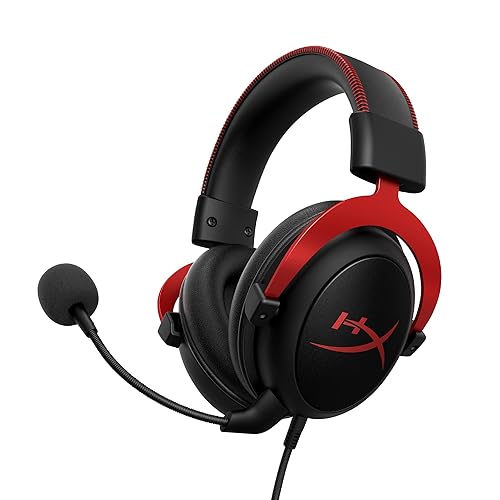 Best for long sessionsHyperX Cloud II Gaming HeadsetView on Amazon
- 6
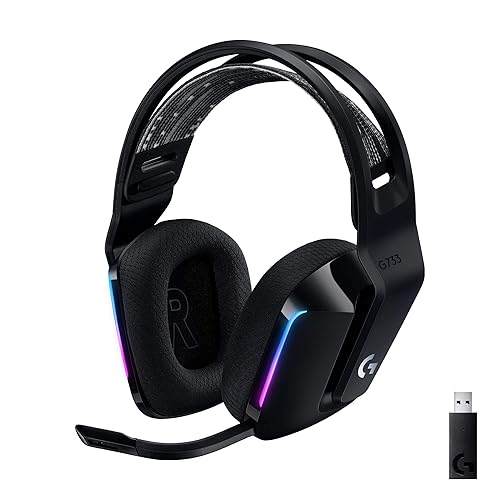 Best for wireless lightweight useLogitech G733 Lightspeed Wireless Gaming HeadsetView on Amazon
Our Top Picks
Quick Comparison
| Product | Best for | Key feature |
|---|---|---|
| SteelSeries Arctis Nova Pro Omni Gaming Headset | Overall performance across platforms | 96kHz/24-bit audio and active noise cancellation |
| Logitech G Astro A50 Multi-Platform Wireless Gaming Headset | Multi-platform wireless play | Audio switcher with 2.4GHz and Bluetooth |
| HyperX Cloud III Wired Gaming Headset | Wired simplicity | USB-C, USB-A and 3.5mm connectivity |
| Razer BlackShark V2 X Gaming Headset | Budget-conscious buyers | 7.1 surround sound and 50mm drivers |
| HyperX Cloud II Gaming Headset | Long sessions | Memory foam ear pads and aluminum frame |
| Logitech G733 Lightspeed Wireless Gaming Headset | Lightweight wireless use | Lightspeed wireless with a suspension headband |
SteelSeries Arctis Nova Pro Omni Gaming Headset
96kHz/24bit, ANC, ClearCast Pro Mic, AI Noise Rejection, Mobile App, Mix 2.4GHz+BT, OmniPlay PC+PlayStation+Xbox SteelSeries Arctis Nova Pro Omni Gaming Headset – Midnight Blue
Best for: Overall performance across platforms
This is the premium option for players who use a PC, PlayStation and Xbox and want one headset that handles all three. It suits players who value active noise cancellation and a clear, detailed mic in noisy rooms.
Key specs
- 96kHz/24-bit audio resolution
- Active noise cancellation
- ClearCast Pro microphone with AI noise rejection
- Mix of 2.4GHz wireless and Bluetooth
- Companion mobile app
Pros
- Works across PC, PlayStation and Xbox without swapping hardware
- Noise cancellation helps in loud households
- Mic noise rejection is a strong point for voice chat
Cons
- Higher cost than most models in this list
- Feature set can take time to learn in the app
Bottom line: Choose this if you want the most complete feature set and you switch between platforms often.
Logitech G Astro A50 Multi-Platform Wireless Gaming Headset
For PS5, Xbox, PC: PLAYSYNC Audio Switcher, <16 bit/48kHz (Console), <24 bit/48 kHz (PC), 24hr Battery, 2.4GHz & BT – Black Logitech G Astro A50 Multi-Platform Wireless Gaming Headset – Black
Best for: Multi-platform wireless play
This model pairs with a dedicated audio base station that handles switching between consoles and PC. It fits households where several people share one set of hardware and want fast changeovers.
Key specs
- Audio switcher with 2.4GHz and Bluetooth connectivity
- Battery life listed around 24 hours per charge
- Works with PlayStation, Xbox and PC through the base
Pros
- Quick switching between platforms through the base
- Long listed battery life for all-day sessions
- Clean, simple setup compared with multi-cable systems
Cons
- The base station adds desk clutter
- Audio resolution on console is lower than the PC ceiling listed in the specs
Bottom line: A strong pick for shared households that want wireless freedom without managing separate dongles.
HyperX Cloud III Wired Gaming Headset
USB-C + USB-A + 3.5mm Connectivity | Memory Foam | Durable Frame | Ultra-Clear 10mm Mic HyperX Cloud III Wired Gaming Headset for PC, PS5, PS4, Xbox Series X | S
Best for: Wired simplicity
This is a good fit for players who want no batteries, no charging and no pairing. It also suits anyone who prefers to plug straight into a PC or console and start playing.
Key specs
- USB-C, USB-A and 3.5mm connectivity
- Ultra-clear 10mm microphone
- Memory foam ear pads
- Durable frame design
Pros
- Multiple connection options cover most setups
- No battery to manage
- Memory foam pads are a comfort strength noted by many owners
Cons
- Cable limits movement away from the desk
- No wireless option if you later want to go cordless
Bottom line: Ideal for desk-based players who value reliability and zero charging.
Razer BlackShark V2 X Gaming Headset
Razer BlackShark V2 X Gaming Headset: 7.1 Surround Sound – 50mm Drivers – Memory Foam Cushion – For PC, PS4, PS5, Switch – 3.5mm Audio Jack – Black
Best for: Budget-conscious buyers
This budget pick suits players who want surround sound and a solid wired build without moving into premium territory. It works well as a first upgrade from earbuds or a basic bundled headset.
Key specs
- 7.1 surround sound
- 50mm drivers
- Memory foam cushion
- 3.5mm audio jack for PC, PS4, PS5 and Switch
Pros
- Wide platform support through a standard 3.5mm jack
- Large drivers suit a range of game genres
- Simple plug-and-play setup
Cons
- Wired only, so cable management matters
- Build materials feel lighter than premium models
Bottom line: A sensible choice for players who want good value and do not need wireless features.
HyperX Cloud II Gaming Headset
HyperX Cloud II Gaming Headset – 7.1 Surround Sound – Memory Foam Ear Pads – Durable Aluminum Frame – Multi Platform Headset – Works with PC, PS4, PS4 PRO, Xbox One, Xbox One S – Red (KHX-HSCP-RD)
Best for: Long sessions
This long-running design is known for a light clamp and generous padding. It suits players who wear a headset for several hours at a time and want a stable, familiar fit.
Key specs
- 7.1 surround sound
- Memory foam ear pads
- Durable aluminum frame
- Works with PC, PS4, PS4 Pro, Xbox One and Xbox One S
Pros
- Owners often describe it as comfortable over long sessions
- Aluminum frame holds up to regular adjustment
- Broad platform compatibility
Cons
- Older design, so newer features like wireless are absent
- Ear cups can feel warm in hot rooms
Bottom line: A dependable choice for comfort-first players who prefer a proven design.
Logitech G733 Lightspeed Wireless Gaming Headset
Suspension Headband, Blue VO!CE Mic, PRO-G Audio, PC, PS5, PS4, Switch Compatible Logitech G733 Lightspeed Wireless Gaming Headset – Black
Best for: Lightweight wireless use
This headset is aimed at players who want wireless freedom with a light, flexible build. The suspension-style headband spreads weight across the top of the head, which many owners find helpful during long matches.
Key specs
- Lightspeed wireless connection
- Suspension headband
- Blue VO!CE microphone processing
- Compatible with PC, PS5, PS4 and Switch
Pros
- Wireless operation without a base station
- Suspension headband reduces clamping pressure
- Good fit for mixed-platform households
Cons
- Battery needs regular charging
- Mic and audio tuning vary by platform
Bottom line: Best for players who want a wireless headset that feels light and stays comfortable.
Buying Guide
Connectivity: wired, wireless or both
Wired headsets avoid charging and interference, while wireless models give you room to move. Check which ports your device has before you buy. A USB-C connection, a 3.5mm jack or a wireless dongle each suit different hardware. Multi-platform headsets often combine a base station with Bluetooth so you can switch between systems quickly.
Good picks for this: HyperX Cloud III Wired Gaming Headset, Logitech G Astro A50 Multi-Platform Wireless Gaming Headset
Platform compatibility
Confirm the headset supports every system you use. Some models work fully on PC but offer limited microphone or surround features on consoles. Read the compatibility list on the listing and note whether surround sound behaves the same on each platform.
Good picks for this: SteelSeries Arctis Nova Pro Omni Gaming Headset, Razer BlackShark V2 X Gaming Headset
Comfort and clamp force
Comfort matters more than most specs once you play for hours. Look for memory foam or padded earcups, a headband that distributes weight, and a clamp force that holds the headset in place without pressing on your ears. If you wear glasses, check that the cups have enough depth to avoid pushing on the arms.
Good picks for this: HyperX Cloud II Gaming Headset, Logitech G733 Lightspeed Wireless Gaming Headset
Microphone quality
A clear microphone matters as much as the sound you hear. Look for noise rejection, a boom mic that you can position close to your mouth, and a mute function that is easy to reach. Some newer models use AI-based noise filtering, which can help in noisy rooms.
Good picks for this: SteelSeries Arctis Nova Pro Omni Gaming Headset, HyperX Cloud III Wired Gaming Headset
Battery life and charging
For wireless models, check the listed battery life and how the headset charges. Some use a standard USB cable, while others need a base or dock. Plan to charge overnight or keep a spare cable nearby if you play long sessions.
Good picks for this: Logitech G Astro A50 Multi-Platform Wireless Gaming Headset, Logitech G733 Lightspeed Wireless Gaming Headset
Durability and build
Headsets that get moved, folded and adjusted often need solid hinges and a sturdy frame. Aluminum or reinforced plastic headbands tend to hold up better than thin plastic, and detachable cables make replacement easier if one fails.
Good picks for this: HyperX Cloud II Gaming Headset, Razer BlackShark V2 X Gaming Headset
Care and maintenance
Replace worn ear pads when the foam flattens or the covering cracks, since pads affect both comfort and sound isolation. Wipe the cups and headband with a dry or lightly dampened cloth, and keep liquids away from electronics. Store the headset on a stand to avoid bending the headband.
Good picks for this: HyperX Cloud III Wired Gaming Headset, SteelSeries Arctis Nova Pro Omni Gaming Headset
FAQ
What makes a gaming headset the best choice for me?
The best choice depends on your platforms, how long you play and whether you need wireless freedom. Start with compatibility, then weigh comfort and microphone quality.
Do I need a wireless headset for gaming?
Not necessarily. Wired headsets avoid charging and have no wireless latency concerns. Wireless models offer more movement and less cable clutter.
Can one headset work on PC and consoles?
Many models do, using a 3.5mm jack, USB adapter or a base station. Check the compatibility list, since some features may behave differently on each platform.
How long should a gaming headset last?
Lifespan depends on build quality and care. Replaceable ear pads and cables can extend the life of a headset considerably.
Is surround sound worth it?
Surround sound can help with directional cues in shooters and competitive titles. Stereo may be enough for story-driven games, and the benefit varies by person.
How do I know if a headset fits my head?
Look at the headband adjustment range and the depth of the earcups. If you can, try a headset in person before buying. Consult a professional audiologist if you have ongoing ear discomfort or hearing concerns.
Conclusion
The SteelSeries Arctis Nova Pro Omni Gaming Headset suits players who want the widest feature set across platforms. The Logitech G Astro A50 Multi-Platform Wireless Gaming Headset fits shared households that switch between systems. The HyperX Cloud III Wired Gaming Headset is a reliable, charge-free option for desk players. The Razer BlackShark V2 X Gaming Headset offers a budget-friendly route into surround sound. The HyperX Cloud II Gaming Headset suits comfort-focused players, and the Logitech G733 Lightspeed Wireless Gaming Headset works well for light wireless use. Match your platforms and comfort needs first, then choose the model that fits.
Sources
- Background on hearing health and safe listening levels (nidcd.nih.gov)
- Guidance on noise exposure and protecting your hearing (cdc.gov)
- Occupational noise limits and exposure information (osha.gov)
Related reading
- Recommended Gaming Headset PC: 5 Best Picks Compared for 2026
- Pc Gaming Headset Best: 5 Best Picks Compared for Every Setup (2026)
- 7 Best Top Wireless Gaming Headset Picks Compared for 2026
- 7 Best Inexpensive Gaming Headset Picks Compared for 2026
- 7 Best Computer Headsets for Gaming Picks Compared for 2026
- 6 Best Low Cost Gaming Headset Picks: 6 Compared for Every Budget (2026)
About Colin Foster
Colin Foster is part of our editorial team and reviews and edits our headphone comfort & accessories + gaming headsets guides, checking product details against manufacturer specifications and owner feedback.