 By Colin Foster
Updated November 2026
A good surround sound gaming headset should place footsteps and gunfire where they belong, stay comfortable through long sessions, and work with the platform you actually play on. The picks below were selected by reviewing manufacturer specifications, brand reputation and common owner feedback patterns, weighing driver setup, virtual or built-in surround support, microphone quality, compatibility and comfort.
Our top picks at a glance
- 1
 TOP CHOICEBest overallCorsair HS35 Surround v2 Multiplatform Wired Gaming HeadsetView on Amazon
- 2
 TOP CHOICEBest for PC audio tuningLogitech G432 Wired Gaming Headset – BlackView on Amazon
- 3
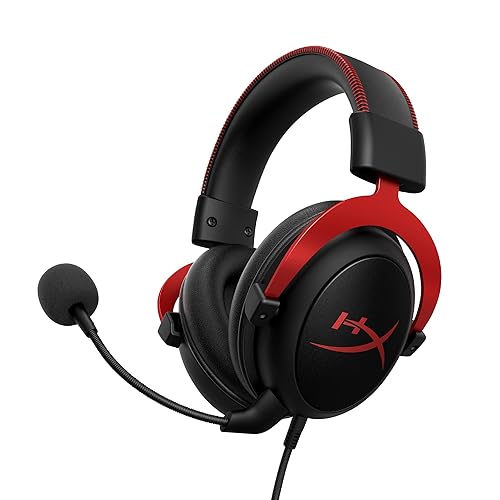 TOP CHOICEBest for budget-minded buyersHyperX Cloud II Gaming HeadsetView on Amazon
- 4
 Best for competitive shootersRazer BlackShark V2 X Wired Gaming Headset with Mic for PC and PS5View on Amazon
- 5
 Best for wireless flexibility4Ghz USB Gaming Headphones, Bluetooth 5.4 & Type-C Wireless Gaming HeadsetView on Amazon
Our Top Picks
Quick Comparison
| Product | Best for | Key feature |
|---|---|---|
| Corsair HS35 Surround v2 | Multi-platform players | Dolby 7.1 with broad compatibility |
| Logitech G432 Wired Gaming Headset | PC audio tuning | DTS Headphone:X 2.0 support |
| HyperX Cloud II Gaming Headset | Budget-minded buyers | 7.1 surround with memory foam pads |
| Razer BlackShark V2 X Wired Gaming Headset | Competitive shooters | Lightweight 240 g build |
| 2.4GHz USB Gaming Headphones with Bluetooth 5.4 | Wireless flexibility | Multiple connection modes |
Corsair HS35 Surround v2 Multiplatform Wired Gaming Headset
Corsair HS35 Surround v2 Multiplatform Wired Gaming Headset – Dolby 7.1 – Flexible Omni-Directional Microphone – Universal 3.5mm Connection – PC, Mac, PS5, PS4, Xbox, Nintendo Switch, Mobile – Carbon
Best for: Players switching between PC, console and mobile
This suits owners who want one headset that connects through a universal 3.5mm jack and carries Dolby 7.1 processing across several platforms.
Pros:
- Wide platform compatibility including PC, PS5 and Xbox
- Flexible omni-directional microphone
Cons:
- Surround quality depends on the software you enable
Logitech G432 Wired Gaming Headset – Black
DTS Headphone:X 2.0, 50 mm audio drivers, USB and 3.5 mm jack, Flip-to-Mute mic, PC compatible Logitech G432 Wired Gaming Headset – Black
Best for: PC audio tuning
This fits players who want to experiment with virtual surround and who use both USB and a 3.5mm jack on a computer.
Pros:
- DTS Headphone:X 2.0 support for virtual surround
- Flip-to-Mute microphone is easy to find by feel
Cons:
- Best results depend on PC setup and software
HyperX Cloud II Gaming Headset
HyperX Cloud II Gaming Headset – 7.1 Surround Sound – Memory Foam Ear Pads – Durable Aluminum Frame – Multi Platform Headset – Works with PC, PS4, PS4 PRO, Xbox One, Xbox One S – Red (KHX-HSCP-RD)
Best for: Budget-minded buyers
This is a common choice for players who want 7.1 surround and a sturdy aluminum frame without paying for premium features.
Pros:
- Memory foam ear pads are a frequently praised comfort feature
- Works across PC, PlayStation and Xbox
Cons:
- Sound staging is less precise than higher-end options
Razer BlackShark V2 X Wired Gaming Headset with Mic for PC and PS5
TriForce Titanium 50 mm Drivers, HyperClear Cardioid Mic, 240 g Lightweight, Noise-Isolating Earcups, 3.5 mm, PS4, Switch Razer BlackShark V2 X Wired Gaming Headset with Mic for PC and PS5, Black
Best for: Competitive shooters
This suits players who spend long hours in fast games and value light weight and directional clarity over bass.
Pros:
- Lightweight 240 g build for long sessions
- Cardioid microphone aimed at clear voice pickup
Cons:
- Bass-heavy listeners may want more low-end presence
2.4Ghz USB Gaming Headphones, Bluetooth 5.4 & Type-C Wireless Gaming Headset
2.4Ghz USB Gaming Headphones, Bluetooth 5.4 & Type-C, Noise Canceling Mic, RGB Light, Ideal for FPS, RPG Gamers, Not for Xbox Wireless Gaming Headset for PC PS5 PS4 Mac Switch 7.1 Surround Sound 100-H
Best for: Wireless flexibility
This option suits players who want to move between a USB dongle, Bluetooth and Type-C connections without swapping cables.
Pros:
- Multiple connection modes including 2.4GHz and Bluetooth 5.4
- Noise-canceling microphone and RGB lighting
Cons:
- Wireless connections require charging and can add latency
Buying Guide
Check the surround format
Look for listings that name a specific format such as Dolby 7.1, DTS Headphone:X or 7.1 virtual surround. Many headsets rely on software processing, so the format matters less than how well it is supported on your platform.
Match the connection to your platform
A USB connection usually unlocks the headset’s own surround processing on PC, while a 3.5mm jack is the most universal choice for consoles and mobile devices. Confirm which connection your system supports before buying.
Evaluate the microphone
A flexible or boom microphone with noise rejection keeps voice clear in loud rooms. Check whether it mutes by flipping up or with a button, since this affects how often you will use it.
Consider fit and weight
Headsets under about 300 grams are generally easier to wear for hours, and memory foam or breathable pads reduce pressure on the head. Clamp force listed by the manufacturer is also worth comparing if you wear glasses.
Good picks for this: Razer BlackShark V2 X Wired Gaming Headset and HyperX Cloud II Gaming Headset
FAQ
Do I need a USB headset for surround sound?
Not always. USB headsets often include their own processing, but many 3.5mm headsets also deliver good virtual surround when paired with a compatible software setting.
Related reading
- 6 Best Gaming Headsets for Sound Quality: Top Picks Compared (2026)
- What's a Good Gaming Headset? 7 Best Picks Compared for 2026
- Top 5 Wireless Gaming Headsets with Microphone Picks for Every Setup
- Top 5 Gaming in Ear Headset Picks for Every Setup (2026)
- Top 4 Computer Gaming Headset Microphone Options for Every Setup
About Colin Foster
Colin Foster is part of our editorial team and reviews and edits our headphone comfort & accessories + gaming headsets guides, checking product details against manufacturer specifications and owner feedback.


