 By Colin Foster
Updated November 2026
A dual wireless gaming headset lets you switch between a 2.4GHz dongle and Bluetooth, so you can run low-latency game audio on one device and phone calls or music on another. This list compares six models by connection options, battery life, comfort and microphone design, using manufacturer specifications and common owner feedback as the main guides.
Our top picks at a glance
- 1
 TOP CHOICEBest overallHyperX Cloud Jet Wireless Gaming HeadsetView on Amazon
- 2
 TOP CHOICEBest for multi-device pairingHyperX Cloud Jet 2.4GHz + BluetoothView on Amazon
- 3
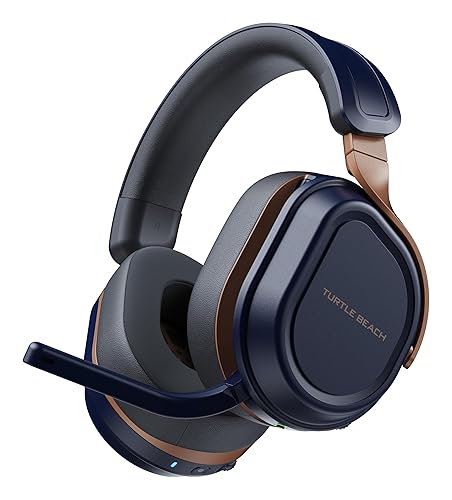 TOP CHOICEBest for long battery lifeTurtle Beach Stealth 700 Wireless Gaming HeadsetView on Amazon
- 4
 Best for RGB and low latencyAOC Bluetooth 5.4 and 2.4GHz Gaming HeadphonesView on Amazon
- 5
 Best budget pickNUBWO G06 Dual Wireless Gaming HeadsetView on Amazon
- 6
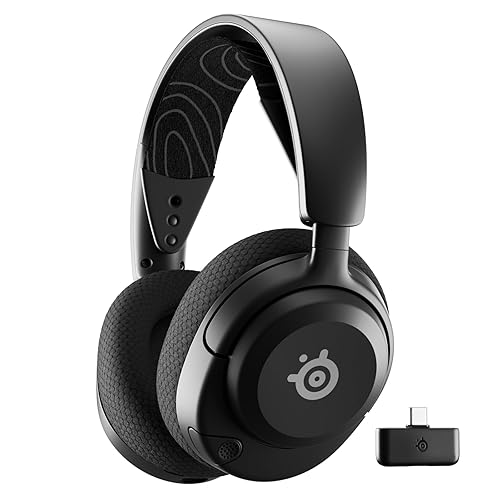 Best for clear voice chatSteelSeries Arctis Nova 5 Wireless Multi-System Gaming HeadsetView on Amazon
Our Top Picks
| Product | Best for | Key feature |
|---|---|---|
| HyperX Cloud Jet Wireless Gaming Headset | Overall balance | Dual wireless connectivity |
| HyperX Cloud Jet 2.4GHz + Bluetooth | Multi-device pairing | Simultaneous 2.4GHz and Bluetooth |
| Turtle Beach Stealth 700 Wireless Gaming Headset | Long battery life | Up to 80-hour battery |
| AOC Bluetooth 5.4 and 2.4GHz Gaming Headphones | RGB and low latency | 20ms latency, 7.1 surround |
| NUBWO G06 Dual Wireless Gaming Headset | Budget setups | 100-hour battery, 50mm drivers |
| SteelSeries Arctis Nova 5 Wireless Multi-System Gaming Headset | Clear voice chat | ClearCast Gen2.X microphone |
HyperX Cloud Jet Wireless Gaming Headset
Wireless Headphones | Wireless Connectivity HyperX Cloud Jet Wireless Gaming Headset
Best for: Overall balance across consoles and PC
This model suits players who want one headset for gaming and calls without managing complicated settings. Its dual connectivity covers most common setups.
Pros
- Dual wireless connection options
- Comfortable fit for long sessions
Cons
- Bluetooth audio quality trails the dongle
HyperX Cloud Jet 2.4GHz + Bluetooth
Wireless Headphones | 2.4GHz + Bluetooth HyperX Cloud Jet – Wireless Gaming Headset
Best for: Multi-device pairing
Best for players who swap between a console and a phone and want both connections ready at the same time.
Pros
- Switches between sources quickly
- Lightweight build
Cons
- Bluetooth range is shorter than the 2.4GHz link
Turtle Beach Stealth 700 Wireless Gaming Headset
Xbox Series X|S, Xbox One, PlayStation, Multiplatform, Bluetooth, 60mm Dual Drivers, 80-Hr Battery, Flip-to-Mute Mic, Cobalt Turtle Beach Stealth 700 Wireless Gaming Headset for Xbox, PS5, PC, Mobile
Best for: Long battery life
A fit for marathon sessions where recharging mid-game is a hassle. Owners frequently mention the battery as a deciding factor.
Pros
- Battery rated up to 80 hours
- Flip-to-mute microphone
Cons
- Heavier than many competing models
AOC Bluetooth 5.4 and 2.4GHz Gaming Headphones
Bluetooth 5.4 & 2.4GHz Gaming Headphones with Noise Canceling Mic, RGB, Type-C, 20ms Latency, 45H, 7.1 Virtual Surround AOC Wireless Gaming Headset for PS5, PS4, Nintendo Switch, PC- Black
Best for: RGB and low latency
Players who want lighting effects and a quick wireless response will find this model’s feature list useful. It is listed for a range of consoles and PC.
Pros
- Listed latency of 20ms
- RGB lighting and 7.1 virtual surround
Cons
- Lighting features are not essential for performance
NUBWO G06 Dual Wireless Gaming Headset
NUBWO G06 Dual Wireless Gaming Headset with Mic for PS5, PS4, PC, Mobile, Switch: 2.4GHz Wireless + Bluetooth – 100 Hr Battery – 50mm Drivers – Pink
Best for: Budget setups
A budget pick for players who want dual wireless modes and a long battery without spending heavily on a premium model.
Pros
- Listed battery life of 100 hours
- Covers PC, consoles and mobile
Cons
- Build feels lighter than premium options
SteelSeries Arctis Nova 5 Wireless Multi-System Gaming Headset
SteelSeriesNeodymium Magnetic Drivers — 60 HR Battery — 2.4GHz or BT — ClearCast Gen2.X Mic — PC, PS5, PS4, Switch, Mobile Arctis Nova 5 Wireless Multi-System Gaming Headset – Black
Best for: Clear voice chat
Suited to team players who rely on voice comms and want a microphone designed for clarity across platforms.
Pros
- ClearCast Gen2.X microphone
- Listed battery life of 60 hours
Cons
- Premium positioning may exceed casual needs
Buying Guide
Connection Type
Check whether the headset uses a 2.4GHz dongle, Bluetooth, or both. The 2.4GHz link usually delivers lower latency, while Bluetooth handles phones and tablets. If you plan to use both, confirm the headset can connect to two sources at once.
FAQ
What does a dual wireless gaming headset actually do?
A dual wireless gaming headset connects to two sources at once, usually a 2.4GHz USB dongle for low-latency game audio and Bluetooth for a phone, tablet, or laptop. This lets you hear game chat and in-game sound on your console or PC while still taking calls or playing music from another device. Exact pairing behavior varies by model, so check the connection details before you buy.
Is 2.4GHz better than Bluetooth for gaming?
For most gaming, 2.4GHz is the better choice because it generally delivers lower latency than standard Bluetooth. Bluetooth is more convenient for phones and general audio but can introduce a noticeable delay during fast-paced games. Many people use 2.4GHz for gameplay and Bluetooth for everything else.
Will these headsets work with both PlayStation and PC?
Several models in this list are built for multiple platforms, including PlayStation, PC, Switch, and mobile devices. Compatibility can depend on the specific dongle, adapter, or connection mode, so confirm the platform list on the product page before purchasing. Some consoles may require a cable or an extra adapter for full functionality.
How long do the batteries last?
Battery life differs across the six models, with some offering roughly 45 to 100 hours on a charge depending on the specification. Real-world results will vary with volume level, lighting features such as RGB, and whether Bluetooth or 2.4GHz is active. Charging over USB-C is common on this type of headset, so a quick top-up before a session is usually easy.
Do the microphones work well for voice chat?
Most of these headsets include a detachable or flip-to-mute boom microphone designed for clear voice chat during games. Noise canceling or noise-reducing mic designs help cut background sound, which matters if you game in a busy room. Check each model’s microphone description to see which best fits how you plan to talk with teammates.
Which option should beginners choose?
Beginners who want a simple setup with reliable performance may find the HyperX Cloud Jet a good starting point. If you need more than one device connected at the same time, the dual-mode models with both 2.4GHz and Bluetooth are a better fit. Budget and platform support should guide the final decision.
Conclusion
If you want a balanced, well-rounded dual wireless gaming headset, the HyperX Cloud Jet is a strong first pick, while the HyperX Cloud Jet 2.4GHz and Bluetooth version suits anyone who switches often between a console or PC and a phone. Players who prioritize long battery life should look at the Turtle Beach Stealth 700, and those who want RGB lighting and low latency will find the AOC model appealing.
For multi-platform households or players who want the widest compatibility, the NUBWO G06 and SteelSeries Arctis Nova 5 are the options to compare closely against your daily setup. Match the connection type, battery needs, and microphone style to how you actually play, and the right headset will be easier to spot.
Related reading
- Wireless Headset vs Wired Gaming: Which Should You Choose? (2026)
- Wireless Gaming Headset PlayStation: 6 Factors to Check Before You Buy (2026)
- Wireless Gaming Headset Computer Setup: A Step-by-Step Guide (2026)
- Top 5 Wireless Gaming Headsets with Microphone Picks for Every Setup
- Steelseries Arctis Nova Pro Wireless Gaming Headset: Setup, Fit and Fixes (2026)
- Best Wireless Gaming Headset Reddit: 5 Factors That Matter in 2026
About Colin Foster
Colin Foster is part of our editorial team and reviews and edits our headphone comfort & accessories + gaming headsets guides, checking product details against manufacturer specifications and owner feedback.


