 By Colin Foster
Updated November 2026
A comfortable wireless gaming headset matters most when your sessions run long. Clamping force, headband padding, ear cup material and total weight all affect how your head feels after three hours, so this list compares seven models on those factors alongside battery life and platform support. The picks below are based on product listings, manufacturer specifications and patterns in owner feedback.
Our top picks at a glance
- 1
 TOP CHOICEBest overallHyperX Cloud III S Wireless Gaming HeadsetView on Amazon
- 2
 TOP CHOICEBest for long battery lifeHyperX Cloud Alpha Wireless Gaming Headset for PCView on Amazon
- 3
 TOP CHOICEBest for RGB and a secure fitLogitech G733 Lightspeed Wireless Gaming HeadsetView on Amazon
- 4
 Best for lightweight comfortHyperX Cloud Jet Wireless Gaming HeadsetView on Amazon
- 5
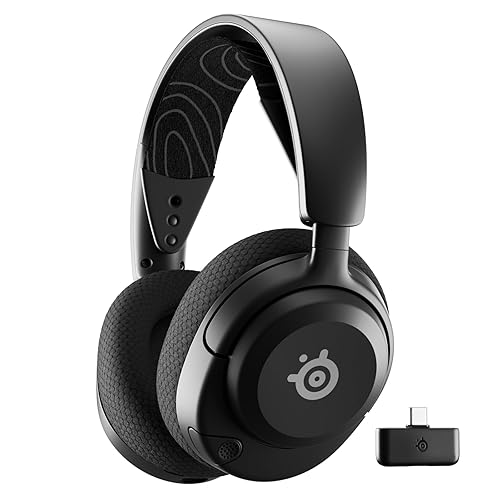 Best for multi-console useSteelSeries Arctis Nova 5 Wireless Multi-System Gaming HeadsetView on Amazon
- 6
 Best for surround sound on a budgetAOC Wireless Gaming Headset for PS5, PC and SwitchView on Amazon
- 7
 Best for flexible connectionsAcer Wireless Gaming Headset for PS5, PC, PS4, Switch, Mac & Laptop, TView on Amazon
Our Top Picks
| Product | Best for | Key feature |
|---|---|---|
| HyperX Cloud III S Wireless | Overall comfort | 120-hour battery |
| HyperX Cloud Alpha Wireless | Long battery life | 300-hour battery, memory foam |
| Logitech G733 Lightspeed | RGB and secure fit | Suspension headband |
| HyperX Cloud Jet Wireless | Lightweight comfort | Wireless connectivity |
| SteelSeries Arctis Nova 5 | Multi-console use | 60-hour battery, multi-system |
| AOC Wireless Gaming Headset | Surround on a budget | 7.1 virtual surround |
| Acer Wireless Gaming Headset | Flexible connections | Tri-mode wireless and wired |
HyperX Cloud III S Wireless Gaming Headset
HyperXWireless Headphones | 2.4GHz + Bluetooth | 120-Hour Battery | Detachable Mic Cloud III S Wireless Gaming Headset | Multi-Platform Compatibility
Best for: overall comfort across long sessions
This model suits players who want a balanced headset that works on several platforms without a complicated setup. Its listing emphasizes a 120-hour battery and a detachable microphone.
Pros
- Long battery life for multi-hour sessions
- Detachable microphone for quick switching
Cons
- Owners sometimes mention clamping force on larger heads
HyperX Cloud Alpha Wireless Gaming Headset for PC
HyperX Cloud Alpha Wireless – Gaming Headset for PC, 300-hour battery life, DTS Headphone:X Spatial Audio, Memory foam, Dual Chamber Drivers, Noise-canceling mic, Durable aluminum frame,Red
Best for: long battery life
Players who game for long stretches between charges will appreciate the rated 300-hour battery. Memory foam padding and an aluminum frame are common points in owner descriptions.
Pros
- Manufacturer rates battery life at 300 hours
- Memory foam earpads and headband padding
Cons
- Heavier than the lightweight options on this list
Logitech G733 Lightspeed Wireless Gaming Headset
Suspension Headband, LIGHTSYNC RGB, Blue VO!CE mic Technology, PRO-G Audio Drivers Logitech G733 Lightspeed Wireless Gaming Headset – Blue
Best for: RGB styling and a secure fit
This headset is aimed at players who want a suspension-style headband that spreads weight across the top of the head. Its lighting and PRO-G drivers are the main highlights in the listing.
Pros
- Suspension headband distributes pressure
- Lightspeed wireless connection
Cons
- RGB lighting adds to battery draw
HyperX Cloud Jet Wireless Gaming Headset
Wireless Headphones | Wireless Connectivity HyperX Cloud Jet Wireless Gaming Headset
Best for: lightweight comfort
Players who find larger headsets fatiguing may prefer this lighter build. It suits people who switch between desk and couch play and want a headset that does not feel heavy after an hour.
Pros
- Lighter build for extended wear
- Wireless connectivity across listed platforms
Cons
- Fewer advanced audio features than premium models
SteelSeries Arctis Nova 5 Wireless Multi-System Gaming Headset
SteelSeriesNeodymium Magnetic Drivers — 60 HR Battery — 2.4GHz or BT — ClearCast Gen2.X Mic — PC, PS5, PS4, Switch, Mobile Arctis Nova 5 Wireless Multi-System Gaming Headset – Black
Best for: multi-console use
This headset targets players who move between PC, PlayStation, Switch and mobile. The listing cites a 60-hour battery and both 2.4GHz and Bluetooth connectivity.
Pros
- Works across PC, PS5, PS4, Switch and mobile
- Offers both 2.4GHz and Bluetooth modes
Cons
- Battery life is shorter than the 300-hour Alpha model
AOC Wireless Gaming Headset for PS5, PC and Switch
Bluetooth 5.4 & 2.4GHz Gaming Headphones with Noise Canceling Mic, RGB, Type-C, 20ms Latency, 45H, 7.1 Virtual Surround AOC Wireless Gaming Headset for PS5, PS4, Nintendo Switch, PC- Black
Best for: surround sound on a budget
Buyers who want virtual surround and a long listed battery without a premium price tag may find this model practical. It supports both Bluetooth and 2.4GHz connections.
Pros
- Listed 45-hour battery with RGB lighting
- Virtual 7.1 surround for positional audio
Cons
- Owners often compare its build quality less favorably to top brands
Buying Guide
Clamping Force and Fit
Clamping force is the pressure the headband applies to keep the ear cups sealed around your ears. A firm clamp improves isolation and keeps the headset in place during fast movement, but too much pressure can cause soreness after long sessions. Look for a headset that feels secure when you shake your head gently, and check whether the headband adjusts far enough to suit your head size.
Headband Padding and Suspension Design
A suspension headband spreads weight across the top of your head rather than concentrating it on two points, which many players find more comfortable over multi-hour sessions. Padded or cushioned headbands help as well, especially if you wear glasses or have a sensitive scalp. Consider whether the padding is thick enough to absorb pressure without feeling bulky.
Ear Cup Material and Breathability
Ear cup padding affects both comfort and heat buildup. Memory foam conforms to the shape of your head and tends to feel plush, while leatherette or fabric covers differ in breathability and how they handle sweat. If you tend to run warm or play for long stretches, look for breathable materials and consider how the cups will feel in a warm room.
Weight and Battery Life
A lighter headset generally reduces neck and head fatigue, so total weight is worth comparing alongside the clamp and padding. Battery life matters too, since a headset that needs frequent charging interrupts long sessions. Check the rated runtime for the connection mode you plan to use most, because Bluetooth and 2.4GHz modes can differ.
Platform Compatibility and Connectivity
Before buying, confirm that the headset supports the consoles and devices you use. Some models connect through a 2.4GHz dongle, others add Bluetooth, and a few include a wired option as a backup. Choosing a headset that works across your setup avoids extra adapters and makes switching between systems easier.
FAQ
Which wireless gaming headset is the most comfortable for long sessions?
Comfort depends on head shape and personal preference, but headsets with suspension headbands and soft memory foam ear cups tend to be the easiest to wear for hours. Compare clamping force and weight before deciding. Trying a model in person, if possible, is the best way to confirm the fit.
Does a lighter headset always feel more comfortable?
Lower weight usually helps reduce fatigue, but it is not the only factor. Clamping force, padding and how weight is distributed also play a big role. A slightly heavier headset with a well-designed suspension band can feel better than a lighter one with poor balance.
Is 2.4GHz better than Bluetooth for gaming?
Generally, 2.4GHz connections use a dedicated dongle and offer lower latency, which is important for competitive play. Bluetooth is more convenient for connecting to phones and laptops but can add delay. Many headsets offer both, so you can pick the mode that fits each situation.
Do I need a headset that works on multiple platforms?
If you play on more than one system, a multi-platform headset saves money and avoids juggling separate devices. Check the listed compatibility before buying, since some models support only PC or specific consoles. Confirm whether any features, such as surround sound, behave differently on each platform.
How long do wireless gaming headset batteries typically last?
Battery life varies widely across models and depends on volume, lighting and connection mode. Manufacturers list maximum runtimes, but actual use may be shorter at higher volumes. Keeping a charging cable nearby is a good habit for long sessions.
Conclusion
If you want a lightweight, budget-friendly option for mixed platforms, the more affordable models on this list are a practical fit. Players who prioritize long battery life and a plush, supportive fit for marathon sessions should lean toward the headsets with suspension headbands and memory foam cups.
For multi-system households or anyone who switches between consoles and PC, pick a headset with strong compatibility and flexible connectivity. Match your choice to your head shape, your typical session length and the devices you use most, and the right comfortable wireless headset will be easy to identify.
Related reading
- Wireless Headset vs Wired Gaming: Which Should You Choose? (2026)
- Wireless Gaming Headset PlayStation: 6 Factors to Check Before You Buy (2026)
- Wireless Gaming Headset Computer Setup: A Step-by-Step Guide (2026)
- Top 5 Wireless Gaming Headsets with Microphone Picks for Every Setup
- Steelseries Arctis Nova Pro Wireless Gaming Headset: Setup, Fit and Fixes (2026)
- Best Wireless Gaming Headset Reddit: 5 Factors That Matter in 2026
- Audeze Maxwell Wireless Gaming Headset Review (2026)
- 7 Best Top Wireless Gaming Headset Picks Compared for 2026
About Colin Foster
Colin Foster is part of our editorial team and reviews and edits our headphone comfort & accessories + gaming headsets guides, checking product details against manufacturer specifications and owner feedback.


