 By Colin Foster
Updated November 2026
A wired USB gaming headset is a good fit if you want a stable connection with no battery to charge and no wireless lag to worry about. This list compares seven wired USB options on the criteria that matter most: connection type, microphone quality, surround sound support, comfort for long sessions and how well each one works across PC and console. Each pick is based on manufacturer specifications and patterns that owners frequently mention in their listings and reviews.
Our top picks at a glance
- 1
 TOP CHOICEBest overallRazer Kraken V3 X Wired USB Gaming HeadsetView on Amazon
- 2
 TOP CHOICEBest for budget-minded buyersLogitech G432 Wired Gaming Headset – BlackView on Amazon
- 3
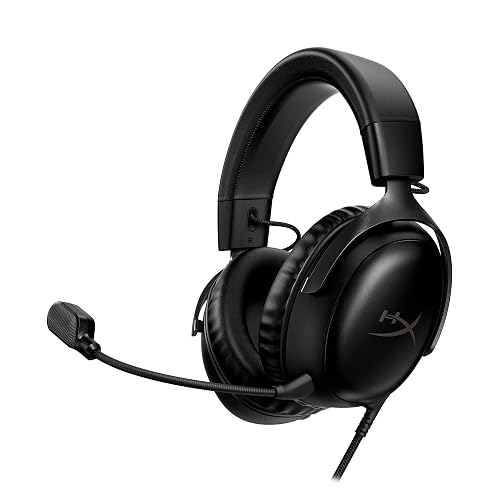 TOP CHOICEBest for console and PC flexibilityHyperX Cloud III Wired Gaming Headset for PC, PS5, PS4, Xbox Series X | SView on Amazon
- 4
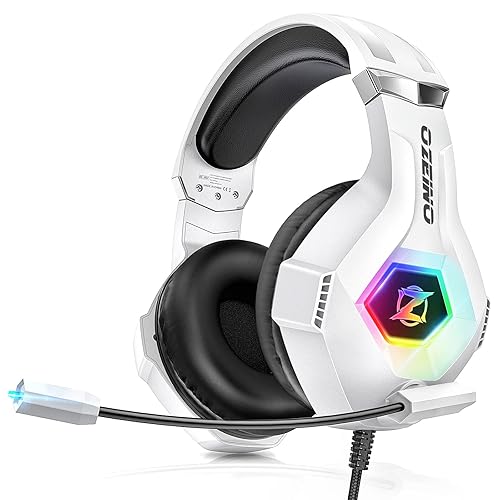 Best for multi-platform usersOzeino Gaming Headset for PC, Ps4, Ps5, Xbox HeadsetView on Amazon
- 5
 Best for long lightweight wearRazer BlackShark V2 X Wired Gaming Headset with Mic for PC and PS5View on Amazon
- 6
 Best for budget surround soundBENGOO G9000 Stereo Gaming Headset for PS4 PC Xbox One PS5 Controller,View on Amazon
- 7
 Best for clear voice chatClear Broadcast Quality Mic, Dolby Audio 7.1, Plug-and-Play, Memory FoView on Amazon
Our Top Picks
Quick Comparison
| Product | Best for | Key feature |
|---|---|---|
| Razer Kraken V3 X Wired USB Gaming Headset | Best overall | 7.1 surround, lightweight build |
| Logitech G432 Wired Gaming Headset | Budget-minded buyers | DTS Headphone:X 2.0 support |
| HyperX Cloud III Wired Gaming Headset | Console and PC flexibility | USB-C, USB-A and 3.5mm |
| Ozeino Gaming Headset | Multi-platform users | 7.1 surround, LED lighting |
| Razer BlackShark V2 X Wired Gaming Headset | Long lightweight wear | 240 g frame, 50mm drivers |
| BENGOO G9000 Stereo Gaming Headset | Budget surround sound | 7.1 surround, soft earmuffs |
| Corsair HS80 RGB USB Wired PC Gaming Headset | Clear voice chat | Dolby Audio 7.1, memory foam |
Razer Kraken V3 X Wired USB Gaming Headset
TriForce 40mm Drivers, HyperClear Cardioid Mic, 7.1 Surround Sound, Chroma RGB Lighting Razer Kraken V3 X Wired USB Gaming Headset, Lightweight, Black
Best for: Best overall
This headset suits gamers who want a light, simple USB setup with surround sound and a mic that stays clear without fuss.
Pros
- 40mm drivers with 7.1 surround sound
- Lightweight build suited to extended sessions
Cons
- Some owners find the clamp firm at first
Logitech G432 Wired Gaming Headset – Black
DTS Headphone:X 2.0, 50 mm audio drivers, USB and 3.5 mm jack, Flip-to-Mute mic, PC compatible Logitech G432 Wired Gaming Headset – Black
Best for: Budget-minded buyers
A practical choice for players who want DTS Headphone:X 2.0 support and a flip-to-mute mic without paying for extras they will not use.
Pros
- USB and 3.5mm connectivity for broad compatibility
- Flip-to-mute microphone is easy to reach
Cons
- Build feels lighter than premium options
HyperX Cloud III Wired Gaming Headset for PC, PS5, PS4, Xbox Series X | S
HyperXUSB-C + USB-A + 3.5mm Connectivity | Memory Foam | Durable Frame | Ultra-Clear 10mm Mic Cloud III Wired Gaming Headset for PC, PS5, PS4, Xbox Series X | S
Best for: Console and PC flexibility
Players who move between a PC and a console will appreciate the USB-C, USB-A and 3.5mm options, along with memory foam padding.
Pros
- Three connection types cover most setups
- Memory foam earpads with a durable frame
Cons
- Clamp pressure can feel snug on smaller heads
Ozeino Gaming Headset for PC, Ps4, Ps5, Xbox Headset
Ozeino Gaming Headset for PC, Ps4, Ps5, Xbox Headset with 7.1 Surround Sound Gaming Headphones with Noise Canceling Mic, LED Light Over Ear Headphones for Switch, Xbox Series X/S, Laptop, Mobile White
Best for: Multi-platform users
This option fits households with several devices, including switch and mobile, who want surround sound and RGB lighting in one headset.
Pros
- 7.1 surround sound with a noise-canceling mic
- Works with a wide range of platforms
Cons
- Lighting is a matter of taste and can feel busy
Razer BlackShark V2 X Wired Gaming Headset with Mic for PC and PS5
TriForce Titanium 50 mm Drivers, HyperClear Cardioid Mic, 240 g Lightweight, Noise-Isolating Earcups, 3.5 mm, PS4, Switch Razer BlackShark V2 X Wired Gaming Headset with Mic for PC and PS5, Black
Best for: Long lightweight wear
Gamers who spend hours in one session and want a light frame with noise-isolating earcups will find this design appealing.
Pros
- 240 g frame reduces fatigue for many users
- 50mm drivers and a cardioid mic
Cons
- Passive isolation may feel tight to some listeners
Buying Guide
Connection Type and Compatibility
USB headsets use a digital connection that often includes their own sound card, which can make them a strong choice for PC. Check whether a model also includes a 3.5 mm jack, since that extra option helps if you plan to use the headset with a controller, a phone or a console that doesn’t support USB audio.
Microphone Quality and Features
A clear microphone matters as much as good sound if you chat with teammates. Look for a noise-canceling or cardioid pickup pattern, and consider a flip-to-mute or boom mic design that is easy to position and quick to silence when you need privacy.
Surround Sound Support
Virtual 7.1 and processing technologies such as DTS Headphone:X or Dolby Audio can help you locate footsteps and directional cues in competitive games. Keep in mind that software-based surround depends on the app or platform settings, so the result may vary from one game to the next.
Comfort for Long Sessions
Ear cup style, headband padding and overall weight all affect how long you can play before fatigue sets in. Memory foam earpads and a lightweight frame are useful features if you expect marathon sessions, while over-ear designs usually feel more comfortable than on-ear models over several hours.
Build Quality and Extras
A sturdy frame and detachable cable can extend the life of a headset you use every day. Lighting, on-ear controls and adjustable headbands are nice extras, but they should come second to fit, mic performance and how well the headset works with the devices you already own.
FAQ
What is the difference between a USB headset and a 3.5 mm headset?
A USB headset sends a digital signal through its own built-in audio processing, which often enables features like virtual surround and lighting controls. A 3.5 mm headset relies on your device’s sound card and is generally more flexible across older or simpler devices.
Do I need a USB headset for PC gaming?
You don’t strictly need one, but a USB headset can simplify setup and provide surround features without extra hardware. If your motherboard or sound card already performs well, a 3.5 mm model may work just as well.
Can I use a wired USB gaming headset on a console?
Many wired USB headsets also include a 3.5 mm jack, which allows them to connect to consoles and controllers. Check the product details for the exact connection options, since USB-only models may not work with every console.
Is virtual 7.1 surround sound worth it?
Virtual surround can help you better perceive direction in many games, especially shooters and open-world titles. The effect depends on the game, the software and your own hearing, so it is worth testing it yourself.
How do I know if a headset will be comfortable for long sessions?
Look for soft earpads, a padded headband and a moderate overall weight. Try to test the fit in person when possible, because clamping force and ear cup size differ widely between models.
Conclusion
If you want a budget-friendly wired option with strong comfort and an easy setup for PC and console, a headset with both USB and 3.5 mm connections is the most versatile pick. Players who value immersive positional audio and advanced software features should look at models with built-in surround processing and a dedicated USB audio chip.
For competitive players who spend long hours in voice chat, prioritize a headset with a clear, noise-canceling microphone and lightweight, memory foam padding. Match the headset to the platforms you play on most, and you will get the best balance of performance and comfort.
Related reading
- Wireless Headset vs Wired Gaming: Which Should You Choose? (2026)
- Top 5 Gaming Headsets with USB for PC Players in 2026
- Hyperx Cloud Ii Wired Gaming Headset (2026): Which Should You Choose?
- 7 Best Good Wired Gaming Headset Picks Compared for 2026
- Wireless Gaming Headset PlayStation: 6 Factors to Check Before You Buy (2026)
About Colin Foster
Colin Foster is part of our editorial team and reviews and edits our headphone comfort & accessories + gaming headsets guides, checking product details against manufacturer specifications and owner feedback.


