By Colin Foster
Updated November 2026
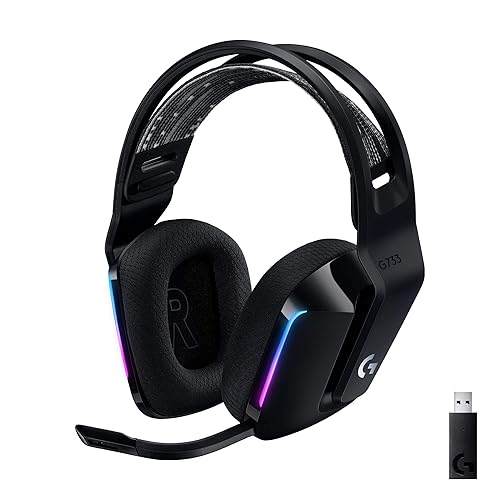
A good gaming headset for a PC gamer comes down to matching a few specific features to how you actually play. In this guide, you will learn how to evaluate connection type, microphone quality, comfort, audio profile, and PC compatibility, so you can narrow a crowded market to a handful of realistic options. By the end, you will know which specs to ignore and which ones will shape your daily experience.
Step 1: Decide How You Will Connect to Your PC
Connection type is the first filter because it determines compatibility, audio quality, and how many devices you can run at once. Most gaming headsets for PC fall into one of three groups, and each one solves a different problem.
Shopping for one? See our guide: A10 Astro Gaming Headset Review: Features and Performance.
- USB headsets include their own sound card or DAC. They are easy to set up and often sound more consistent across Windows updates, but they bypass your motherboard’s audio hardware.
- 3.5 mm analog headsets plug into the front or rear audio jacks on your PC. They work with almost any machine and any controller, but sound quality depends heavily on your motherboard or sound card.
- Wireless headsets use either a USB dongle or Bluetooth. Dongle-based wireless is the better choice for gaming because Bluetooth typically adds more latency and may lower microphone quality.
If your desk setup already includes a dedicated DAC or amp, a 3.5 mm headset will often sound better than a budget USB model. The 9 Best DAC/AMP for PC Gaming: Expert Picks Compared (2026) roundup covers the options worth considering for that kind of setup.
Step 2: Check Microphone Quality and Noise Handling
A headset that sounds great but transmits muffled or noisy voice will frustrate your teammates. Look at these microphone traits before anything else.
- Boom versus retractable design. Boom mics placed close to the mouth generally pick up cleaner voice. Retractable mics are tidier but can sound thinner if they sit at an awkward angle.
- Noise-cancelling or noise-suppression features. Many headsets use software-based noise suppression, which can be effective for keyboard clatter and fan noise. Test it in voice chat before committing to a long session.
- Mute behavior. A physical mute switch that shows a clear visual indicator saves you from broadcasting while you think you are muted.
- Mic-monitoring (sidetone). Hearing your own voice in the earcups helps you avoid speaking too loudly, which is a common habit among new headset users.
Step 3: Evaluate Comfort for Long Sessions
Comfort matters more than most spec sheets suggest, especially if you play for three or four hours at a time. Pressure points that feel fine in a store can become painful after an hour of ranked matches. For a deeper look at this topic, see Gaming Headset Comfort for Long Sessions.
Key comfort factors
- Clamping force. Manufacturers often list clamp force in newtons. Many owners find that roughly 2 to 4 N feels secure without causing headaches, though individual head shapes vary.
- Ear cup material and depth. Memory foam with leatherette or fabric covers is common. Deeper cups help larger ears fit without pressing on the outer ear.
- Weight. Headsets under about 300 grams are often described by owners as comfortable for extended wear, though this varies by design.
- Replaceable ear pads. If the pads wear out or cause sweating, replacements let you extend the life of the headset.
Step 4: Choose the Right Sound Profile for Gaming
Gaming audio has different priorities than music listening. You want accurate directional cues for footsteps and gunfire, clear dialogue, and enough bass to feel impact without masking detail.
| Sound Trait | What It Means for Gaming | What to Look For |
|---|---|---|
| Soundstage and imaging | Helps you locate enemies by direction | Open-back designs or headsets advertising positional audio |
| Frequency balance | Keeps voice and effects clear | A mild midrange lift around 2 to 4 kHz for clarity |
| Bass response | Adds impact without drowning out detail | Tight, controlled bass rather than heavy boom |
| Surround processing | Simulates a multi-speaker layout | Software options you can toggle on or off |
Some players prefer closed-back headsets for isolation, while others choose open-back models for a wider soundstage. Neither is objectively better; choose based on whether you play in a noisy room or a quiet one.
Step 5: Confirm Software and PC Compatibility
Many gaming headsets rely on companion software for equalizer presets, surround toggles, and firmware updates. Before buying, check that the manufacturer supports your version of Windows and offers a driver download. Owners frequently report that headsets work well on day one but lose features after an OS update when the vendor stops supporting older drivers.
If you connect through a controller instead of directly to the PC, the adapter matters too. For example, the guide Headphone Adapter Xbox One Controller: Connect Any Headset (Step-by-Step) explains how to route a standard headset through a controller jack.
Step 6: Set Your Budget Tier Realistically
Budget headsets can perform well for most players, and premium models mainly offer better build materials, more refined tuning, or extra features. Decide which tier fits your needs before comparing specific models. The 6 Best Low Cost Gaming Headset Picks: 6 Compared for Every Budget (2026) comparison breaks down what changes as you move up the range.
Step 7: Test Before You Commit
Use the return window to check fit and mic performance in real games. Record a short voice test and listen back on another device. Confirm that the headset stays comfortable after 90 minutes and that the mic does not pick up excessive desk noise.
Common mistakes
- Buying based on surround sound claims alone without testing stereo positioning.
- Ignoring clamping force, which leads to pressure fatigue after an hour.
- Choosing wireless Bluetooth for competitive play, where dongle-based connections typically feel more responsive.
- Skipping the mic test and assuming the boom will sound clear.
- Forgetting to install the companion software, then assuming the headset is faulty.
Tips for getting the most from your headset
- Set Windows default playback and recording devices to your headset before launching a game.
- Use a sound check tool or a voice chat test to adjust mic gain.
- Replace ear pads every year or when they start to flatten or peel.
- Store the headset on a stand to avoid bending the headband.
Recommended gear
- Steelseries Arctis Nova Pro Wireless is a popular wireless gaming headset with a detachable boom mic and companion software for tuning sound. View on Amazon
- Audeze Maxwell is a wireless gaming headset known for planar magnetic drivers and a focus on detailed audio. View on Amazon
- Astro A10 is a lightweight gaming headset with a flip-to-mute boom mic that many players use for daily sessions. View on Amazon
FAQ
Is a USB or 3.5 mm gaming headset better for PC?
USB headsets are easier to set up and bring their own audio hardware, which keeps sound consistent. A 3.5 mm headset can sound better if paired with a good DAC or amp, but it depends on your motherboard or sound card.
Do I need a wireless gaming headset for PC?
No. Wired headsets are reliable and avoid battery concerns. Wireless models offer freedom of movement, and dongle-based wireless connections are generally preferred over Bluetooth for gaming.
How important is microphone quality?
Very important if you play with others. A clear mic reduces miscommunication and listener fatigue. Test the mic in voice chat before deciding.
What clamping force is comfortable?
Many owners find roughly 2 to 4 newtons comfortable, but head size and personal preference affect this. Check manufacturer specs and read owner feedback on long-session comfort.
Are open-back gaming headsets good for competitive play?
Open-back designs often offer a wider soundstage, which some players find helpful for locating sounds. They leak more sound and provide less isolation, so they suit quieter rooms better.
Do I need software to use a gaming headset?
Not always, but companion software often unlocks equalizer presets, surround settings, and firmware updates. Check whether the software supports your version of Windows before buying.
Can I use a gaming headset for music?
Yes, though gaming tuning often emphasizes positional cues and voice clarity over neutral music reproduction. Many players use the same headset for both without issue.
Conclusion
Choosing a gaming headset for a PC gamer means balancing connection type, microphone quality, comfort, sound profile, and software support. Work through these steps in order and test your shortlist before the return window closes. A well-matched headset will make every session clearer and more comfortable.
Ready to choose one?
About Colin Foster
Colin Foster is part of our editorial team and reviews and edits our headphone comfort & accessories + gaming headsets guides, checking product details against manufacturer specifications and owner feedback.