By Claire Whitaker
Updated November 2026
A bluetooth headphone USB adapter lets a computer, console or other device with a USB port send audio to wireless headphones or earbuds that would otherwise have no way to connect. For most club members, the goal is simple: get reliable wireless audio on a desktop or laptop without replacing the headphones. This list focuses on USB Bluetooth adapters that plug into a PC or console, with the criteria below shaping every pick: Bluetooth version and codec support, driver compatibility with Windows and other systems, latency for gaming and video, range, and how consistently owners report stable pairing.
Our top picks at a glance
- 1
 TOP CHOICEBest overallUGREEN USB Bluetooth 5.3 Adapter for PC Bluetooth Dongle ReceiverView on Amazon
- 2
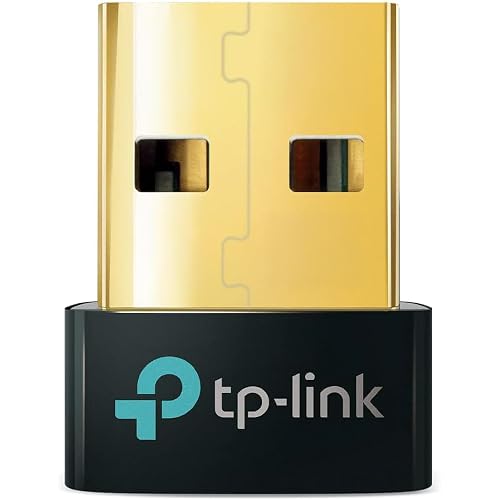 TOP CHOICEBest for wide device compatibilityTP-Link USB Bluetooth Adapter for PC – Bluetooth 5.4 USB Dongle ReceiverView on Amazon
- 3
 TOP CHOICEBest for newer Bluetooth featuresUGREEN USB Bluetooth 6.0 Adapter for PC Bluetooth Dongle ReceiverView on Amazon
- 4
 Best for PlayStation 5 and USB-C setupsUGREEN USB-C Bluetooth 5.3 Audio Adapter for PS5 with aptX Low LatencyView on Amazon
- 5
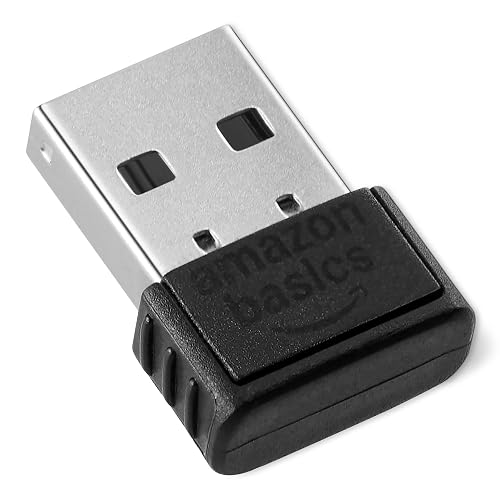 Best budget pickAmazon Basics Bluetooth 5.4 USB Adapter Dongle for PCView on Amazon
Our Top Picks
Quick Comparison
| Product | Best for | Key feature |
|---|---|---|
| UGREEN USB Bluetooth 5.3 Adapter for PC | Windows desktops and laptops | Bluetooth 5.3 with EDR and BLE support |
| TP-Link USB Bluetooth Adapter for PC (UB500) | Mixed Windows setups with older hardware | Bluetooth 5.4 with nano design |
| UGREEN USB Bluetooth 6.0 Adapter for PC | Users who want the newest Bluetooth standard | Bluetooth 6.0 with EDR and BLE support |
| UGREEN USB-C Bluetooth 5.3 Audio Adapter | PlayStation 5 and USB-C audio transmission | aptX Low Latency and aptX Adaptive support |
| Amazon Basics Bluetooth 5.4 USB Adapter | Simple, no-fuss desktop audio | Bluetooth 5.4 with Windows 11, 10 and 8.1 support |
UGREEN USB Bluetooth 5.3 Adapter for PC Bluetooth Dongle Receiver
Plug & Play, For Windows 11/10/8.1 Only, Desktop, Laptop, Works with Mice, Keyboards, Headphones, Speakers, Printer UGREEN USB Bluetooth 5.3 Adapter for PC Bluetooth Dongle Receiver EDR & BLE
Best for: Windows desktops and laptops that need a dependable all-around Bluetooth audio connection.
This adapter suits club members who want wireless headphones on a Windows PC and also use Bluetooth mice or keyboards on the same dongle. It is designed for plug-and-play use on Windows 11, 10 and 8.1.
Key specs
- Bluetooth 5.3
- EDR and BLE support
- USB plug-and-play, Windows 11, 10 and 8.1
Pros
- Plug-and-play setup on supported Windows versions
- Works with headphones, speakers, mice and keyboards
- Compact dongle that stays out of the way on a desk
Cons
- Listed for Windows only, so Mac and Linux users need another option
- Audio quality depends on the codecs your headphones support
Bottom line: A strong first choice for a Windows PC owner who wants a reliable, general-purpose Bluetooth audio link.
TP-Link USB Bluetooth Adapter for PC – Bluetooth 5.4 USB Dongle Receiver
Plug and Play, Nano Design, EDR & BLE, Supports Windows 11/10/8.1/7 for Desktop, Laptop, Keyboard, Mouse, etc (UB500) TP-Link USB Bluetooth Adapter for PC – Bluetooth 5.4 USB Dongle Receiver
Best for: Mixed Windows setups that include older hardware alongside newer devices.
This TP-Link model is aimed at users who want broad compatibility across Windows versions, including 7, and who value a small nano-sized dongle that leaves the second USB port free.
Key specs
- Bluetooth 5.4
- EDR and BLE support
- Nano design, supports Windows 11, 10, 8.1 and 7
Pros
- Wider Windows version support, including Windows 7
- Very small footprint for laptops
- Plug-and-play setup for common peripherals
Cons
- Windows-focused, so not suited to macOS or Linux
- Owners with demanding gaming audio may still want a low-latency codec
Bottom line: The right choice for a laptop owner who wants compact hardware and support for older Windows machines.
UGREEN USB Bluetooth 6.0 Adapter for PC Bluetooth Dongle Receiver
EDR & BLE, Plug & Play for Windows 11/10/8.1, for Headphone/Keyboard/Mouse/Speakers/Printer UGREEN USB Bluetooth 6.0 Adapter for PC Bluetooth Dongle Receiver
Best for: Users who want the newest Bluetooth standard on a Windows PC.
This model is for club members who plan to keep their setup for several years and want the latest Bluetooth version listed on the box, along with EDR and BLE support for both classic and low-energy devices.
Key specs
- Bluetooth 6.0
- EDR and BLE support
- Plug-and-play on Windows 11, 10 and 8.1
Pros
- Newest Bluetooth version among these picks
- Handles headphones, speakers, keyboards and mice on one dongle
- Simple setup on supported Windows versions
Cons
- Benefits of the newer standard depend on your headphones also supporting it
- Windows-only compatibility
Bottom line: Best for a Windows user who wants future-leaning hardware and plans to pair newer devices.
UGREEN USB-C Bluetooth 5.3 Audio Adapter for PS5 with aptX Low Latency
Bluetooth 5.3 Audio Adapter, Wireless Audio Transmitter to Connect Wireless Headphones/Earbuds UGREEN USB-C Bluetooth Adapter for PS5 with APTX Low Latency/aptX-Adaptive
Best for: PlayStation 5 owners and USB-C setups that need low-latency wireless audio.
This is an audio transmitter rather than a general PC dongle. It suits gamers who want wireless headphones on a console and who care about audio lag during play, especially if their headphones support aptX codecs.
Key specs
- Bluetooth 5.3
- aptX Low Latency and aptX Adaptive support
- USB-C connection
Pros
- aptX Low Latency support helps with gaming sync
- USB-C connector fits modern consoles and laptops
- Designed for wireless headphones and earbuds
Cons
- Latency benefits require headphones that also support aptX
- Not a Windows keyboard-and-mouse dongle, so it serves a narrower purpose
Bottom line: The best fit for a console gamer who wants to pair wireless headphones with a low-latency codec.
Amazon Basics Bluetooth 5.4 USB Adapter Dongle for PC
Amazon Basics Bluetooth 5.4 USB Adapter Dongle for PC, USB Receiver for Bluetooth Mouse, Keyboard, Laptop, Works with Windows 11/10/8.1
Best for: Simple, no-fuss desktop audio on a budget.
This adapter is for club members who want a straightforward Bluetooth dongle without extra features and who mainly need it for headphones, a mouse and a keyboard on Windows.
Key specs
- Bluetooth 5.4
- USB receiver dongle
- Works with Windows 11, 10 and 8.1
Pros
- Budget-friendly option within this group
- Bluetooth 5.4 with straightforward setup
- Works with common Bluetooth mice, keyboards and laptops
Cons
- Fewer advanced audio codec options are highlighted in the listing
- Windows-only compatibility
Bottom line: A sensible choice for someone who wants basic Bluetooth audio on a Windows PC without paying for extras.
Buying Guide
Bluetooth version and range
Newer Bluetooth versions generally offer better connection stability and more efficient power use. Range is more practical to judge in your own room, but a dongle placed on a desk with a clear line of sight to your headphones will usually perform better than one hidden behind a monitor or metal case.
Good picks for this: UGREEN USB Bluetooth 6.0 Adapter for PC, UGREEN USB Bluetooth 5.3 Adapter for PC
Codec support
The codec determines how audio is compressed between the adapter and your headphones. If your headphones support aptX Low Latency, that can reduce audio lag. Check your headphone manual for supported codecs before choosing.
Good picks for this: UGREEN USB-C Bluetooth 5.3 Audio Adapter
Operating system compatibility
Most listings in this group are Windows-focused. Confirm your version of Windows is supported, and check whether your computer already has a built-in Bluetooth radio that could conflict with a second adapter.
Good picks for this: TP-Link USB Bluetooth Adapter for PC, Amazon Basics Bluetooth 5.4 USB Adapter
Form factor and port fit
A nano-sized dongle sits flush in a laptop port and is less likely to be knocked. A larger dongle may be easier to reposition for better signal. USB-C models suit newer laptops and consoles with USB-C ports only.
Good picks for this: TP-Link USB Bluetooth Adapter for PC, UGREEN USB-C Bluetooth 5.3 Audio Adapter
Use case: gaming versus calls and music
Gaming benefits most from low latency, while music and video calls care more about stable connections. Decide which matters most before buying.
Good picks for this: UGREEN USB-C Bluetooth 5.3 Audio Adapter, UGREEN USB Bluetooth 5.3 Adapter for PC
Durability and care
Keep the dongle out of direct sunlight and avoid bending the USB connector. Unplug and reseat the adapter if pairing becomes unreliable, and keep firmware or driver updates current where the manufacturer provides them.
Good picks for this: Amazon Basics Bluetooth 5.4 USB Adapter, TP-Link USB Bluetooth Adapter for PC
FAQ
Can a USB Bluetooth adapter make wired headphones wireless?
A USB Bluetooth adapter connects wireless devices to your computer. Wired headphones need a separate transmitter or a different type of adapter, so check the product type before buying.
Do I need a driver to use a bluetooth headphone USB adapter?
Many listings in this group are plug-and-play on supported Windows versions, but some systems may need a driver update. Check the manufacturer’s setup notes for your operating system.
Will a USB adapter work with my existing built-in Bluetooth?
Yes, in many cases, but two Bluetooth radios can conflict. Disable the built-in radio in Device Manager if pairing becomes unstable, or use only the adapter.
What is the difference between Bluetooth 5.3 and 5.4 for headphones?
Newer versions offer incremental improvements in efficiency and connection handling. Real-world benefit depends on whether your headphones also support the same version.
Why does my audio lag when gaming?
Latency comes from both the Bluetooth link and codec. Codecs such as aptX Low Latency can reduce delay if your headphones support them. Wired connections remain the most reliable option for competitive play.
Can I use one adapter for both headphones and a Bluetooth mouse?
Several of these dongles list support for both audio devices and peripherals. Pair each device separately and confirm the listing supports your specific hardware.
How far can a USB Bluetooth adapter reach?
Range depends on walls, interference and the adapter’s antenna design. Placing the dongle on a desk or using a USB extension cable often improves stability.
Conclusion
For most Windows desktop and laptop users, the UGREEN USB Bluetooth 5.3 Adapter for PC is a dependable starting point. Owners who use older Windows machines may prefer the TP-Link model, while those who want the newest standard may look at the Bluetooth 6.0 version. Console gamers who need low latency should consider the UGREEN USB-C audio adapter, provided their headphones support aptX. The Amazon Basics adapter suits buyers who want simple, basic Bluetooth audio.
Sources
- Official Bluetooth specification versions and how they affect device compatibility
- Windows Bluetooth driver setup and troubleshooting guidance for USB adapters
- Background on wireless device regulation and radio frequency rules in the United States (fcc.gov)
Related reading
- Usb-c to 3.5mm Headphone Adapter (2026): Pros, Cons & Verdict
- USB C Headphone Adapter Not Working: 7 Fixes That Work
- Top 5 Headphone Socket Bluetooth Adapter Picks for Every Setup
- Insignia Headphone Bluetooth Adapter Streaming Media Player?
- Headphone Adapters Explained: 3.5 mm, 6.3 mm and USB-C
About Claire Whitaker
Claire Whitaker is part of our editorial team and reviews and edits our headphone comfort & accessories + gaming headsets guides, checking product details against manufacturer specifications and owner feedback.