By Colin Foster
Updated November 2026
Gaming headset noise cancellation can cut background chatter, fan hum and keyboard clatter so your voice and game audio come through clearly. This guide explains the two main approaches, how to test what a headset actually does, and how to set up your mic so noise reduction helps rather than muffles your voice.
Understand the Two Types of Noise Control
Most gaming headsets rely on one of two methods. Passive noise isolation uses tight-fitting ear cups and dense padding to block sound physically, and it works best on higher frequencies like speech and typing. Active noise cancellation (ANC) uses microphones inside or outside the ear cup to sample ambient sound and play an inverted signal that cancels low, steady noise such as air conditioners, engine rumble and PC fans.
Shopping for one? See our guide: A10 Astro Gaming Headset Review: Features and Performance.
Passive isolation is always on and needs no battery. ANC generally requires power, so check whether the headset is wired, wireless or both, and how long it runs on a charge when ANC is active. Owners often report that ANC handles constant low drone well but does little against sudden sounds like a door slamming.
Check the Microphone Noise Suppression
Noise cancellation for your audio and noise suppression for your mic are separate features. Your friends hear your mic, so its suppression matters as much as what you hear. Look for a boom mic with a noise-cancelling design, and for software or firmware options that filter background noise before it reaches your voice.
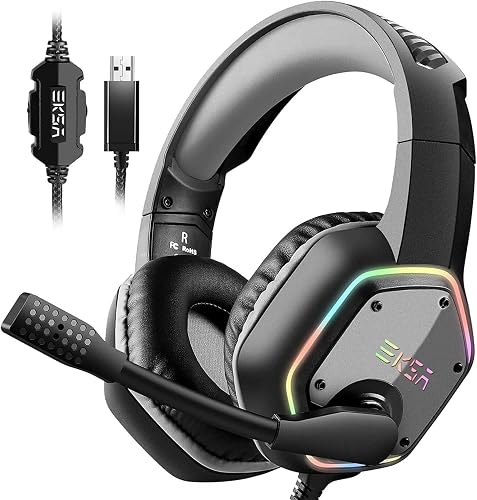
When you compare headsets, check the mic placement. A boom mic positioned close to the mouth picks up less room noise than a mic on a short stalk or built into the cup.
Set Up and Test Your Headset
Run a quick test before your next match. Use a voice recording app or your platform’s built-in mic test, then ask a friend how you sound.
- Put the headset on and adjust the headband so the ear cups fully seal around your ears without pinching.
- Position the boom mic about one finger’s width from the corner of your mouth, slightly off-axis so breath pops are reduced.
- Turn on ANC or noise suppression if the headset offers it, then record 15 seconds of normal speech with your keyboard and fan running.
- Play the recording back. If your voice sounds thin or robotic, lower the suppression level one step at a time until it sounds natural.
- Repeat the test with the noise source on and off to confirm the feature is actually reducing background sound.
Balance Noise Reduction Against Sound Quality
Stronger ANC can add a slight pressure feeling in the ears and can reduce footstep detail in competitive games. Start with the lowest level that solves your problem. If you play footstep-heavy shooters, you may prefer passive isolation with ANC switched off, then turn ANC on for quiet listening or noisy rooms.
Recommended gear
- Foam ear cup covers help seal the ear cups and improve passive isolation without changing the headset. View on Amazon
- A pop filter for boom mics reduces breath noise that noise suppression can sometimes struggle with. View on Amazon
- A USB audio interface with a mic gain control lets you set mic level precisely so suppression works as intended. View on Amazon
Common Mistakes
- Assuming ANC blocks everything. It mainly targets steady low-frequency noise, not sharp or sudden sounds.
- Leaving the mic too far from your mouth, which forces the suppression to work harder and thins your voice.
- Setting noise suppression too high and sounding robotic to your teammates.
- Forgetting that a worn ear pad can break the seal and reduce passive isolation.
- Testing only in silence. Always check your setup with real background noise running.
For more on comparing headsets, see What's a Good Gaming Headset? 7 Best Picks Compared for 2026 and Gaming Headset Comfort for Long Sessions. If you want a wireless option, 7 Best Top Wireless Gaming Headset Picks Compared for 2026 covers several models.
FAQ
Does gaming headset noise cancellation affect battery life?
Yes, active noise cancellation uses power, so wireless headsets typically run for less time with it switched on. Check the manufacturer’s battery rating with ANC active and carry a charging cable for long sessions.
Will my teammates hear my keyboard if I use noise cancellation?
It depends on the mic and its suppression settings. A boom mic close to your mouth with noise suppression enabled usually reduces keyboard clatter, but a quick recording test is the best way to confirm.
Can I add noise cancellation to a headset that lacks it?
Not really. You can improve passive isolation with better ear cup covers and a tighter fit, but true active cancellation needs built-in electronics and microphones.
Conclusion
Gaming headset noise cancellation works best when you understand the difference between passive isolation, active cancellation and mic suppression. Test your setup with real background noise, then adjust the levels until your voice sounds natural and your game audio stays clear. A few small changes to fit and mic position often make a bigger difference than the feature list.
Related reading
- Wireless Gaming Headset Computer Setup: A Step-by-Step Guide (2026)
- Steelseries Arctis Nova Pro Wireless Gaming Headset: Setup, Fit and Fixes (2026)
- Recommended Gaming Headset PC: 5 Best Picks Compared for 2026
Ready to choose one?
About Colin Foster
Colin Foster is part of our editorial team and reviews and edits our headphone comfort & accessories + gaming headsets guides, checking product details against manufacturer specifications and owner feedback.