 By Claire Whitaker
Updated November 2026
Plenty of headphones and gaming headsets use a single 3.5mm TRRS plug that carries both audio and microphone, but many desktop and laptop computers still have separate green and pink jacks. A headphone adapter for computer solves that mismatch by splitting one combined plug into two standard connectors, so you can keep your headset on a PC without switching to USB. The picks below were selected by reviewing manufacturer specifications, brand reputation and common owner feedback patterns, focusing on connector type, cable construction, shielding, cable length and how clearly each listing describes its TRRS compatibility. Read on for the comparison, buying factors and answers to common questions.
Our top picks at a glance
- 1
 TOP CHOICEBest overallHeadphone Splitter For Computer 3.5mm Female to 2 Dual 3.5mm MaleView on Amazon
- 2
 TOP CHOICEBest for gaming headsets5mm Female to 2 Dual Male 3.5mm Audio Y Splitter (CTIA TRRS)View on Amazon
- 3
 TOP CHOICEBest for braided durabilityUGREEN Headphone Splitter for Computer 3.5mm Female to 2 Dual 3.5mm MaleView on Amazon
- 4
 Best for compact desk setups2-in-1 Braided Y Separator Aux Dongle Converter Audio CableView on Amazon
- 5
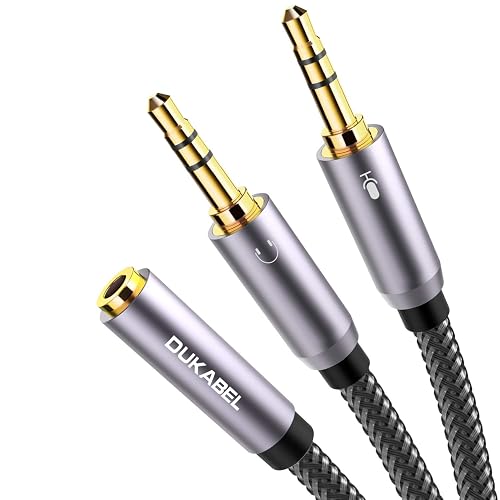 Best for longer reachGold-Plated Headphone Mic Splitter for PC, 3.5mm TRRS Female to Dual Male 30CMView on Amazon
- 6
 Best budget pickAudio Y Splitter for PC 3.5mm Female to 2 Dual 3.5mm MaleView on Amazon
Our Top Picks
Quick Comparison
| Product | Best for | Key feature |
|---|---|---|
| Headphone Splitter For Computer 3.5mm Female to 2 Dual 3.5mm Male | Everyday PC headset use | Clear split of audio and mic jacks |
| 3.5mm Female to 2 Dual Male 3.5mm Audio Y Splitter | Gaming headsets on desktops and laptops | CTIA TRRS compatibility |
| UGREEN Headphone Splitter for Computer | Long-term daily wear and tug | Braided audio cable |
| 2-in-1 Braided Y Separator Aux Dongle Converter | Compact desk setups | Braided, short-profile cable |
| Gold-Plated Headphone Mic Splitter for PC 30CM | Desks where the PC sits farther away | 24K gold-plated contacts and 30 cm length |
| Audio Y Splitter for PC 3.5mm Female to 2 Dual Male | Shoppers who want a simple, low-cost option | Straightforward Y-cable design |
Headphone Splitter For Computer 3.5mm Female to 2 Dual 3.5mm Male
Headphone Splitter For Computer 3.5mm Female to 2 Dual 3.5mm Male Headphone Mic Audio Y Splitter Cable Smartphone Headset to PC Adapter
Best for: Everyday PC headset use with separate audio and mic jacks
This is a good fit for people who have a combined-plug headset and a desktop or laptop with two separate 3.5mm ports. It is a general-purpose adapter that works for most headsets sold for phones and consoles that use a four-ring plug.
Key specs
- 3.5mm female input, two 3.5mm male outputs (audio and mic)
- Designed for TRRS (four-conductor) headset plugs
Pros
- Simple two-port layout that matches typical PC jacks
- Works with many phone-style headsets
- Small footprint behind the computer
Cons
- Standard-length cable may not reach distant towers
- Does not add volume or sound processing
Bottom line: A sensible first choice for someone who wants a plain, dependable split between headphones and mic on a PC.
3.5mm Female to 2 Dual Male 3.5mm Audio Y Splitter (CTIA TRRS)
3.5mm Female to 2 Dual Male 3.5mm Audio Y Splitter, For CTIA Plug TRRS Headsets, Desktop/Laptop with Separate Audio and Mic 1Pcs Computer Headphone Splitter, Gaming Headset to PC Adapter mic input.
Best for: Gaming headsets on desktops and laptops
Aimed at gamers and voice-chat users who want the mic to register on the PC without fiddling with drivers. The listing specifies CTIA-standard TRRS wiring, which matches the most common headset layout.
Key specs
- CTIA TRRS wiring for combined-plug headsets
- One female input, two dual male outputs (headphone and mic)
Pros
- Explicit CTIA compatibility note in the listing
- Separate audio and mic channels for clean voice chat
- Lightweight and easy to route under a desk
Cons
- Headsets with OMTP wiring may not work correctly
- Thin cable can feel fragile in heavy use
Bottom line: Best for gamers who have confirmed their headset uses CTIA wiring and want a straightforward mic-and-audio split.
UGREEN Headphone Splitter for Computer 3.5mm Female to 2 Dual 3.5mm Male
Gaming Headset to PC Adapter, Braided Audio Cable, For Laptop with Separate Audio and Mic, Stereo Jack Earphones Port Y Cord UGREEN Headphone Splitter for Computer 3.5mm Female to 2 Dual 3.5mm Male
Best for: Long-term daily wear and frequent plugging
Suited to people who unplug and replug their headset often, or whose cables get pulled across a desk. The braided jacket is the main selling point owners tend to mention.
Key specs
- Braided audio cable jacket
- 3.5mm female input, two dual 3.5mm male outputs
Pros
- Braided jacket resists kinks better than plain PVC
- Well-known accessory brand
- Clean split for audio and mic on PC
Cons
- Braiding adds some stiffness near the plugs
- Fixed cable length limits placement options
Bottom line: A solid pick for people who want a durable splitter they can leave connected for months.
2-in-1 Braided Y Separator Aux Dongle Converter Audio Cable
2-in-1 Braided Y Separator Aux Dongle Converters Audio Cable Cord for Headset Microphone Gaming Computer Speaker PC Laptop Headphone Mic Splitter for PC, 3.5mm TRRS Female to Dual Male TRS Adapter
Best for: Compact desk setups with limited space behind the PC
Aimed at users with a crowded desk who need a short, tidy connection. The listing describes a TRRS female-to-dual-TRS arrangement with a braided finish.
Key specs
- 3.5mm TRRS female to dual TRS male layout
- Braided cable construction
Pros
- Tidy braided finish for cable-heavy desks
- Covers headset, speaker and mic use cases in the listing
- Compact Y shape reduces clutter
Cons
- Listing terminology varies, so confirm port compatibility
- Less cable length for distant ports
Bottom line: A good match for a small desk where a short, neat splitter matters more than reach.
Gold-Plated Headphone Mic Splitter for PC, 3.5mm TRRS Female to Dual Male 30CM
24K Gold-Plated, Double Shielding, Connect a TRRS Headset or Mic to Computers with 2 separate microphone and headphone jacks. Headphone Mic Splitter for PC, 3.5mm TRRS Female to Dual Male Adapter-30CM
Best for: Setups where the PC sits farther from the desk surface
Suited to people whose computer is under a desk or several feet away. The listing highlights 24K gold-plated contacts and double shielding, which are features buyers often look for in low-noise connections.
Key specs
- 30 cm (about 12 inch) cable length
- 24K gold-plated contacts and double shielding per listing
Pros
- Gold-plated contacts are commonly associated with better corrosion resistance
- Double shielding is aimed at reducing interference
- Longer cable than many short Y splitters
Cons
- Gold plating does not change audio quality on its own
- Still a short cable, so it will not reach far-off ports
Bottom line: A reasonable choice for a desk setup that needs a bit more slack than the average splitter offers.
Audio Y Splitter for PC 3.5mm Female to 2 Dual 3.5mm Male
Audio Y Splitter for PC 3.5mm Female with Headphone/Microphone Transform to 2 Dual 3.5mm Male for Computer Headset Splitter Cable for PC 3.5mm Jack Headphone Adapter Convertors
Best for: Shoppers who want a simple, no-frills splitter
Aimed at people who only need the basic function: take one combined headset plug and feed a PC with separate audio and mic jacks. It is a practical backup or spare for a second computer.
Key specs
- 3.5mm female input, two dual 3.5mm male outputs
- Y-cable design for headphone and microphone jacks
Pros
- Straightforward function with minimal setup
- Useful as a spare for a second PC or laptop
- Covers the core headset-to-PC use case
Cons
- Fewer listing details on shielding and materials
- Build quality may vary between sellers
Bottom line: A workable option for someone who wants the basic split without extra features.
Buying Guide
Connector Type: TRRS vs. TRS
Most combined headset plugs use TRRS (four conductors: left, right, ground and mic). A standard headphone plug uses TRS (three conductors). Check your headset’s plug, and confirm the adapter lists TRRS input. Mismatched wiring is the most common reason a mic fails to register.
Good picks for this: Headphone Splitter For Computer 3.5mm Female to 2 Dual 3.5mm Male, 3.5mm Female to 2 Dual Male 3.5mm Audio Y Splitter
CTIA vs. OMTP Wiring
Two TRRS wiring standards exist. CTIA is the layout used by most modern headsets, while OMTP is an older arrangement that swaps the mic and ground. If your mic is silent after plugging in, the wiring standard is a likely cause. Check your headset’s documentation or the adapter’s compatibility note before buying.
Good picks for this: 3.5mm Female to 2 Dual Male 3.5mm Audio Y Splitter, Gold-Plated Headphone Mic Splitter for PC
Cable Length and Reach
Most splitters are short, often under 30 cm, and are meant to sit at the PC. If your computer is on the floor or several feet from your chair, look for a longer cable or plan for an extension. Measure from the port to the spot where the headset will rest before choosing.
Good picks for this: Gold-Plated Headphone Mic Splitter for PC 30CM, UGREEN Headphone Splitter for Computer
Cable Construction and Durability
Braided jackets generally resist kinking and abrasion better than thin PVC. Strain relief at each connector matters too, since plugs are the most common failure point. If the cable will be plugged and unplugged often, prioritize a braided or reinforced build.
Good picks for this: UGREEN Headphone Splitter for Computer, 2-in-1 Braided Y Separator Aux Dongle Converter
Shielding and Noise
Shielding helps reduce hum and interference, especially near power supplies and monitors. Double shielding is a feature some listings highlight. Keep in mind that shielding reduces noise rather than improving sound quality, so treat it as a secondary factor.
Good picks for this: Gold-Plated Headphone Mic Splitter for PC 30CM, Headphone Splitter For Computer 3.5mm Female to 2 Dual 3.5mm Male
Contact Plating
Gold plating is common on connectors because it resists oxidation. It helps keep contacts clean over time, but it does not change the signal itself. Plating matters most in humid environments or for devices that are plugged in very frequently.
Good picks for this: Gold-Plated Headphone Mic Splitter for PC 30CM, Audio Y Splitter for PC 3.5mm Female to 2 Dual 3.5mm Male
Compatibility With Your PC
Check that your computer has separate audio and mic jacks, or a combo jack that supports headsets. Some laptops use a single combo port that already handles TRRS, so a splitter may be unnecessary. Confirm the port type in your computer’s manual before buying.
Good picks for this: 2-in-1 Braided Y Separator Aux Dongle Converter, Audio Y Splitter for PC 3.5mm Female to 2 Dual 3.5mm Male
FAQ
What is a headphone adapter for computer used for?
It splits a single combined TRRS headset plug into two separate 3.5mm connectors, one for headphones and one for the microphone. This lets a headset with a four-ring plug work on a PC that has separate audio and mic jacks.
Do I need a headphone to computer adapter if my PC has a combo jack?
Often no. Many laptops and some desktops use a combo jack that accepts TRRS plugs directly. Check your computer’s port layout first. A splitter is only needed when the audio and mic jacks are separate.
Why is my mic not working with the splitter?
The most common cause is a wiring mismatch, such as CTIA versus OMTP. Confirm your headset’s wiring and the adapter’s compatibility. Also check that the mic is enabled in your computer’s sound settings.
Will a splitter reduce sound quality?
A passive splitter does not add processing, so audio quality is generally not affected in a meaningful way. Connection quality, cable condition and the sound card in your PC matter more than the splitter itself.
Is gold plating necessary?
Gold plating helps resist corrosion and keeps contacts clean, which can be useful over long periods. It does not change the audio signal on its own, so treat it as a durability feature rather than a sound upgrade.
What is the difference between TRRS and TRS?
TRRS has four conductors and carries both headphone audio and microphone signal through one plug. TRS has three conductors and carries only stereo audio. Headsets with a mic usually need TRRS, so a splitter with TRRS input is required.
Can I use this with a gaming headset?
Yes, many gaming headsets use a combined TRRS plug. Check whether your headset uses CTIA wiring and confirm that the adapter supports it. Some gaming headsets include their own USB adapter, which may be a better match for your system.
Conclusion
For most people, a basic headphone adapter for computer with clear TRRS compatibility covers the job. The first listing is a sound general-purpose choice, while the CTIA-specific splitter suits gaming headsets. Braided or gold-plated models are better for frequent plugging or humid environments, and the compact and longer options address desk layout concerns. Start by confirming your headset’s wiring and your PC’s jack type, then pick the cable length and build that fit your desk.
Sources
- Product safety guidance on cables, cords and electrical accessories used with consumer electronics (cpsc.gov)
- Information on hearing health and safe listening levels when using headphones (nidcd.nih.gov)
- Standards and technical resources on audio interfaces and signal transmission
Related reading
- iPhone Headphone Adapter Not Working on Calls: 7 Fixes That Work
- iPhone Headphone Adapter Black: Which Ones Work and Why
- iPhone 7 Adapter Headphone: How to Choose and Use One (Step-by-Step)
- iPad USB-C Headphone Adapter Review: Pros and Cons
- Why Is My Headphone Adapter Not Working? A Step-by-Step Fix Guide
- Usb-c to 3.5mm Headphone Adapter (2026): Pros, Cons & Verdict
About Claire Whitaker
Claire Whitaker is part of our editorial team and reviews and edits our headphone comfort & accessories + gaming headsets guides, checking product details against manufacturer specifications and owner feedback.


