 By Claire Whitaker
Updated November 2026
Finding a reliable headphone and mic adapter for PC usually comes down to one problem: your headset has a single 3.5mm plug, but your computer has separate green and pink jacks, and the two don’t talk to each other. A good adapter splits that plug into dedicated headphone and microphone connectors so you can hear and speak at the same time. This list focuses on TRRS splitters (the standard for gaming and PC headsets), and each pick is judged on connector build, cable construction, how clearly the listing describes its wiring, and the patterns owners tend to mention in their feedback.
Our top picks at a glance
- 1
 TOP CHOICEBest overallHeadphone Splitter For Computer 3.5mm Female to 2 Dual 3.5mm Male HeadView on Amazon
- 2
 TOP CHOICEBest for gaming headsetsHeadphone Mic & Audio Splitter for PC Y Adapter for Astro A10 A40 TurtView on Amazon
- 3
 TOP CHOICEBest for braided durabilityGaming Headset to PC Adapter, Braided Audio Cable, For Laptop with SepView on Amazon
- 4
 Best for CTIA-style headsets5mm Female to 2 Dual Male 3.5mm Audio Y Splitter, For CTIA Plug TRRS HeadsetsView on Amazon
- 5
 Best budget pickAudio Y Splitter for PC 3.5mm Female with Headphone/Microphone TransfoView on Amazon
- 6
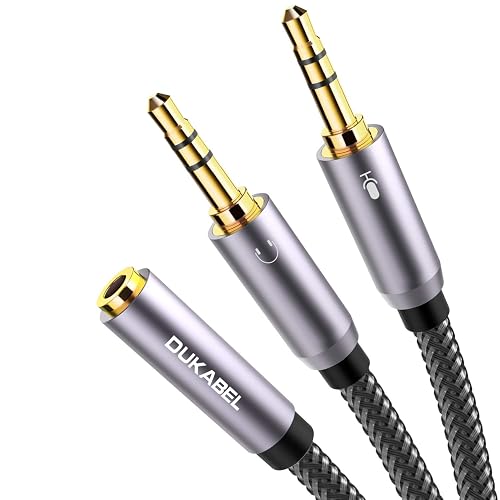 Best for shielding24K Gold-Plated Headphone Mic Splitter for PC, 3.5mm TRRS Female to Dual Male Adapter-30CMView on Amazon
- 7
 Best for short runsMaeline Headphone Splitter Adapter, 3.5mm Mic Cable for Computer, HeadView on Amazon
Our Top Picks
| Product | Best for | Key feature |
|---|---|---|
| Headphone Splitter For Computer 3.5mm Female to 2 Dual 3.5mm Male | Everyday PC headset use | Separate headphone and mic outputs |
| Headphone Mic & Audio Splitter for PC Y Adapter | Gaming headsets from major brands | Listed compatibility with popular gaming headsets |
| Gaming Headset to PC Adapter, Braided Audio Cable (UGREEN) | Long-term daily wear | Braided outer jacket |
| 3.5mm Female to 2 Dual Male Audio Y Splitter (CTIA) | CTIA-wired headsets | CTIA TRRS wiring standard |
| Audio Y Splitter for PC 3.5mm Female with Headphone/Microphone | Shoppers who want a simple, low-cost solution | Straightforward Y-split design |
| 24K Gold-Plated Headphone Mic Splitter for PC | Users worried about interference | Gold-plated contacts and double shielding |
| Maeline Headphone Splitter Adapter | Desk setups with short cable runs | Compact 3.5mm mic cable design |
Headphone Splitter For Computer 3.5mm Female to 2 Dual 3.5mm Male Headphone Mic Audio Y Splitter Cable Smartphone Headset to PC Adapter
Headphone Splitter For Computer 3.5mm Female to 2 Dual 3.5mm Male Headphone Mic Audio Y Splitter Cable Smartphone Headset to PC Adapter
Best for: Everyday PC headset use
This is a general-purpose option for people who want a straightforward way to connect a single-plug headset to a desktop or laptop with separate jacks. It suits users who don’t need gaming-specific compatibility notes.
Key specs
- Connector: 3.5mm female to two 3.5mm male
- Function: separate headphone and microphone outputs
Pros
- Simple, familiar Y-split layout
- Works with many smartphone-style headsets
- Easy to plug in and swap
Cons
- Standard cable jacket may feel thin over time
- Not specifically tuned for gaming headset wiring
Bottom line: A solid default choice if you want a no-fuss adapter and your headset uses a standard TRRS plug.
Headphone Mic & Audio Splitter for PC Y Adapter for Astro A10 A40 Turtle Beach HyperX Cloud SteelSeries Razer Gaming Headsets
Headphone Mic & Audio Splitter for PC Y Adapter for Astro A10 A40 Turtle Beach HyperX Cloud SteelSeries Razer Gaming Headsets Headset Headphone Splitter Adapter Cable for PC 3.5mm Mic Audio Y-Splitter
Best for: Gaming headsets from major brands
Aimed at gamers whose headset is one of the brands named in the listing. It is a good fit for people who want a splitter marketed specifically for gaming headset wiring.
Key specs
- Connector: 3.5mm TRRS split into separate audio and mic plugs
- Designed for PC use with separate jacks
Pros
- Listed compatibility with popular gaming headset lines
- Clear separation of audio and mic channels
- Straightforward plug-and-play use
Cons
- Compatibility claims depend on your exact headset wiring
- Build quality reports vary across owner feedback
Bottom line: Best for gamers who want a splitter labeled for their headset family.
Gaming Headset to PC Adapter, Braided Audio Cable, For Laptop with Separate Audio and Mic, UGREEN Headphone Splitter for Computer 3.5mm Female to 2 Dual 3.5mm Male
Gaming Headset to PC Adapter, Braided Audio Cable, For Laptop with Separate Audio and Mic, Stereo Jack Earphones Port Y Cord UGREEN Headphone Splitter for Computer 3.5mm Female to 2 Dual 3.5mm Male
Best for: Long-term daily wear
Suited to users who coil and uncoil their cables often, or who keep a headset on the desk all day. The braided jacket is the main selling point.
Key specs
- Braided audio cable jacket
- Connector: 3.5mm female to two 3.5mm male
Pros
- Braided outer cable resists tangling and kinking better than smooth jackets
- Separate audio and mic outputs for laptops and desktops
- Recognizable brand with broad accessory support
Cons
- Braided cable is slightly bulkier to route
- Strain relief at the plugs is the usual weak point owners mention
Bottom line: The right pick if cable durability matters more than the thinnest possible profile.
3.5mm Female to 2 Dual Male 3.5mm Audio Y Splitter, For CTIA Plug TRRS Headsets
3.5mm Female to 2 Dual Male 3.5mm Audio Y Splitter, For CTIA Plug TRRS Headsets, Desktop/Laptop with Separate Audio and Mic 1Pcs Computer Headphone Splitter, Gaming Headset to PC Adapter mic input.
Best for: CTIA-wired headsets
This one is worth a look if your headset specifically follows the CTIA wiring standard, which is common on many phone-style and budget headsets used with PCs.
Key specs
- Wiring standard: CTIA TRRS
- Connector: 3.5mm female to two 3.5mm male
Pros
- Explicitly labeled for CTIA wiring
- Helpful for mismatched mic and ground layouts
- Simple two-plug output
Cons
- Useless if your headset uses the OMTP layout instead
- Listing title is long and somewhat crowded with keywords
Bottom line: Choose this if you know your headset is CTIA; otherwise check wiring first.
Audio Y Splitter for PC 3.5mm Female with Headphone/Microphone Transform to 2 Dual 3.5mm Male
Audio Y Splitter for PC 3.5mm Female with Headphone/Microphone Transform to 2 Dual 3.5mm Male for Computer Headset Splitter Cable for PC 3.5mm Jack Headphone Adapter Convertors
Best for: Shoppers who want a simple, low-cost solution
A practical choice for people with a basic headset who want the simplest possible adapter and don’t need premium cable features.
Key specs
- Connector: 3.5mm female to two 3.5mm male
- Function: headphone and microphone split
Pros
- Easy, no-frills design
- Works with common TRRS headsets
- Good as a spare or backup adapter
Cons
- Construction details are less documented than premium options
- Owner feedback on durability varies
Bottom line: A sensible budget pick for occasional use or a spare in the drawer.
24K Gold-Plated Headphone Mic Splitter for PC, 3.5mm TRRS Female to Dual Male Adapter-30CM
24K Gold-Plated, Double Shielding, Connect a TRRS Headset or Mic to Computers with 2 separate microphone and headphone jacks. Headphone Mic Splitter for PC, 3.5mm TRRS Female to Dual Male Adapter-30CM
Best for: Users worried about interference
The listing emphasizes gold-plated contacts and double shielding, which appeals to people who notice hum or noise from their setup.
Key specs
- Contacts: 24K gold-plated
- Shielding: double shielding (per listing)
- Cable length: 30 cm
Pros
- Gold-plated contacts resist corrosion better than bare metal
- Double shielding aims to reduce interference
- Short 30 cm length keeps cable clutter low
Cons
- 30 cm is too short for some desk layouts
- Shielding benefits depend on the rest of your setup
Bottom line: A good match for desk setups where clean audio and a short run matter most.
Maeline Headphone Splitter Adapter, 3.5mm Mic Cable for Computer, Headset 3.5mm Female to 2 Dual Male Microphone Audio Stereo Jack
Maeline Headphone Splitter Adapter, 3.5mm Mic Cable for Computer, Headset 3.5mm Female to 2 Dual Male Microphone Audio Stereo Jack Earphones Port to Gaming Speaker PC
Best for: Desk setups with short cable runs
A compact option for people whose PC sits close to the headset, where a long adapter cable would only add tangles.
Key specs
- Connector: 3.5mm female to two 3.5mm male
- Designed as a compact mic cable for computers
Pros
- Compact footprint for tight desks
- Covers headphone and mic on separate plugs
- Simple setup with no drivers needed
Cons
- Less cable length for flexible positioning
- Limited detail on shielding and materials in the listing
Bottom line: Ideal for compact desks where a short, tidy adapter is more useful than extra length.
Buying Guide
Check Your Headset’s Wiring Standard (CTIA vs. OMTP)
Most PC headsets use a 4-conductor TRRS plug, but the ring order differs between the CTIA and OMTP standards. Using the wrong adapter can give you a headset that plays audio but has no working mic. Check your headset manual or product page for the wiring standard before buying.
Good picks for this: 3.5mm Female to 2 Dual Male Audio Y Splitter (CTIA), Headphone Splitter For Computer 3.5mm Female to 2 Dual 3.5mm Male
Cable Construction and Jacket Material
Braided jackets resist kinking and tangling better than smooth PVC, which matters if the adapter lives on a desk. Look for solid strain relief where the cable meets each plug, since that is where failures often start.
Good picks for this: Gaming Headset to PC Adapter, Braided Audio Cable (UGREEN), Maeline Headphone Splitter Adapter
Plug Plating and Shielding
Gold-plated contacts resist oxidation, which can help keep the connection clean over time. Double shielding is intended to reduce interference from nearby electronics. Neither feature is a magic fix, but both are useful when you’re chasing clean audio.
Good picks for this: 24K Gold-Plated Headphone Mic Splitter for PC, Headphone Mic & Audio Splitter for PC Y Adapter
Cable Length and Desk Layout
Measure the distance from your PC’s front or rear audio jacks to where your headset rests. Very short cables keep things tidy but can pull on your headset if you move around. Longer runs give flexibility but add slack to manage. Aim for a length that leaves a little slack without dragging.
Good picks for this: Maeline Headphone Splitter Adapter, Audio Y Splitter for PC 3.5mm Female with Headphone/Microphone
Compatibility with Your Headset Brand
Some listings name specific gaming headset families. These claims are useful starting points, but actual compatibility depends on how your headset is wired internally. When a listing names your brand, treat it as a hint and confirm the wiring standard.
Good picks for this: Headphone Mic & Audio Splitter for PC Y Adapter for Astro A10 A40 Turtle Beach HyperX Cloud, Headphone Splitter For Computer 3.5mm Female to 2 Dual 3.5mm Male
Intended Use: Occasional or Daily
If you use a headset for calls once a week, a simple budget splitter is usually enough. If you game for hours each day, prioritize cable durability and solid connectors, since daily plugging and unplugging is where cheap adapters tend to wear out.
Good picks for this: Audio Y Splitter for PC 3.5mm Female with Headphone/Microphone, Gaming Headset to PC Adapter, Braided Audio Cable (UGREEN)
FAQ
Do I need a special adapter for a headset with separate headphone and mic plugs?
No. If your headset already has separate plugs for audio and microphone, you can usually connect them directly to your PC’s matching jacks without a splitter. A splitter is needed when you have one combined 3.5mm plug.
How do I know if my headset is CTIA or OMTP?
Check the product manual or manufacturer specification. If the wiring standard is not listed, the ring order of the plug is sometimes shown in diagrams. When unsure, test the mic on a call to confirm it works before relying on the adapter.
Why does my mic work on the phone but not on the PC?
This is often a wiring standard mismatch or a PC audio setting. Confirm that the microphone input is selected in your system sound settings and that the mic is not muted. If the setting is correct, a CTIA/OMTP mismatch is a likely cause.
Is gold plating worth it on an adapter?
Gold plating helps resist oxidation and corrosion, which can keep connections stable over years of use. It won’t fix a poorly designed cable, so it is one factor among several rather than the most important one.
Can a splitter cause audio hiss or hum?
Poor shielding or a loose connection can contribute to noise. Using a shielded adapter, keeping the cable away from power supplies, and ensuring the plugs are fully seated are the most common ways to reduce it.
Do I need drivers to use these adapters?
Generally no. These are passive adapters that route the signal through the cable. Your operating system’s standard audio drivers handle the rest. If you have problems, check your sound settings first.
Will a longer adapter reduce audio quality?
For typical headphone and mic runs of a meter or so, a passive adapter’s effect on audio quality is usually small. Stick to the shortest length that gives you comfortable slack, and avoid coiling extra cable tightly.
Conclusion
For most people, the Headphone Splitter For Computer 3.5mm Female to 2 Dual 3.5mm Male is the simplest all-around starting point. Gamers with headsets from the brands named in the listing may prefer the gaming-labeled splitter, while CTIA headset owners should choose the CTIA-specific option. Readers who want a tough, tangle-resistant cable should consider the braided UGREEN model, and those on a tight budget or needing a spare can use the basic Y splitter. Confirm your headset’s wiring standard before buying to avoid a mic that won’t work.
Sources
- Standards and technical background on audio connector and signal design
- Guidance on electromagnetic interference and how shielding relates to consumer electronics (fcc.gov)
- Reference information on measurement standards relevant to electrical connections (nist.gov)
Related reading
- iPhone Headphone Adapter Not Working on Calls: 7 Fixes That Work
- iPhone Headphone Adapter Black: Which Ones Work and Why
- Why Is My Headphone Adapter Not Working? A Step-by-Step Fix Guide
- Usb-c to 3.5mm Headphone Adapter (2026): Pros, Cons & Verdict
- USB C Headphone Adapter Not Working: 7 Fixes That Work
About Claire Whitaker
Claire Whitaker is part of our editorial team and reviews and edits our headphone comfort & accessories + gaming headsets guides, checking product details against manufacturer specifications and owner feedback.


