 By Colin Foster
Updated November 2026
A headphone stand with charging combines a headset holder and a power hub on one desk footprint, so your headphones stay off the floor and your phone, controller or earbuds stay topped up. The picks below were chosen by reviewing product listings, brand documentation and common owner feedback, weighing four things: charging output, base stability, hanger fit for different headset sizes, and whether the lighting or layout suits a gaming desk.
Our top picks at a glance
- 1
 TOP CHOICEBest overallNew Bee Headphone Stand with RGB Lighting, Sturdy Aluminum Gaming Headset HolderView on Amazon
- 2
 TOP CHOICEBest for wireless chargingHeadphone Stand with 15w Wireless Charger, Suguder 4 in 1 Charging StationView on Amazon
- 3
 TOP CHOICEBest for multiple headsetsKAFRI RGB Dual Headphone Stand with USB C Charger Desk Gaming Double Headset HolderView on Amazon
- 4
 Best for controller storageKDD Headset Stand with Charging Station, Detachable Controller HolderView on Amazon
- 5
 Best for a budget pickRGB Headphone Stand with 2 USB-C Charging Port and 1 USB Charging PortView on Amazon
- 6
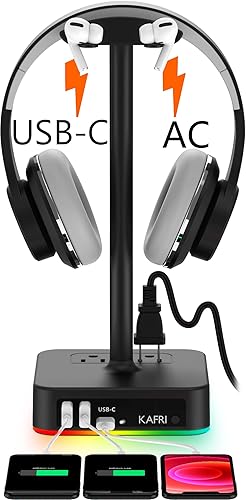 Best for a tidy gaming cornerKAFRI RGB Headphone Stand with USB A&C Charger Desk Gaming Headset HolderView on Amazon
- 7
 Best for wireless padsKDD Headphone & Controller Stand with Wireless Charging – Rotatable HeView on Amazon
Our Top Picks
| Product | Best for | Key feature |
|---|---|---|
| New Bee Headphone Stand | Overall desk use | Aluminum base, RGB, USB-C |
| Suguder 4 in 1 Charging Station | Wireless charging | 15W wireless pad |
| KAFRI RGB Dual Headphone Stand | Multiple headsets | Two hangers, USB-C |
| KDD Headset Stand with Charging Station | Controller storage | Detachable controller holder |
| RGB Headphone Stand (White) | Budget setups | Two USB-C plus USB |
| KAFRI RGB Headphone Stand (USB A&C) | Compact gaming corners | Three USB ports, two outlets |
| KDD Headphone & Controller Stand | Wireless pad users | Wireless charging, 9 light modes |
New Bee Headphone Stand with RGB Lighting, Sturdy Aluminum Gaming Headset Holder
New Bee Headphone Stand with RGB Lighting, Sturdy Aluminum Gaming Headset Holder with USB-C & USB Charging Ports, Stable Desktop Earphone Stand for All Headphones Size, Black
Best for: Overall desk use with a stable base
This suits gamers and desk workers who want a heavy aluminum base that resists tipping when a large over-ear headset is hung on it.
Pros
- Aluminum build feels solid on a desktop
- USB-C and USB ports for phones and controllers
Cons
- RGB lighting can be too bright for dim rooms
Headphone Stand with 15w Wireless Charger, Suguder 4 in 1 Charging Station
Headphone Stand with 15w Wireless Charger, Suguder 4 in 1 Charging Station Headset Holder for AirPods Max/Pro/4/3/2 iWatch 10/9/8/7/6/5/4/3/2/1/SE iPhone 17/16/15/14/13/12/11/X for Desktop Table Game
Best for: Wireless charging for phones and earbuds
Best for people who keep a wireless-capable phone and earbuds on the desk and want to drop them on a pad without cables.
Pros
- Wireless pad rated at 15W in the listing
- Covers headsets, watches and phones in one unit
Cons
- Owners often note the device must sit centered on the pad
KAFRI RGB Dual Headphone Stand with USB C Charger Desk Gaming Double Headset Holder
KAFRI RGB Dual Headphone Stand with USB C Charger Desk Gaming Double Headset Holder Hanger Rack with 3 USB Charging Port and 2 Outlet – Suitable for Gamer Desktop Table Game Earphone Accessories Gift
Best for: Multiple headsets on one desk
A good fit for households or shared desks where two headsets need separate hangers and a common charging hub.
Pros
- Two hangers keep headsets from tangling
- Three USB charging ports plus two outlets
Cons
- Footprint is wider than single-hanger models
KDD Headset Stand with Charging Station, Detachable Controller Holder
KDD Headset Stand with Charging Station – Detachable Controller Holder with 9 Light Modes – Rotatable Headphone Hanger with USB A&C Charger Ports – Earphone Hook for PC Gaming Accessories Storage
Best for: Controller storage alongside headsets
Suited to console and PC gamers who want a place for a controller next to the headset without a separate hook.
Pros
- Detachable controller holder adds flexibility
- Rotatable headset hanger
Cons
- Multiple light modes may distract some users
RGB Headphone Stand with 2 USB-C Charging Port and 1 USB Charging Port
RGB Headphone Stand with 2 USB-C Charging Port and 1 USB Charging Port, Desk Gaming Headset Holder with 7 Light Modes and Non-Slip Rubber Base Suitable for All Earphone Accessories (White)
Best for: Budget-minded setups
A straightforward option for someone who needs a headset hook and two fast charging ports without paying for extras they will not use.
Pros
- Non-slip rubber base reduces sliding
- Two USB-C ports suit modern phones
Cons
- Lighter build than aluminum models
KAFRI RGB Headphone Stand with USB A&C Charger Desk Gaming Headset Holder
KAFRI RGB Headphone Stand with USB A&C Charger Desk Gaming Headset Holder Hanger Rack with 3 USB Charging Port and 2 Outlet – Suitable for Gamer Desktop Table Game Earphone Accessories Boyfriend Gifts
Best for: Tidy gaming corners with limited space
Works for someone with a narrow desk who wants one compact unit that combines a hanger, outlets and USB charging.
Pros
- Compact footprint for small desks
- Mix of USB-A and USB-C ports
Cons
- Only one headset hanger
Buying Guide
Charging Type and Output
Check which devices you actually need to charge before you buy. Some stands offer only USB-A ports, while others add USB-C ports or a Qi wireless pad, and wireless charging typically delivers less power and runs slower than a wired connection. If you charge a laptop-class device or a modern phone that supports fast charging, a USB-C port is the more useful choice.
Base Stability and Non-Slip Feet
A headset stand with a heavy or wide base resists tipping, especially when you hang a large over-ear headset on one side. Look for rubber or non-slip pads on the underside, which keep the stand from sliding across a glossy desk. Aluminum and metal bases generally feel more solid than thin plastic ones.
Hanger Fit for Your Headset Size
Measure the headband width of your headphones and make sure the hook or cradle is wide enough to hold them without pinching the band. Dual-hanger designs are useful if you own more than one headset or want to store a controller alongside your audio gear. A rotatable hanger can also help you fit awkward headsets into tight desk corners.
Lighting and Desk Style
RGB lighting adds a gaming look, and many stands offer several light modes that you can switch between or turn off entirely. If you prefer a quieter setup, choose a stand with plain lighting or none at all. Consider how the color and finish will match your monitor, keyboard and other desk accessories.
FAQ
Can a headphone stand with charging fast-charge my phone?
It depends on the port and the stand’s power output. USB-C ports are more likely to support faster charging than standard USB-A ports, but the actual speed also depends on your phone and cable. Check the stated output in the product listing before you expect quick charging.
Is wireless charging on a headset stand as fast as a wired cable?
In most cases, wireless charging is slower than a direct wired connection because some energy is lost during transfer. It is convenient for overnight or light top-ups but may not suit a phone that needs a quick boost. Make sure your phone supports the wireless standard the stand uses.
Will a headphone stand fit gaming headsets with large ear cups?
Most stands are designed for standard over-ear and on-ear headsets, but very large or heavy headsets can strain a narrow hook. A wider cradle and a heavier base will handle bigger headsets better. Check the hanger dimensions against your headband before ordering.
Do I need a stand with RGB lighting?
No, lighting is a style choice rather than a functional requirement. If you want a gaming-focused look, RGB models with several light modes are a good fit, but plain stands work just as well for holding headsets and charging devices. Choose based on your desk setup and personal preference.
Can I use a headset stand with charging for controllers and earbuds too?
Many of these stands include extra space or a dedicated holder for controllers, and the charging ports can power earbud cases or other small devices. Confirm that the stand has a suitable spot for your specific controller or accessory. Using a standard charging cable with the ports is usually all that is required.
Conclusion
If you want a sturdy, good-looking stand with broad compatibility, the New Bee model is a strong all-around choice, and the Suguder stand suits anyone who wants wireless charging alongside a headset holder. Buyers with several headsets or a controller to store should look at the KAFRI dual-hanger and KDD models for extra capacity.
For a simple, budget-minded desk setup, the plain RGB stand with USB-C and USB ports covers the basics without extra features. Match your pick to the devices you charge most often and the size of the headsets you own, and the right stand will fit your desk without hassle.
Before you buy: helpful guides
- 3D Print Headphone Stand: A Step-by-Step Guide for Beginners
- Headphone Stand for Desk: A Step-by-Step Guide to Choosing and Setting One Up
- Headphone Stand for Multiple Headphones: How to Choose and Set One Up (2026)
- Headphone Stand with Wireless Charger: 6 Factors to Check Before You Buy
- Wall Mount Headphone Stand: A Step-by-Step Install Guide for Clean Desks
Related reading
About Colin Foster
Colin Foster is part of our editorial team and reviews and edits our headphone comfort & accessories + gaming headsets guides, checking product details against manufacturer specifications and owner feedback.


