By Colin Foster
Updated November 2026
Choosing a logitech headset for gaming comes down to a few practical questions: wired or wireless, how the microphone performs, whether the clamp stays comfortable through long sessions, and which platforms it supports. This list compares five Logitech models on connection type, comfort design, audio features and the setups each one suits best. Picks are based on manufacturer specifications, product listings and common owner feedback patterns, not on our own testing.
Best overall: Logitech G733 Lightspeed Wireless Gaming Headset – Black – View on Amazon
Best for wireless freedom: Logitech G733 Lightspeed Wireless Gaming Headset – White – View on Amazon
Best for budget wired play: Logitech G432 Wired Gaming Headset – Black – View on Amazon
Best for multi-platform use: Logitech PRO X3 Lightspeed Gaming Headset – Black – View on Amazon
Best for all-day comfort: Logitech G321 Lightspeed Wireless Bluetooth Gaming Headset with Mic – Black – View on Amazon
Our Top Picks
| Product | Best for | Key feature |
|---|---|---|
| Logitech G733 Lightspeed Wireless (Black) | Overall wireless gaming | LIGHTSYNC RGB and Blue VO!CE mic |
| Logitech G432 Wired Gaming Headset | Budget wired setups | DTS Headphone:X 2.0 support |
| Logitech PRO X3 Lightspeed Gaming Headset | Multi-platform play | Graphene drivers and 7.1 surround |
| Logitech G733 Lightspeed Wireless (White) | Matching white setups | Same wireless build, white finish |
| Logitech G321 Lightspeed Wireless Bluetooth | Long sessions | 20+ hour battery rating |
Logitech G733 Lightspeed Wireless Gaming Headset – Black

Suspension Headband, Blue VO!CE Mic, PRO-G Audio, PC, PS5, PS4, Switch Compatible Logitech G733 Lightspeed Wireless Gaming Headset – Black
Best for: Overall wireless gaming with RGB styling
This model suits players who want wireless freedom without giving up a detachable, noise-conscious mic. The suspension headband spreads clamping pressure across the head rather than concentrating it at the ears.
Pros
- Lightweight suspension headband for extended wear
- Blue VO!CE mic technology for clearer voice pickup
Cons
- RGB lighting is a styling choice that adds some battery draw
Logitech G432 Wired Gaming Headset – Black

DTS Headphone:X 2.0, 50 mm audio drivers, USB and 3.5 mm jack, Flip-to-Mute mic, PC compatible Logitech G432 Wired Gaming Headset – Black
Best for: Budget wired setups
A solid fit for players who prefer a wired connection and don’t need wireless range. It works across PC and console setups through USB or a 3.5 mm jack.
Pros
- DTS Headphone:X 2.0 spatial audio support
- Flip-to-mute microphone is easy to find by feel
Cons
- The cable limits movement compared with wireless models
Logitech PRO X3 Lightspeed Gaming Headset – Black

Logitech G48 kHz Mic, 50 mm Graphene Drivers, 7.1 Surround, Bluetooth, PC, PS5 PRO X3 Lightspeed Gaming Headset – Black
Best for: Multi-platform use
Players who switch between PC, PlayStation and mobile will appreciate the Bluetooth option alongside the Lightspeed connection. Graphene drivers and 7.1 surround aim for detailed positional audio in games.
Pros
- Bluetooth and Lightspeed connections in one headset
- 50 mm graphene drivers with 7.1 surround processing
Cons
- Surround features may need software setup to get the most out of them
Logitech G733 Lightspeed Wireless Gaming Headset – White
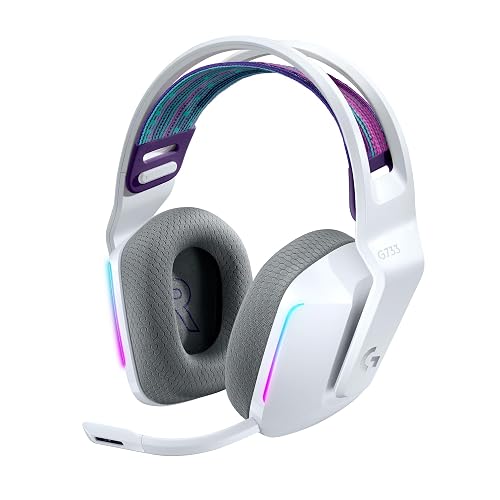
Suspension headband, LIGHTSYNC RGB, Blue VO!CE mic technology, PRO-G audio drivers Logitech G733 Lightspeed Wireless Gaming Headset – White
Best for: Wireless play with a white finish
This is the same wireless build as the black G733, aimed at players with white or light-toned setups who still want LIGHTSYNC RGB and PRO-G drivers.
Pros
- Same Lightspeed wireless performance as the black version
- PRO-G audio drivers and Blue VO!CE mic
Cons
- Light finishes tend to show dirt and wear sooner, according to owner feedback
Logitech G321 Lightspeed Wireless Bluetooth Gaming Headset with Mic – Black

Pc gaming headset, dynamic comfort and fit, 16 kHz boom mic, 20+ hrs battery, PC, PS4, PS5, nintendo switch, mobile Logitech G321 Lightspeed Wireless Bluetooth Gaming Headset with Mic – Black
Best for: Long sessions
A good match for players who game for hours at a time and want a lighter, more forgiving fit. The listed battery life of 20+ hours helps reduce mid-session charging.
Pros
- Listed battery life of 20+ hours
- 16 kHz boom mic with dynamic comfort design
Cons
- Bass response is less pronounced than in larger, premium models
Buying Guide
Wired vs. wireless connection
Wireless models remove cable tangles and give more room to move, but they require charging. Wired models never run out of power and often cost less to own over time.
Microphone quality and placement
A boom mic that sits 1 to 2 centimeters from the mouth typically captures clearer voice than a mic positioned far away. Check whether the mic is detachable or has a flip-to-mute function if you switch between chatting and silence often.
Comfort and clamping force
Suspension headbands distribute weight differently than fixed plastic bands. Look for padded ear cups with breathable fabric if you expect sessions longer than two hours. For more on this, see Gaming Headset Comfort for Long Sessions.
FAQ
Is a wireless Logitech gaming headset good enough for competitive play?
Wireless models like the G733 Lightspeed and G321 Lightspeed are designed for low-latency connections using the included USB receiver or Bluetooth, which suits most gaming. If you play at a very high level where every millisecond matters, a wired model such as the G432 is the more conservative choice. Either way, check the connection options against the platform you plan to use.
Which Logitech headset works with a PS5 or Nintendo Switch?
The G733 in both colors and the G432 are listed with support for multiple platforms, including PS5 and Switch, depending on the connection method. The G321 is a Bluetooth option that fits mobile and some console use. Confirm the exact compatibility on the product listing before you buy, since console support can differ by model and connection type.
Does the microphone on these headsets need to be boom-style to sound clear?
A boom microphone placed near the mouth generally picks up cleaner voice audio than a built-in or hidden mic, and most of the models here use boom designs. Positioning matters as much as the mic itself, so keep the boom a finger or two from the corner of your mouth. Mute options such as flip-to-mute are handy for quickly silencing yourself during a match.
How do I know if a Logitech headset will be comfortable for long sessions?
Look at the headband design, the clamping force, and the ear cup padding, since these determine how the headset feels after hours of wear. Suspension-style headbands distribute weight more evenly than rigid bands, and many people find that helpful for extended play. Because comfort is personal, trying a headset in person or checking a retailer’s return policy is a sensible safeguard.
Are the RGB and LIGHTSYNC features worth paying attention to?
LIGHTSYNC RGB is a visual feature found on the PRO X3, and it is mainly about appearance and matching a gaming setup. It does not change how the headset sounds or performs in game. If lighting is not important to you, you can prioritize battery life, connection type, and comfort instead.
Which should I choose if I mostly play on PC?
The G733 Lightspeed (in black or white) is a strong all-round option for PC players who want wireless freedom and a good microphone. If you prefer no charging and a simpler setup, the wired G432 is a practical alternative. Match the choice to how often you move around and how much you value battery life.
Conclusion
For most gamers who want wireless convenience across PC and consoles, the Logitech G733 Lightspeed in black is the most balanced choice, and the white version offers the same core experience in a different color. Players who want a simpler, no-charging setup should look at the wired G432, while those focused on mobile and Bluetooth use will find the G321 a good fit.
If you are gaming mainly on a PC with RGB styling in mind, the PRO X3 is worth a closer look. Compare battery life, connection options, and comfort against your own play habits before you decide.
Related reading
- Logitech Gaming Headset G430: Setup, Fit and Fixes That Matter (2026)
- Logitech G Gaming Headset: 5 Best Picks Compared for 2026
- 6 Best Logitech G733 Gaming Headset Options for Every Setup (2026)
- 6 Best Logitech Best Gaming Headset Picks for Every Gamer (2026)
- Wireless Headset vs Wired Gaming: Which Should You Choose? (2026)
- Wireless Gaming Headset PlayStation: 6 Factors to Check Before You Buy (2026)
- Wireless Gaming Headset Computer Setup: A Step-by-Step Guide (2026)
About Colin Foster
Colin Foster is part of our editorial team and reviews and edits our headphone comfort & accessories + gaming headsets guides, checking product details against manufacturer specifications and owner feedback.