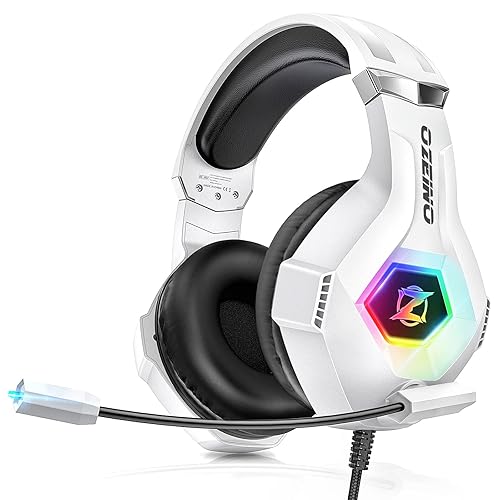
 By Colin Foster
Updated November 2026
The Razer BlackShark V2 X gaming headset is a wired, budget-minded option for players who want a comfortable, PC-friendly headset with 7.1 virtual surround and a detachable boom mic. It suits people gaming on a PC, PlayStation, Switch or similar device who mostly use a 3.5mm connection and do not need wireless freedom. It is a weaker fit for buyers who want Bluetooth, a long wireless battery life or a premium build with extensive software tuning. Read on for the specifications, the trade-offs and how it compares with two Razer alternatives.

Razer BlackShark V2 X Gaming Headset: 7.1 Surround Sound – 50mm Drivers – Memory Foam Cushion – For PC, PS4, PS5, Switch – 3.5mm Audio Jack – Black
Product Overview
The BlackShark V2 X is a closed-back, over-ear gaming headset built around 50mm drivers. Razer positions it as an entry point into its BlackShark line, sitting below the wireless and higher-tier models. Its main selling points are the 7.1 surround sound option, memory foam ear cushions and a wired 3.5mm connection that works with a wide range of consoles, controllers and computers. It is aimed at players who want a headset that is easy to set up rather than one that requires a dongle, app or charging routine.
Because it uses a standard 3.5mm jack, it can be plugged into a PC’s front or rear audio jack, a PlayStation controller, a Switch dock or a phone with an adapter. Owners frequently mention that this flexibility is the reason they chose it over a wireless model, especially when they switch between several devices in one room.
Key Features & Specifications
The table below lists the specifications the product name and manufacturer materials make clear. Items that vary by firmware or depend on the source device are described in general terms.
| Feature | What It Means |
|---|---|
| Driver size | 50mm dynamic drivers, a common size for full-range gaming audio |
| Surround sound | 7.1 virtual surround sound, activated through Razer software or supported platforms |
| Connection | Wired, 3.5mm audio jack |
| Ear cushions | Memory foam cushions, typically replaceable on Razer headsets of this design |
| Microphone | Detachable boom microphone |
| Compatibility | PC, PlayStation, Switch and other 3.5mm-compatible devices |
| Design | Closed-back, over-ear, black finish |
Check the manufacturer listing before buying if you need an exact cable length, impedance or frequency response figure, as these details can change between production runs.
Pros & Cons
Pros
- Wired 3.5mm connection works across PC, consoles and many other devices without a dongle or charging.
- Memory foam cushions are a comfort-focused choice for sessions that run for an hour or more.
- 50mm drivers give a full, balanced sound profile suited to footsteps, music and in-game audio.
- 7.1 virtual surround option is available for players who want directional cues.
- Detachable boom microphone lets you use the headset as ordinary headphones when you do not need voice chat.
- Generally straightforward setup, with no batteries to charge or pairing to manage.
Cons
- No wireless or Bluetooth option, so the cable limits movement away from your device.
- Virtual surround is only as good as the software and game support behind it, and results vary.
- Build materials are mostly plastic, which some buyers feel is less durable than premium metal-frame designs.
- Closed-back design keeps sound in but can feel warm during long sessions in hot rooms.
- Microphone quality is adequate for voice chat but not a studio-grade recording tool.
Performance Analysis
Performance for a headset like this comes down to three things: how the drivers reproduce game audio, how well the virtual surround works in practice and how the microphone handles your voice. Based on the 50mm driver size and the closed-back design, owners commonly describe the sound as punchy in the bass and clear in the midrange, which suits shooters, racing games and action titles where footsteps and gunfire need to cut through.
The 7.1 virtual surround feature is the most debated part of this class of headset. Owners who use it with games that have solid positional audio tend to report a noticeable sense of direction, while those playing titles without strong spatial mixing often leave it off. A practical test is to play a game with clear footstep cues in stereo first, then switch surround on and compare. If you hear little difference, a stereo setting will probably serve you equally well.
The detachable boom microphone is generally described as clear enough for team voice chat and party calls. It is not designed for streaming vocals or podcasting, where a dedicated USB microphone would be a better choice. Comfort is a strong point for the memory foam cushions, though clamping force and weight can differ between individuals, so a few hours of wear is the only real test of fit.
Who Should Buy This Product?
This headset makes the most sense for players who value simplicity and compatibility. If you move between a PC, a PlayStation and a Switch, a plug-in 3.5mm headset saves you from managing batteries, pairing and dongles. It is also a reasonable pick for students, families sharing a setup or anyone who wants a comfortable, budget-friendly headset for voice chat and general gaming.
You should skip it if you need wireless freedom, if you want a headset you can use from across a room or if you plan to record serious vocal content. Players who want a long-life battery and wireless range are better served by a wireless model, and streamers or podcasters should look at dedicated microphones or headsets built around a stronger mic.
Buying Guide
Before committing to any gaming headset, check the points below. They apply to the BlackShark V2 X and to its alternatives.
- Connection type. Decide whether you need wired simplicity or wireless freedom. Wired 3.5mm is the most compatible option. Wireless gives more movement but adds charging and pairing. Our Gaming Headset PC Gamer Guide: 7 Factors to Check Before You Buy (2026) walks through this trade-off in more detail.
- Fit and comfort. Check clamp force, headband padding and cushion material. Players who wear headsets for long periods should read our Gaming Headset Comfort for Long Sessions.
- Surround sound. Test whether virtual surround helps in the games you play most. Compare it with stereo before paying extra for a headset whose main pitch is spatial audio.
- Microphone. Confirm the mic is detachable or retractable if you want to use the headset as regular headphones, and check whether it suits your voice chat needs.
- Platform support. Make sure the headset works with every device you own, including any controller adapters you may need. Our Headphone Adapter Xbox One Controller: Connect Any Headset (Step-by-Step) covers the connection steps.
If you want to compare options, two alternatives from Razer’s own lineup are worth a look:
The Razer BlackShark V3 X HyperSpeed Wireless Gaming Headset adds wireless connectivity with three modes, a lighter 270g frame and a 70-hour battery rating. It suits players who want a wireless headset with a clear mic and a light build.

Razer70-Hour Battery, HyperClear Mic, 7.1 Surround Sound, TriForce Gen-2 Drivers, 3 Connectivity Modes, 270g Lightweight Design BlackShark V3 X HyperSpeed Wireless Gaming Headset for PC, Black
The Razer BlackShark V2 HyperSpeed Wireless PC Gaming Headset offers a 280g lightweight design, a wideband microphone, Bluetooth or USB connection and a 70-hour battery rating. It is a good fit for players who want wireless flexibility across PC, Mac, PlayStation, Switch and mobile.

Razer280g Lightweight, Wideband Mic, 50mm Drivers, Bluetooth or USB, 70 Hr Battery, for Mac, PlayStation, Switch & Mobile BlackShark V2 HyperSpeed Wireless PC Gaming Headset, 2.4GHz, Black
For a broader look at the category, see our What's a Good Gaming Headset? 7 Best Picks Compared for 2026 and our 7 Best Top Wireless Gaming Headset Picks Compared for 2026.
FAQ
Does the Razer BlackShark V2 X work with PlayStation and Switch?
Yes. The headset uses a standard 3.5mm jack, so it can connect to PlayStation controllers and Switch docks or handheld units that have a headphone port. Check that your controller or console has a compatible audio jack before buying.
Is the BlackShark V2 X wireless?
No. It is a wired headset. If you need Bluetooth or a 2.4GHz wireless connection, look at a wireless model from the same family.
Is 7.1 surround sound worth using?
It depends on the game. Titles with strong positional audio tend to benefit most. Compare surround with stereo in your favorite games and keep whichever gives you clearer cues.
Are the ear cushions replaceable?
Replacement cushions are a common feature on Razer headsets of this type, and owners often swap them to change comfort or sound isolation. Confirm availability for your exact model before purchase.
Can I use the microphone for streaming?
The boom mic works for voice chat and casual calls. For streaming, podcasting or music, a dedicated USB microphone will usually produce better results.
Is the headset comfortable for long sessions?
Owners often describe the memory foam cushions as comfortable for extended play, though fit depends on head shape and clamp force. Try it for several hours if you can, or check the return policy.
How does it compare with the wireless Razer models?
The wired BlackShark V2 X trades movement and battery life for simplicity and broad device compatibility. The wireless alternatives add freedom and longer battery runtime, which many players find worth the extra complexity.
Should I consult anyone before buying audio gear for hearing reasons?
If you have hearing concerns or tinnitus, consult an audiologist or hearing professional before setting high volume levels for long periods.
Final Verdict
The Razer BlackShark V2 X is a practical, wired gaming headset with 50mm drivers, memory foam cushions and a detachable boom mic. Its biggest strengths are compatibility and simplicity, and it makes sense for players who want a headset that works across several devices without charging or pairing. Its main limits are the lack of wireless freedom and a microphone aimed at chat rather than content creation. If those limits do not affect you, it is a sensible choice.
Check the current listing and read recent owner reviews before buying: View on Amazon
About Colin Foster
Colin Foster is part of our editorial team and reviews and edits our headphone comfort & accessories + gaming headsets guides, checking product details against manufacturer specifications and owner feedback.