By Claire Whitaker
Updated November 2026
A travel smart wireless headphone Bluetooth adapter lets you use your favorite wired or Bluetooth-free headphones with a seatback screen, hotel TV, gate audio system or laptop without carrying a stack of cables. In this guide you will learn what these adapters do, how to match one to your devices, how to set it up before a trip, and what to avoid so your audio stays clear and your battery lasts.
What a Travel Smart Wireless Headphone Bluetooth Adapter Actually Does
Most of the time, the problem is simple: your headphones either have no Bluetooth or your source device has a headphone jack that the source does not want to share. A travel adapter sits between the two. It receives audio from the source, either through a 3.5mm cable, a USB port or a Bluetooth link, and sends it to your headphones over a second Bluetooth link or a wired connection.
There are two basic designs. A transmitter plugs into a device that has a wired output (like an airplane armrest jack or a TV headphone port) and broadcasts Bluetooth to your headphones. A receiver does the opposite: it takes Bluetooth audio from your phone or laptop and outputs it to a wired jack. Some models do both and switch modes with a button.
Step 1: Identify Your Source and Your Headphones
Before you buy or pack anything, write down two things: the output on the device you will be listening to, and the input your headphones accept. Common combinations include:
- Airplane seatback jack (3.5mm or dual-jack) to Bluetooth headphones: needs a transmitter
- Hotel TV or gate-area audio jack to Bluetooth headphones: needs a transmitter
- Laptop or older desktop with no Bluetooth to wired headphones: needs a receiver, or a USB Bluetooth dongle
- Wired-only headphones and a phone with no headphone jack: needs a USB-C or Lightning audio output plus a receiver
Also check whether your headphones support multipoint or only single-device pairing. If they are single-device only, the adapter must be the device they pair with, and you cannot pair them to your phone at the same time.
Step 2: Choose the Right Type of Adapter
For travel, the most useful feature set is smaller than most product pages suggest. Focus on these factors:
- Mode support. A transmitter-only unit is fine for planes and hotel TVs. If you also want to use wired headphones with a laptop, look for a model that offers both transmit and receive modes.
- Codec support. SBC is the baseline. AAC helps with iPhones and many Apple headphones. aptX or aptX Low Latency matters if you watch video and notice lip-sync delay. Check the spec sheet before you assume.
- Battery life. Manufacturers usually list hours of playback per charge. Plan for less in real use, especially with noise-cancelling headphones that draw more power.
- Size and weight. A unit about the size of a key fob fits in a coat pocket. Larger units with built-in displays are harder to keep out of the way on a tray table.
- Charging method. USB-C charging is the most convenient on trips because one cable can serve multiple devices.
- Latency. If you only listen to podcasts or music, latency rarely matters. For movies, games or video calls, look for a low-latency mode or codec.
Step 3: Prepare Your Gear Before You Leave
A quick setup check at home saves a frustrating moment at the gate. Use this checklist:
- Fully charge the adapter and your headphones
- Pair the adapter with your headphones and confirm it reconnects after power-off
- Test the wired connection with a short cable to the source you plan to use
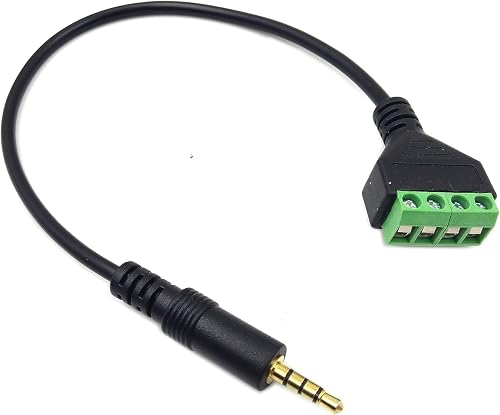
- Pack the correct cable: 3.5mm to 3.5mm, USB-C to 3.5mm, or a dual-jack splitter if the source has two outputs
- Bring the charging cable and a small power bank for long travel days
- Save the adapter’s manual or quick-start guide offline on your phone
Setting Up on a Plane
Most airplane seatback jacks are 3.5mm. Plug the transmitter into the jack, power it on, and put your headphones into pairing mode. Wait for the connection indicator. Then go to the in-flight entertainment menu and confirm the audio output is set to the wired jack, not the screen speakers. Some systems require you to select “headphones” or “audio out” before the signal starts flowing.
Setting Up at a Hotel or Gate
Hotel TVs and gate displays vary. Many have a 3.5mm or optical output. If you see only an optical (TOSLINK) port, you will need a different adapter type. Check the port before you pack the adapter that matches it.
Step 4: Test Audio Quality and Sync
Play a short video clip with clear dialogue. Watch the speaker’s lips. If the audio trails the image by a noticeable fraction of a second, check whether your adapter has a low-latency mode or whether your headphones support a faster codec. For music and audiobooks, a small delay is usually unnoticeable.
Also check volume balance. Some travel setups output quiet audio, so the TV or seatback volume may need to go higher than normal. Start low to protect your hearing, then raise it slowly.
Common Mistakes to Avoid
- Assuming Bluetooth will work everywhere. Many older in-flight systems and hotel TVs only offer wired outputs.
- Forgetting to charge. Two devices mean two batteries. Charge both the night before.
- Pairing once and never testing. Test the full setup at home, not at the gate.
- Mixing up transmit and receive mode. Check the indicator light or app before you blame the device.
- Ignoring the volume ceiling. Some sources cap output. Check the source volume before you change the adapter.
- Letting the cable pull. Plugging a heavy adapter into a seatback jack can loosen the connection. Use a short extension or a stabilizing sleeve.
Tips for Better Travel Audio
- Carry a short 3.5mm extension if your adapter sits awkwardly in a jack.
- Keep a small microfiber cloth in the case to wipe jack contacts.
- Turn off Wi-Fi on the source phone if you only need Bluetooth audio, which can reduce interference.
- Store the adapter in a padded pouch so the jack pins do not bend in your bag.
- If you use noise-cancelling headphones, enable the transparency mode for announcements.
Recommended gear
These items help most with a travel setup built around a wireless adapter. Choose based on your source and headphone types.
- Anker Soundcore Stereo Bluetooth Transmitter is a common choice for pairing wireless headphones to airplane and TV audio jacks, with a compact body that fits in a pocket. View on Amazon
- Avantree DG80 is a widely used dual-mode transmitter and receiver that works with TVs, laptops and in-flight jacks. View on Amazon
- Belkin 3.5mm audio extension cable gives the adapter some slack so it does not strain the seatback port. View on Amazon
- Anker USB-C to 3.5mm audio adapter lets you connect a wired headset to a USB-C phone or laptop when Bluetooth is not an option. View on Amazon
For more on specific device pairings, see 6 Best Wireless Bluetooth Headphone Adapter Picks for Every Need (2026) and Is There a Bluetooth Adapter for Headphone Jack? Yes, Here's How. If your adapter is not connecting on a particular device, Why Is My Headphone Adapter Not Working? A Step-by-Step Fix Guide covers the most common causes. For a dual-jack setup on a plane, 6 Best Bluetooth 3.5mm Headphone Adapters for Airplanes, Cars and Home (2026) lists options by use case.
FAQ
Can I use a travel Bluetooth adapter on any airplane?
Most airlines with seatback entertainment offer a 3.5mm or dual-jack output, so a transmitter usually works. Some older or regional aircraft may not have an accessible audio jack. Check with the airline if you are unsure, and bring a wired backup.
Does a Bluetooth adapter add noticeable delay?
Standard SBC codecs can add a delay that shows up in video. Adapters with aptX Low Latency or a dedicated low-latency mode reduce this. For audio-only listening, delay is rarely a problem.
Can I connect two sets of headphones to one adapter?
Some transmitters support two simultaneous headphone connections, which is useful for couples on a flight. Check the spec sheet for dual-link support before you buy.
Will the adapter drain my headphone battery faster?
Your headphones use Bluetooth either way, so the drain is similar to normal use. The adapter itself has its own battery, so charge it before the trip.
Do I need the adapter if my phone has Bluetooth?
No. If your phone can pair with your headphones directly and the source you want to use is your phone, you do not need a separate adapter. The adapter is for sources that have only a wired output.
Can I use a travel adapter with a gaming console on the go?
Some transmitters work with consoles that have a 3.5mm controller or audio jack. Latency may be higher than with a wired headset, so test before a competitive session.
What should I do if the audio cuts out?
Move the adapter away from other wireless devices, check the battery level, and re-pair if needed. Reseating the wired connection often fixes intermittent dropouts.
Conclusion
A travel smart wireless headphone Bluetooth adapter solves the mismatch between your headphones and the audio outputs you find on planes, in hotels and at gates. Match the adapter’s mode and codec to your sources, charge and test everything before you leave, and keep a short cable and a charger in your bag. With a little preparation, you can enjoy clean audio anywhere the jack is available. If you have a specific device in mind, a quick check of the spec sheet will confirm whether it fits your setup.
Related reading
Ready to choose one?
About Claire Whitaker
Claire Whitaker is part of our editorial team and reviews and edits our headphone comfort & accessories + gaming headsets guides, checking product details against manufacturer specifications and owner feedback.