By Charlotte Harlow
As an Amazon Associate I earn from qualifying purchases. This page may contain affiliate links.
A usb adapter to headphone jack lets you plug a standard 3.5 mm headphone into a computer, console or newer phone that has only USB ports or no audio jack at all. The right adapter depends on your device, the jack type it outputs and whether you need a microphone channel for calls or gaming. This list focuses on adapters that are widely sold, clearly specified and suited to common headphone setups. Selection was based on published specifications, brand reputation and patterns that owners commonly report, including connector quality, compatibility notes and how well each model handles a headset microphone. We did not test these adapters in a lab, so treat the notes below as a guide to what each product is designed for.
Our Top Picks
Quick Comparison
| Product | Best for | Key feature |
|---|---|---|
| AUX to USB Adapter, 3.5mm Male Audio Jack to USB 2.0 Female Converter Cable | Car AUX-in systems with a USB input | Built for car stereo use only |
| JXMOX USB-A to 3.5mm TRRS Sound Card Adapter, 2-Pack | Desktop and laptop headsets with a mic | TRRS 4-pole support with two-pack value |
| Apple USB-C to 3.5 mm Headphone Jack Adapter (1 USB Port listing) | Travel listening on Mac and iPad | Compact USB-C connection for music and podcasts |
| USB C to Headphone Jack Adapter for iPhone and Galaxy (2 Pack) | Phones without a 3.5 mm port | Two-pack for multiple devices |
| SAMSUNG EE-UC10JUWEGUS USB-C to 3.5mm Headphone Jack Adapter | Samsung Note10 owners | Model-specific Samsung design |
| Apple USB-C to 3.5 mm Headphone Jack Adapter | iPhone and iPad users wanting a first-party option | Apple-branded connector |
AUX to USB Adapter, 3.5mm Male Audio Jack to USB 2.0 Female Converter Cable

AUX to USB Adapter, 3.5mm Male Audio Jack to USB 2.0 Female Converter Cable, Only Work for Car AUX-in with MP3 Decoder, Not for Headset, Speakers, Phone,Computers, Camera,Microphone, Monitor
This adapter is aimed at drivers who want to connect a phone or player’s headphone output to a car’s USB audio input. The listing states it is for car AUX-in use with an MP3 decoder and not for headsets, speakers, phones or computers, so it is a poor fit for desk or gaming use.
Key specs
- 3.5 mm male audio jack to USB 2.0 female converter
- Intended for car AUX-in with MP3 decoder
Pros
- Simple, single-purpose design for car stereos
- Uses a common 3.5 mm plug on one end
- Clearly labeled use case reduces guesswork
Cons
- Not intended for headphones or headsets, despite the search intent
- Does not support microphone input
JXMOX USB-A to 3.5mm TRRS 4-Pole Female Adapter

USB-A to 3.5mm TRRS 4-Pole Female Adapter | External Stereo Sound Card for Headphone, Mac, PS4, PS5, PC, Laptop, Desktop JXMOX USB to 3.5mm Jack Audio Adapter, TRRS 4-Pole Sound Card, 2-Pack
This is a USB sound card adapter with a TRRS 4-pole jack, which is the connector type used by most headsets that combine headphone and microphone on one plug. It suits PC, laptop, PS4 and PS5 users who need a headset mic to work alongside audio output.
Key specs
- USB-A input to 3.5 mm TRRS 4-pole female output
- Sold as a two-pack
Pros
- TRRS design supports headset microphones
- Works across several platforms listed in the title
- Two-pack suits multiple machines or a spare
Cons
- Driver behavior can vary by operating system, so check compatibility
- Not a dedicated amplifier, so it will not drive high-impedance headphones
Apple USB-C to 3.5 mm Headphone Jack Adapter (USB Port Listing)

1 USB Port, Music, Podcasts, Travel Apple USB-C to 3.5 mm Headphone Jack Adapter
This USB-C adapter is aimed at people who carry a Mac or iPad and want to plug in wired headphones while traveling, listening to music or following podcasts. It is a compact option for desk and travel setups where the device only has USB-C.
Key specs
- USB-C to 3.5 mm headphone jack
- Compact form factor for travel
Pros
- Compact and easy to keep in a bag
- Straightforward connection for listening use
- Apple-designed connector fits Apple devices
Cons
- Listing does not clearly confirm microphone support, so check before buying for calls
- A single adapter can be lost easily, so consider a spare
USB C To Headphone Jack Adapter For iPhone and Galaxy (2 Pack)
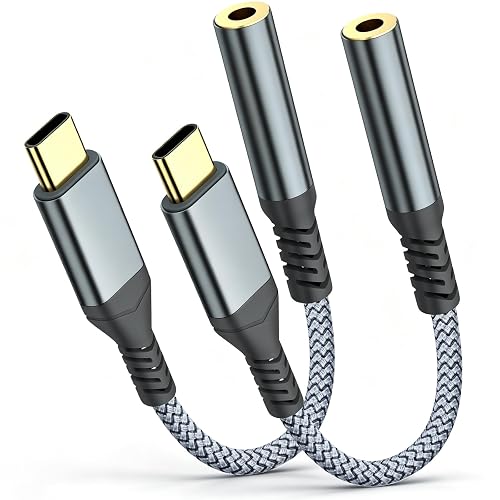
USB C To Headphone Jack Adapter For iphone 17 Pro Max/17 Pro, 16/15 Pro Max, 16/15 Pro, Galaxy S24/S23/S22 Ultra USB C to 3.5mm Audio Headphone Adapte (2 Pack)
This two-pack targets people who use iPhone and Galaxy phones that lack a 3.5 mm port and want one adapter for home, a bag and a car or desk. The two-pack format suits households with more than one phone or a spare for daily carry.
Key specs
- USB-C to 3.5 mm audio adapter
- Sold as a 2-pack
Pros
- Two-pack gives you a spare
- Works with a range of recent phones listed in the title
- USB-C connection fits most modern devices
Cons
- Phone-focused design, not tuned for desktop audio interfaces
- Compatibility is listed by model, so confirm your exact phone before buying
SAMSUNG EE-UC10JUWEGUS USB-C to 3.5mm Headphone Jack Adapter

SAMSUNG EE-UC10JUWEGUS USB-C to 3.5mm Headphone Jack Adapter for Note10 and Note10+ (US Version with Warranty)
This adapter is made for Samsung Galaxy Note10 and Note10+ users who want a manufacturer-branded connector with warranty coverage. It is a good match for owners of those specific phones who need a reliable replacement or a second adapter.
Key specs
- USB-C to 3.5 mm headphone jack
- Samsung part number EE-UC10JUWEGUS
Pros
- Brand-made connector designed for the listed phones
- Warranty listed in the title
- Simple plug-and-play use
Cons
- Model-specific focus limits use with other devices
- Older model listing, so confirm availability and fit
Apple USB-C to 3.5 mm Headphone Jack Adapter

Apple USB-C to 3.5 mm Headphone Jack Adapter
This is Apple’s own USB-C to 3.5 mm adapter, aimed at iPhone, iPad and Mac owners who want a first-party connector for wired headphones. It suits anyone who wants a familiar option from the same brand as their device.
Key specs
- USB-C to 3.5 mm headphone jack
- Apple-branded accessory
Pros
- First-party Apple design for Apple devices
- Simple connection for listening
- Widely recognized, easy to replace
Cons
- Typically sold as a single unit, so buy a spare if you need one at multiple locations
- Microphone support depends on your headset, so check before buying for calls
Buying Guide
Choosing a usb adapter to headphone jack comes down to matching the adapter’s output to your headphone plug and the input on your device. Start by identifying which port you have, then check whether your headset uses a two-ring TRS plug or a three-ring TRRS plug with a microphone.
Selection Criteria
- Port type: USB-A, USB-C or the older USB 2.0 connector used in car systems
- Jack type: TRS for stereo output only, TRRS for headsets with a microphone
- Intended use: desktop, phone, car, travel or gaming
- Build quality: strain relief and solid connector housings
Important Features
Look for a clearly labeled jack type, a stated device compatibility list and a cable or housing that resists bending at the connector. Adapters that specify microphone support are the right choice for voice chat, calls and gaming headsets.
Specs to Check
- Connector type on each end (USB-A, USB-C, 3.5 mm TRS or TRRS)
- Whether the listing states microphone support
- Stated device or operating system compatibility
- Cable length if the adapter is part of a cable run
Choosing by Need
- Gaming or calls on a PC: pick a TRRS-capable adapter that lists microphone support.
- Phone without a headphone port: choose a USB-C adapter matched to your phone model.
- Car stereo: use an adapter designed for car AUX-in, and confirm the head unit’s input type.
- Travel listening: a compact USB-C adapter is easy to carry and store.
Things to Watch Out For
Adapters do not add amplification. If your headphones have high impedance or sound weak, a dedicated headphone amp or USB DAC may help more than a simple adapter. Read the device list carefully, since many adapters are model-specific. If you are unsure how your headphones or ear pads fit during long sessions, see Headphone Comfort Guide: Fit, Pads, Clamp, Heat, Glasses for practical tips. For a deeper look at the difference between adapters and amplification, Headphone DAC vs Amp (2026): Which Is Better for Your Setup? explains the trade-offs. Headphone Adapters Explained: 3.5 mm, 6.3 mm and USB-C covers the connector standards in more detail.
When you need to route a USB audio signal through a dedicated device, a portable option may be more useful. Top 10 Portable USB DAC Headphone Amps for Travel and Desk Use lists alternatives, and Portable USB DAC Amp Guide: How to Choose the Right One (7 Steps) walks through selection step by step. Keep your cables in good shape too, as described in Headphone Cable Care: Preventing Damage and Crackle.
FAQ
Does a usb adapter to headphone jack support a microphone?
Only if the adapter is TRRS-compatible and your headset uses a TRRS plug. A standard TRS adapter carries stereo output only. Check the listing for microphone support before buying for calls or gaming.
What is the difference between TRS and TRRS?
TRS has two rings and carries stereo audio. TRRS has three rings and adds a microphone channel, which is common on headsets. Matching the jack type to your headset is the most important compatibility check.
Will a usb adapter make my headphones louder?
Not usually. A simple adapter passes the signal through without amplification. Low volume with high-impedance headphones usually calls for an amp or a USB DAC with built-in amplification.
Can I use a car AUX USB adapter for headphones?
Adapters designed for car AUX-in are generally intended only for car stereo systems. Using one for headphones or headsets may not work, so choose an adapter matched to your device.
Do I need a USB-C or USB-A adapter?
Match the adapter to the port on your device. Newer phones, iPads and many laptops use USB-C, while many desktops and older laptops use USB-A. Adapters are not interchangeable across port types without a converter.
Is an Apple adapter better than a third-party one?
Apple’s adapter is designed for Apple devices and is easy to find as a replacement. Third-party options may offer two-packs or TRRS support at lower cost, so the better choice depends on your device and whether you need a microphone.
Should I consult a professional about audio setups?
For routine headphone adapters, no specialist help is usually required. If you have hearing concerns or experience pain or ringing, consult a hearing professional. For complex audio routing in a studio, an audio technician can help.
Conclusion
A usb adapter to headphone jack is a simple fix, but the right model depends on your port, your headset and whether you need a microphone. For PC and console headsets that need voice chat, a TRRS sound card adapter such as the JXMOX model is a logical pick. For phones with only USB-C, the Apple USB-C adapter or the two-pack USB-C option covers most daily use. Samsung Note10 owners should consider the model-specific Samsung adapter, while the car-focused AUX cable suits vehicle systems only. Match the connector, confirm compatibility and plan for a spare if you rely on wired headphones every day.

About Charlotte Harlow
Charlotte covers headphone comfort & accessories + gaming headsets, comparing specs, features and long-term owner feedback to help readers choose with confidence.