 By Colin Foster
Updated November 2026
A usb hub headphone stand gives your headset a place to rest while adding charging ports to your desk, so cables stop snaking across the table. This list focuses on stands with real USB-A or USB-C ports, sturdy bases that resist tipping, and headset cradles that fit most over-ear and gaming designs. Selection is based on product listings, brand reputation and common owner feedback patterns.
Our top picks at a glance
- 1
 TOP CHOICEBest overallNew Bee Headphone Stand with RGB Lighting, Sturdy Aluminum Gaming Headset HolderView on Amazon
- 2
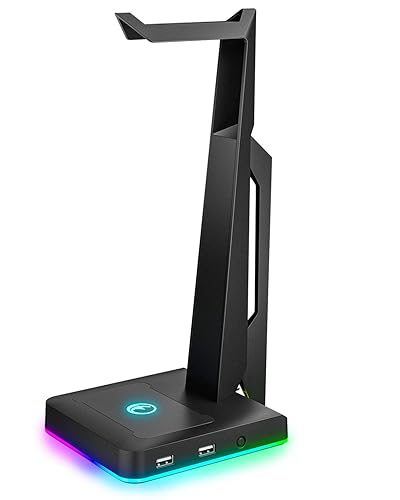 TOP CHOICEBest for multiple headsetsRGB Gaming Headset Stand with 2 USB Ports, Game Headphone Mount for PCView on Amazon
- 3
 TOP CHOICEBest for fast phone chargingNew Bee RGB Headphone Stand with 2 USB-C & 1 USB Charging PortsView on Amazon
- 4
 Best dual-stand layoutKAFRI RGB Dual Headphone Stand with USB C ChargerView on Amazon
- 5
 Best for desk organizationKDD Headphone Stand with USB A&C Charger Ports, RGB ControllerView on Amazon
- 6
 Best for wireless chargingHeadphone Stand with 15w Wireless Charger, Suguder 4 in 1 Charging StaView on Amazon
- 7
 Best budget-style display piecePCB Pattern Acrylic Headset Stand with 1 USB and 1 Type-C Charging PorView on Amazon
Our Top Picks
| Product | Best for | Key feature |
|---|---|---|
| New Bee Headphone Stand with RGB Lighting | Overall desk setups | Aluminum build, USB-C and USB ports |
| RGB Gaming Headset Stand with 2 USB Ports | Multiple headsets | Two USB ports, hanger design |
| New Bee RGB Headphone Stand with 2 USB-C Ports | Fast phone charging | Two USB-C plus one USB |
| KAFRI RGB Dual Headphone Stand | Two-headset desks | Dual hangers, USB-C charger |
| KDD Headphone Stand with USB A&C Ports | Desk organization | Drawer storage base |
| Suguder Headphone Stand with 15W Wireless Charger | Wireless charging | 15W pad plus headset holder |
| PCB Pattern Acrylic Headset Stand | Display and gifting | Acrylic build, light-up base |
New Bee Headphone Stand with RGB Lighting, Sturdy Aluminum Gaming Headset Holder
New Bee Headphone Stand with RGB Lighting, Sturdy Aluminum Gaming Headset Holder with USB-C & USB Charging Ports, Stable Desktop Earphone Stand for All Headphones Size, Black 5 Best USB Type C to Headphone Adapters for Phones and Laptops (2026) goes further into this.
Best for: Overall desk setups that need a solid base and charging ports.
Suited to gamers who want a heavy aluminum stand that holds larger headsets steady while keeping phones charged nearby.
Pros
- Aluminum base resists tipping under heavier headsets.
- Includes both USB-C and USB charging ports.
Cons
- RGB lighting may be more than some desks need.
RGB Gaming Headset Stand with 2 USB Ports, Game Headphone Mount for PC
RGB Gaming Headset Stand with 2 USB Ports, Game Headphone Mount for PC, Xbox One, PS4, Switch, Earphone Holder Hanger, Great for Gaming Stations, Fancy Desk Gamer Accessories, Black
Best for: Multiple headsets across a gaming station.
A good fit for households where more than one person uses headsets on the same desk and wants shared charging ports.
Pros
- Two USB ports offer simple shared charging.
- Hanger design works with a range of headset styles.
Cons
- Lighting controls may take a moment to learn.
New Bee RGB Headphone Stand with 2 USB-C & 1 USB Charging Ports
New Bee RGB Headphone Stand with 2 USB-C & 1 USB Charging Ports, Desk Gaming Headset Holder with 7 Light Modes and Non-Slip Rubber Base Suitable for All Earphone Accessories
Best for: Fast phone charging at the desk.
Ideal for users who keep a phone or tablet on the desk and want USB-C charging without a separate wall brick.
Pros
- Two USB-C ports suit newer phones and cables.
- Non-slip rubber base helps it stay put.
Cons
- Port output depends on the power source plugged in.
KAFRI RGB Dual Headphone Stand with USB C Charger
KAFRI RGB Dual Headphone Stand with USB C Charger Desk Gaming Double Headset Holder Hanger Rack with 3 USB Charging Port and 2 Outlet – Suitable for Gamer Desktop Table Game Earphone Accessories Gift
Best for: Two-headset desks with a compact footprint.
Works for players who swap between two headsets or keep a spare pair within reach.
Pros
- Dual hangers keep two headsets off the desk surface.
- Includes USB-C and additional charging ports.
Cons
- Two hangers can crowd a small desk.
KDD Headphone Stand with USB A&C Charger Ports, RGB Controller
KDD Headphone Stand with USB A&C Charger Ports – RGB Controller Stand with Detachable Hooks – Rotatable Headset Hanger & Device Slot for Phones/Tablets – Drawer Storage Base for Gaming Desk Organizer
Best for: Desk organization and storage.
Suits people who want headset storage, device slots and a drawer in one base to clear clutter.
Pros
- Drawer storage base keeps small items out of sight.
- Detachable hooks adjust to different headset sizes.
Cons
- The larger base takes up more desk space.
Buying Guide
Port Types and Charging Speed
Check whether the stand offers USB-A, USB-C, or both, and whether any port is marked for fast charging. USB-C ports generally suit newer phones and tablets, while USB-A ports work well for older accessories and wired devices. If you plan to charge a phone regularly, look for a dedicated charging port rather than a data-only connection.
Base Stability and Weight
A heavy headset hanging from a light base can tip over, especially on a desk with cables running through it. Look for a weighted or metal base, and check whether the bottom has rubber or non-slip pads to keep it planted. Aluminum and acrylic bases tend to feel more solid than thin plastic.
Headset Cradle Fit
Not every stand fits every headset. Over-ear gaming headsets with wide headbands need a broader hook or cradle, while in-ear and smaller designs can use a simpler hanger. Consider the width of your headband and whether you want to hang one headset or several.
Lighting and Desk Style
RGB lighting can add a bold look to a gaming setup, and many stands offer multiple light modes. If you prefer a quieter desk, choose a stand without lights or one where the lighting can be switched off. Matching the finish and color of the stand to your other gear helps keep the setup tidy.
Extra Features and Storage
Some stands include wireless charging pads, drawer storage, or slots for phones and tablets. These extras are useful if you want to consolidate your desk accessories, but they also add size and cost. Decide whether you need extra storage or whether a simple stand with ports is enough for your space.
FAQ
Can a USB hub headphone stand charge my phone?
Many models include USB-A or USB-C charging ports that can charge phones, tablets, and other small devices. Charging speed depends on the port output and the cable you use. Check the listing for the charging specifications before you buy if fast charging matters to you.
Will a headphone stand fit all types of headsets?
Most stands are designed for common over-ear and gaming headsets, but very large or unusually shaped headsets may not sit securely. Measure the width of your headband and compare it with the hook or cradle size. Stands with adjustable or detachable hooks tend to handle a wider range of designs.
Do I need a stand with RGB lighting?
RGB lighting is optional and mainly a style choice. If you enjoy a colorful gaming setup, a lit stand can be a fun addition. If you want a more subdued desk, pick a model without lights or one where the lighting can be turned off.
Does the stand’s base matter for stability?
Yes, the base is important, especially if you hang heavier headsets or keep cables plugged into the stand. A heavier base with non-slip pads helps prevent tipping and sliding. Avoid very lightweight stands if you use the ports often.
Can I use a headphone stand with consoles like PS4 or Xbox?
Some stands are marketed for use with consoles, PCs, and Switch systems because the headset itself is the main thing being held. The stand’s USB ports are typically for charging rather than connecting game consoles. Check the product description to confirm what the ports support.
Conclusion
If you want a balanced stand with lighting and dependable charging for everyday use, the New Bee options are a strong starting point. Buyers who juggle several headsets or want more ports should look at the multi-hook and dual-headset models, while those who charge phones often will benefit most from a stand with USB-C ports.
For a tidy desk with storage or wireless charging, the more feature-rich stands fit better, and simpler, more affordable models are a good match for those who only need a place to hang a headset and a couple of ports.
Related reading
- 7 Best Headphone Stands with USB Picks for Every Desk (2026)
- Headphone Accessories: Cables, Cases, Stands, Tips
- Wooden Headphone Stand Template: A Step-by-Step Guide for Beginners
- Wood Headphone Stand Diy: A Step-by-Step Build Guide for Beginners
- Wall Mounted Headphone Stand: A Step-by-Step Install Guide for Beginners
- Wall Mount Headphone Stand: A Step-by-Step Install Guide for Clean Desks
- Top 7 Glass Skull Headphone Stands with Gothic Style
- One Piece Headphone Stand: How to Choose and Set One Up (2026)
About Colin Foster
Colin Foster is part of our editorial team and reviews and edits our headphone comfort & accessories + gaming headsets guides, checking product details against manufacturer specifications and owner feedback.


