By Claire Whitaker
Updated November 2026
If your desktop or laptop has no built-in Bluetooth, a bluetooth headphone adapter for pc is the simplest way to connect wireless headphones, speakers, and accessories. Most of these dongles plug into a free USB port and install in a few minutes. The main things that separate them are the Bluetooth version, the effective range, Windows compatibility, and whether the adapter supports both classic Bluetooth (EDR) and Bluetooth Low Energy (BLE). This guide compares six USB dongles from well-known brands, explains what to check before you buy, and answers the questions owners ask most often.
Our top picks at a glance
- 1
 TOP CHOICEBest overallUGREEN USB Bluetooth 5.3 Adapter for PC Bluetooth Dongle ReceiverView on Amazon
- 2
 TOP CHOICEBest for long rangeUSB Bluetooth 6.0 Adapter for Desktop PC with 5dBi AntennaView on Amazon
- 3
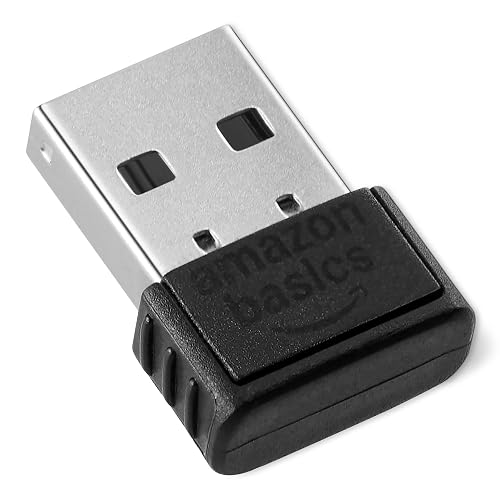 TOP CHOICEBest budget pickAmazon Basics Bluetooth 5.4 USB Adapter Dongle for PCView on Amazon
- 4
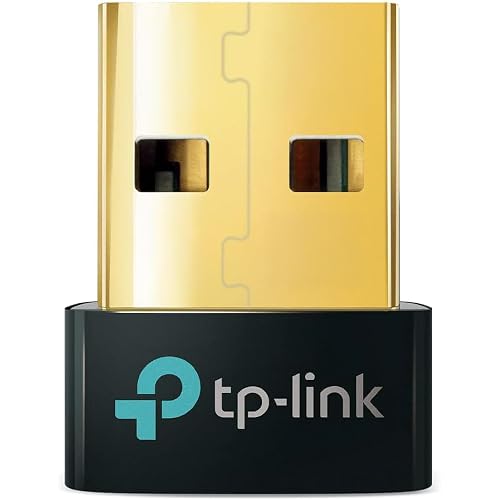 Best for audio-focused setupsTP-Link USB Bluetooth Adapter for PC (UB500)View on Amazon
- 5
 Best for newer Bluetooth featuresUGREEN USB Bluetooth 6.0 Adapter for PC Bluetooth Dongle ReceiverView on Amazon
- 6
 Best for mixed peripheralsClass 1 USB Bluetooth 5.4 Adapter for Desktop PCView on Amazon
Our Top Picks
Quick Comparison
| Product | Best for | Key feature |
|---|---|---|
| UGREEN USB Bluetooth 5.3 Adapter for PC | Most desktop and laptop users | Bluetooth 5.3 with EDR and BLE support |
| TP-Link USB Bluetooth Adapter for PC (UB500) | Headphone and speaker audio | Bluetooth 5.4 in a compact nano design |
| USB Bluetooth 6.0 Adapter for Desktop PC | Larger rooms and desk-to-chair distance | 600 ft advertised range with 5dBi antenna |
| Amazon Basics Bluetooth 5.4 USB Adapter | Budget-minded buyers | Simple plug-and-play setup |
| UGREEN USB Bluetooth 6.0 Adapter for PC | Users wanting the latest Bluetooth version | Bluetooth 6.0 with EDR and BLE |
| Class 1 USB Bluetooth 5.4 Adapter for Desktop PC | Mixed setups with mice, keyboards, and printers | Class 1 transmitter rated for about 500 ft |
UGREEN USB Bluetooth 5.3 Adapter for PC Bluetooth Dongle Receiver
Plug & Play, For Windows 11/10/8.1 Only, Desktop, Laptop, Works with Mice, Keyboards, Headphones, Speakers, Printer UGREEN USB Bluetooth 5.3 Adapter for PC Bluetooth Dongle Receiver EDR & BLE
Best for: Most desktop and laptop users who want a dependable, general-purpose dongle.
This is a good starting point for someone who mainly wants to connect headphones and a keyboard or mouse to a Windows PC. It is listed for Windows 11, 10, and 8.1, which covers most current setups.
Key specs
- Bluetooth 5.3
- Supports EDR and BLE
- USB plug-and-play, Windows 11, 10, and 8.1
Pros
- Works with headphones, speakers, mice, keyboards, and printers
- No driver hunting on supported Windows versions
- Compact enough to leave plugged in
Cons
- Not listed for Windows 7, so older systems are out
- Range depends heavily on walls and interference
Bottom line: A safe, all-round choice for someone who wants one adapter that handles audio and peripherals without fuss.
TP-Link USB Bluetooth Adapter for PC (UB500)
Plug and Play, Nano Design, EDR & BLE, Supports Windows 11/10/8.1/7 for Desktop, Laptop, Keyboard, Mouse, etc (UB500) TP-Link USB Bluetooth Adapter for PC – Bluetooth 5.4 USB Dongle Receiver
Best for: Headphone and speaker audio on a desktop where a small footprint matters.
The nano form factor makes this a good fit for laptops and tight desk setups where a bulky dongle would block a neighboring port.
Key specs
- Bluetooth 5.4
- Supports EDR and BLE
- Nano design, Windows 11, 10, 8.1, and 7
Pros
- Lists Windows 7 support, unlike several newer dongles
- Very low profile, easy to leave in a port
- Works across desktops and laptops
Cons
- Small size means no external antenna for extra range
- Owners sometimes report needing to re-pair after sleep
Bottom line: Best for people who want a discreet adapter for everyday headphone use, especially on older Windows machines.
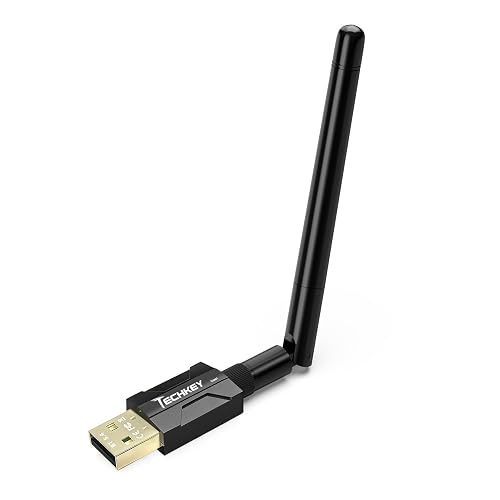
USB Bluetooth 6.0 Adapter for Desktop PC with 5dBi Antenna
USB Bluetooth 6.0 Adapter for Desktop PC: Plug & Play 600FT Long Range Wireless Dongle with 5dBi Antenna for Laptop Windows 11/10/8.1, Pair BT Headphones/Headset/Speaker/Mouse/Keyboard/Print Servers
Best for: Larger rooms and setups where the headphones are far from the computer.
The external antenna is the main reason to consider this model. It suits desktops tucked under a desk or behind a monitor, where a small nano dongle often struggles.
Key specs
- Bluetooth 6.0
- Advertised 600 ft range
- 5dBi external antenna, Windows 11, 10, and 8.1
Pros
- External antenna helps with signal placement
- Supports headphones, speakers, mice, keyboards, and print servers
- Good choice for desktops with poor Bluetooth reception
Cons
- Larger body and antenna take up more space
- Advertised range is a best-case figure; real-world range is shorter
Bottom line: The right pick if you need range more than compactness, particularly for a desktop tower in a corner or under a desk.
Amazon Basics Bluetooth 5.4 USB Adapter Dongle for PC
Amazon Basics Bluetooth 5.4 USB Adapter Dongle for PC, USB Receiver for Bluetooth Mouse, Keyboard, Laptop, Works with Windows 11/10/8.1
Best for: Budget-minded buyers who want a straightforward adapter from a major brand.
This suits someone who needs basic headphone connectivity and has no interest in advanced features. It is a sensible pick for light daily use.
Key specs
- Bluetooth 5.4
- USB receiver for mice, keyboards, laptops, and headphones
- Works with Windows 11, 10, and 8.1
Pros
- Simple setup with no extra software to manage
- Covers the common peripheral types
- Good value for an entry-level dongle
Cons
- Few advanced options or range-enhancing features
- Limited documentation on advanced audio tuning
Bottom line: A practical, no-frills choice for people who just want headphones to work.
UGREEN USB Bluetooth 6.0 Adapter for PC Bluetooth Dongle Receiver
EDR & BLE, Plug & Play for Windows 11/10/8.1, for Headphone/Keyboard/Mouse/Speakers/Printer UGREEN USB Bluetooth 6.0 Adapter for PC Bluetooth Dongle Receiver
Best for: Users who want the newest Bluetooth version on a Windows PC.
Bluetooth 6.0 is the most recent standard in this lineup. The benefits show most clearly when paired with compatible headphones and peripherals that also support newer versions.
Key specs
- Bluetooth 6.0
- Supports EDR and BLE
- Plug-and-play on Windows 11, 10, and 8.1
Pros
- Newest Bluetooth version in the list
- Works with headphones, speakers, keyboards, mice, and printers
- Same easy setup as the 5.3 model from the same brand
Cons
- Older headphones will not gain new features from a newer version
- Not listed for Windows 7
Bottom line: A good match for buyers planning to pair the adapter with newer Bluetooth devices over the next few years.
Class 1 USB Bluetooth 5.4 Adapter for Desktop PC
Class 1 Wireless EDR Transfer Transmitter Receiver 500FT for BT Mouse/Keyboard/Headphones/Print Severs Support Win11/10 Long Range USB Bluetooth 5.4 Adapter for Desktop PC Plug&Play Mini Dongle
Best for: Mixed setups with several Bluetooth peripherals connected to one computer.
The Class 1 rating indicates a higher-power transmitter design, which is intended to extend range. It is aimed at users who connect a combination of headphones, mice, keyboards, and printers.
Key specs
- Bluetooth 5.4
- Class 1 transmitter, listed range about 500 ft
- Supports Windows 11 and 10
Pros
- Designed for longer range than standard Class 2 dongles
- Covers headphones, mice, keyboards, and printers
- Mini form factor fits most ports
Cons
- Listed support is for Windows 11 and 10 only
- Advertised range is an ideal-conditions figure
Bottom line: Suited to people with several wireless peripherals who want extra range and a compact body.
Buying Guide
Bluetooth version and profile support
Look for the Bluetooth version and whether the adapter supports both EDR (classic Bluetooth, used by most headphones and audio) and BLE (Bluetooth Low Energy, used by many mice, keyboards, and sensors). Newer versions generally offer better efficiency and compatibility, but older headphones will not gain features from a newer dongle. A 5.x adapter works well with most current devices.
Good picks for this: UGREEN USB Bluetooth 5.3 Adapter for PC, UGREEN USB Bluetooth 6.0 Adapter for PC
Effective range and antenna design
Advertised range figures are measured under ideal conditions with no walls or interference. In a typical room with furniture and a desk between the PC and headphones, expect a noticeably shorter working distance. If your computer sits under a desk or behind a case, an adapter with an external antenna can help place the signal better than a flush nano dongle.
Good picks for this: USB Bluetooth 6.0 Adapter for Desktop PC with 5dBi Antenna, Class 1 USB Bluetooth 5.4 Adapter for Desktop PC
Operating system compatibility
Check the supported Windows versions before buying. Several models list Windows 11, 10, and 8.1, while some also include Windows 7. Confirm that your version appears on the listing. Support for older operating systems is worth checking if you run an older desktop.
Good picks for this: TP-Link USB Bluetooth Adapter for PC (UB500), Amazon Basics Bluetooth 5.4 USB Adapter Dongle for PC
Physical size and port placement
A nano dongle can stay plugged in without blocking a neighboring port. Larger adapters with antennas are easier to position but take up more room. If your PC has ports close together or sits in a cramped spot, measure the clearance before buying. Many owners prefer a small adapter for laptops and a larger one for desktops.
Good picks for this: TP-Link USB Bluetooth Adapter for PC (UB500), USB Bluetooth 6.0 Adapter for Desktop PC with 5dBi Antenna
Peripheral mix and use case
If you only need headphones, almost any modern dongle will do. If you also connect a mouse, keyboard, printer, or speakers, check that the adapter lists those device types. Adapters that explicitly support mixed peripherals are a safer choice for multi-device setups.
Good picks for this: Class 1 USB Bluetooth 5.4 Adapter for Desktop PC, UGREEN USB Bluetooth 5.3 Adapter for PC
Setup and driver handling
Most listed adapters are described as plug-and-play on supported Windows versions, which means Windows installs the needed drivers automatically. Make sure you do not have a conflicting Bluetooth driver from another device. If pairing fails, remove old Bluetooth entries in Windows Settings, restart, and pair again. Keeping Windows updated also helps with driver compatibility.
Good picks for this: Amazon Basics Bluetooth 5.4 USB Adapter Dongle for PC, UGREEN USB Bluetooth 5.3 Adapter for PC
Durability and everyday care
A USB dongle lives in a port and gets bumped, so build quality matters. Avoid tugging on the adapter to remove it; pull from the body, not the cable or antenna. If you use an extension cable, a short, high-quality one can reduce signal interference from nearby USB 3.0 ports, which can emit radio noise in the 2.4 GHz band that Bluetooth uses. Keep the adapter out of direct heat and check that the USB port itself is not loose.
Good picks for this: TP-Link USB Bluetooth Adapter for PC (UB500), Class 1 USB Bluetooth 5.4 Adapter for Desktop PC
FAQ
Do I need drivers to use a Bluetooth headphone adapter for PC?
Most listed USB adapters are plug-and-play on supported Windows versions, so Windows typically installs the necessary drivers automatically. If pairing or detection fails, check Windows Update for driver updates and make sure no older Bluetooth driver is conflicting with the new adapter.
Will a USB Bluetooth adapter work with both headphones and a keyboard or mouse?
Many adapters are designed for mixed peripherals and list headphones, speakers, mice, keyboards, and printers as supported devices. Check that the listing names the device types you own, since support can vary by peripheral.
What is the difference between EDR and BLE?
EDR (Enhanced Data Rate) is the classic Bluetooth mode used by most headphones and audio devices. BLE (Bluetooth Low Energy) is a lower-power mode commonly used by mice, keyboards, and sensors. An adapter that supports both can connect a wider range of devices.
Does a newer Bluetooth version improve audio on older headphones?
Not directly. The headphones themselves determine which Bluetooth version and codecs they can use. A newer adapter will still work with older headphones, but you will not gain features those headphones do not support.
Why does my Bluetooth headphone connection drop?
Common causes include distance, walls, interference from USB 3.0 ports or Wi-Fi routers, and low battery in the headphones. Moving the adapter to a front-facing port, using a short extension cable, or repositioning the headphones often helps. Re-pairing the device after sleep can also resolve dropouts.
Can I use more than one Bluetooth adapter on the same PC?
Windows can sometimes manage more than one Bluetooth adapter, but multiple dongles can cause pairing conflicts. Most users find it simpler to use a single adapter and remove any others, unless they have a specific reason to run more than one.
Is a Bluetooth adapter the same as a wireless audio transmitter?
They are related but different. A PC Bluetooth adapter lets your computer connect to Bluetooth devices. A transmitter plugs into a device’s audio output and sends audio to Bluetooth headphones. If your goal is to send PC audio to wireless headphones, a Bluetooth adapter on the PC is usually the right tool.
Conclusion
For most people, the UGREEN USB Bluetooth 5.3 Adapter is a safe, well-rounded starting point. Buyers who need extra range for a desktop tucked away from the desk should consider the model with a 5dBi antenna. Anyone on an older Windows system should check the TP-Link UB500 for Windows 7 support. Budget buyers will find the Amazon Basics adapter sufficient for light headphone use, while those planning ahead for newer devices may prefer the Bluetooth 6.0 UGREEN option. The Class 1 adapter suits mixed peripheral setups. Match the adapter to your Windows version, distance, and the devices you plan to connect, and the choice becomes much easier.
Sources
- How wireless devices are regulated and how to read equipment authorization information (fcc.gov)
- Official Bluetooth version history and profile specifications
- Windows support guidance for installing and troubleshooting Bluetooth devices
Related reading
- Travel Smart Wireless Headphone Bluetooth Adapter: How to Choose and Use One
- Top 5 Headphone Socket Bluetooth Adapter Picks for Every Setup
- Top 5 Bluetooth Headphone Adapter TV Picks for Every Setup
About Claire Whitaker
Claire Whitaker is part of our editorial team and reviews and edits our headphone comfort & accessories + gaming headsets guides, checking product details against manufacturer specifications and owner feedback.