By Colin Foster
Updated November 2026
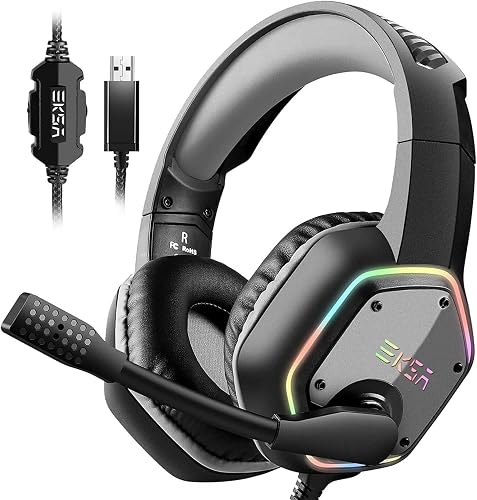
The best gaming headset console setup depends less on brand names and more on how your console connects to audio, how the headset fits during long sessions, and whether the mic will be clear enough for your squad. This guide walks you through the factors that matter, so you can narrow your options quickly and pick a headset that works on your specific system.
Start With Your Console’s Audio Connection
Consoles don’t all handle audio the same way, and this single detail eliminates a lot of headsets. Check which of these your system supports:
Shopping for one? See our guide: 6 Best Low Cost Gaming Headset Picks: 6 Compared for Every Budget (2026).
- 3.5 mm headset jack: Works on nearly every current console controller, usually on the bottom edge of the controller.
- USB dongle: Some wireless headsets use a transmitter for lower latency and surround processing.
- Bluetooth: Convenient for phones, but many consoles don’t offer proper Bluetooth audio for game chat, so confirm before buying.
Manufacturers list supported platforms on the product page. If a headset is marketed for PC only, it may still work on a console through the controller jack, but you may lose the mic or features like console-specific surround modes. For another angle, check out Best Gaming Headsets for PC and Console: 5 Models Compared.
Choose a Wired or Wireless Headset Based on Your Room
Wired headsets have no battery to charge and no pairing step, which makes them a reliable default. Wireless models give you freedom to move around, but they add charging habits to your routine. Owners often report that wireless headsets that use a dedicated transmitter feel more stable than Bluetooth pairing during online matches. If you sit close to the TV, a wired model is usually the simplest option.
Check Fit and Comfort for Long Sessions
A headset that sounds great for twenty minutes can become painful after two hours. Look for these details:
- Adjustable headband that holds the cups without clamping hard on your skull.
- Ear cups large enough to fit over your ears rather than pressing on them.
- Replaceable ear pads, so you can refresh them when they wear out.
- A clamp force that feels firm but not tight after a few minutes of wear.
Glasses wearers often find that thinner ear pads and a lighter headband reduce pressure at the temples. For deeper fit advice, see Gaming Headset Comfort for Long Sessions.
Evaluate the Microphone and Chat Features
On consoles, the microphone matters as much as the sound. A boom mic that can be flipped up to mute is a common and practical feature. Check whether the mic is detachable, since a removable mic lets you use the headset as regular headphones. Some headsets include a chat-to-game balance dial, which helps you hear teammates clearly without drowning out the game. Browsing a broader list such as Budget Friendly Gaming Headset: 6 Best Picks Compared (2026) can show you how these features are distributed across price tiers.
Match Sound Features to How You Play
Surround sound and directional audio help in competitive shooters, but they add processing that some listeners find unnatural in other genres. Focus on whether the headset supports the console’s built-in 3D audio standard, and whether you prefer a clear, balanced tuning for single-player games. If you later add a dedicated amplifier, Best Gaming DAC Amp Combo: 6 Steps to Pick the Right One (2026) explains how that fits into a console setup.
Common Mistakes to Avoid
- Buying a PC-only headset without confirming the console jack or mic will work.
- Ignoring the adapter situation: some consoles need a separate adapter for USB or optical audio.
- Skipping the mute and volume controls, which are harder to reach mid-match if they sit on the cable.
- Assuming Bluetooth will handle game chat, when many consoles only use it for media audio.
Recommended Gear
A longer 3.5 mm extension cable helps if your console sits far from your seat, letting you keep the headset plugged in without stretching. View on Amazon
A small splitter adapter lets you connect a headset and a separate headphone or speaker, which is useful for shared living spaces. View on Amazon
Replacement ear pads are one of the cheapest upgrades for comfort and sound isolation, and many headset models accept standard pad sizes. View on Amazon
FAQ
Can I use any gaming headset on a console?
Most headsets with a 3.5 mm plug will work for audio and chat on consoles, but features like surround modes and mic support can vary. Check the product page for console compatibility before you buy.
Do I need a USB dongle for console gaming?
You don’t always need one. A dongle is useful for wireless headsets that need low latency or console-specific surround processing, but wired headsets connect directly to the controller.
How do I know if a headset is comfortable enough for long sessions?
Look for an adjustable headband, roomy ear cups and replaceable pads. Try the headset for at least thirty minutes if you can, and watch for pressure points at the top of your head or behind your ears.
Conclusion
The best gaming headset console choice comes down to matching your system’s audio connection, your room setup and your comfort needs. Start with compatibility, then weigh wired versus wireless, fit and microphone quality. With those checks done, you’ll have a short list that suits how you actually play.
Related reading
Ready to choose one?
About Colin Foster
Colin Foster is part of our editorial team and reviews and edits our headphone comfort & accessories + gaming headsets guides, checking product details against manufacturer specifications and owner feedback.