By Colin Foster
Updated November 2026
The best gaming headset reddit threads tend to agree on one thing: the right headset depends on how you play, not on a single top-rated model. This guide shows you how to narrow down the field by checking your platform, fit, audio style and microphone needs, so you can use community advice with confidence.
Step 1: Confirm Your Platform and Connection
Start by listing every device you plan to use. A headset that works well on PC may need an adapter on a console, and some wireless models only pair with one base station. Most gaming headsets connect through USB, a 3.5 mm headphone jack, Bluetooth, or a proprietary 2.4 GHz wireless dongle. Check the box or manufacturer page for supported platforms before you read recommendations from other players, since a headset praised on a PC thread may not work the same way on a PlayStation or Xbox.
Shopping for one? See our guide: 6 Best Low Cost Gaming Headset Picks: 6 Compared for Every Budget (2026).
If you plan to switch between devices often, look for a model with multiple inputs or a simple source-switching feature. Otherwise, you may end up swapping cables every time you change games.
Step 2: Test Fit and Comfort for Long Sessions
Comfort matters more than most spec sheets suggest. Clamping force, earcup depth and headband padding all affect how a headset feels after two or three hours. Owners often report that velour pads feel warmer but breathe less than leatherette, while memory-foam cushions can flatten over time. If your ears sit against the driver, a deeper earcup or a replacement pad set can make a noticeable difference. For more on this, see Gaming Headset Comfort for Long Sessions.
Step 3: Choose a Sound Profile That Fits Your Games
Competitive shooters reward clear directional audio, so many players prefer a slightly brighter, detail-focused tuning that makes footsteps easier to place. Single-player and story games usually sound better with a fuller, more balanced profile. Many gaming headsets offer equalizer software or a virtual surround feature. Surround processing can help with positioning, but it can also blur the sound, so test it against stereo before committing. If you want more control over sound quality, a dedicated DAC/amp can help, and Best Dac Amp for Gaming Reddit: How to Pick One for PC and Console (2026) covers how to choose one.
Step 4: Check Microphone Quality and Noise Handling
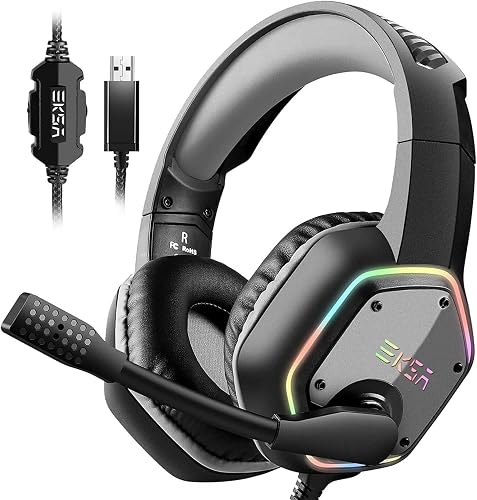
A microphone that sounds fine in a quiet room can pick up keyboard clicks, fans and background voices during a match. Look for a boom mic that you can position close to your mouth, and check whether the headset offers noise cancellation or a mute indicator. Many players in community threads recommend recording a short test clip and listening back before you settle on a model.
Quick Checklist Before You Buy
- List every device you plan to connect to.
- Confirm the connection type (USB, 3.5 mm, Bluetooth or wireless dongle).
- Read reviews focused on comfort after long sessions, not just first impressions.
- Decide whether you need surround, stereo or both.
- Check microphone reviews for noise handling and boom mic positioning.
- Confirm the return policy and warranty terms with the seller.
Common Mistakes to Avoid
- Choosing a headset based only on the number of upvotes in one thread.
- Ignoring platform compatibility and buying a model that needs an adapter you did not plan for.
- Assuming surround sound is always better than stereo.
- Skipping the microphone check, then discovering background noise in your first voice chat.
- Overlooking replacement ear pads, which can extend the life of a headset you already like.
Recommended Gear
- Replacement ear pad set: Swapping worn pads can restore comfort and seal without buying a new headset. View on Amazon
- Headphone jack splitter: Useful if your console or PC has separate audio and microphone ports and your headset uses a single combined plug. View on Amazon
- Headset stand: A stand keeps your headset off the desk, which helps protect the cable and earcups between sessions. View on Amazon
FAQ
Is the best gaming headset reddit recommends the same for everyone?
No. Community recommendations often reflect a specific platform, budget or game genre. Use them as a starting point, then check compatibility and comfort for your own setup.
Do I need a wireless gaming headset?
Not necessarily. Wired models avoid battery charging and connection lag concerns, while wireless models offer more freedom of movement. Choose based on how you play and where you sit.
How can I tell if a microphone is good enough?
Record a short clip in your normal room with your usual fan and keyboard noise, then listen back. If your voice is clear and background noise is controlled, the microphone is likely suitable for most voice chat.
Conclusion
Finding the best gaming headset reddit users talk about starts with your own setup, not someone else’s favorite. Confirm your platform, test comfort and sound preferences, and check the microphone before you buy. With those steps done, you will be in a much better position to choose a headset that you will actually enjoy using every day.
Related reading
- What's a Good Gaming Headset? 7 Best Picks Compared for 2026
- Recommended Gaming Headset PC: 5 Best Picks Compared for 2026
Ready to choose one?
About Colin Foster
Colin Foster is part of our editorial team and reviews and edits our headphone comfort & accessories + gaming headsets guides, checking product details against manufacturer specifications and owner feedback.