By Colin Foster
Updated November 2026
Shopping for a lightweight wireless gaming headset usually comes down to how long you can wear it without fatigue, how well it connects to your consoles and PC, and whether the battery lasts through a full session. The picks below were selected by reviewing product listings, brand reputation and common owner feedback patterns, with weight, earcup design, battery claims and connection options as the main criteria.
Our top picks at a glance
- 1
 TOP CHOICEBest overallRazer Barracuda X Wireless Gaming & Mobile HeadsetView on Amazon
- 2
 TOP CHOICEBest for battery lifeHyperX Cloud Jet Wireless Gaming HeadsetView on Amazon
- 3
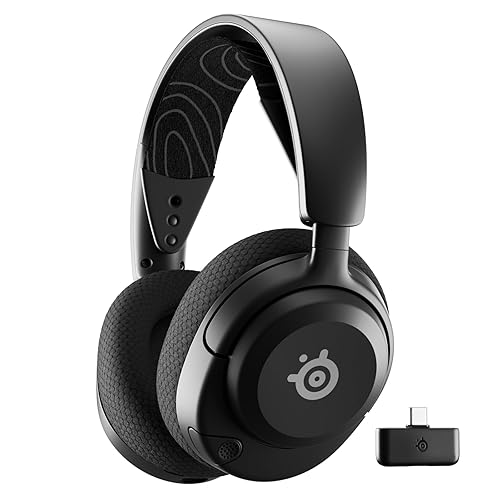 TOP CHOICEBest for multi-system useSteelSeries Arctis Nova 5 Wireless Multi-System Gaming HeadsetView on Amazon
- 4
 Best for PC and console budgetsLogitech G321 Lightspeed Wireless Bluetooth Gaming Headset with MicView on Amazon
- 5
 Best for comfort on long sessionsHyperX Cloud Flight 2 Wireless Gaming HeadsetView on Amazon
- 6
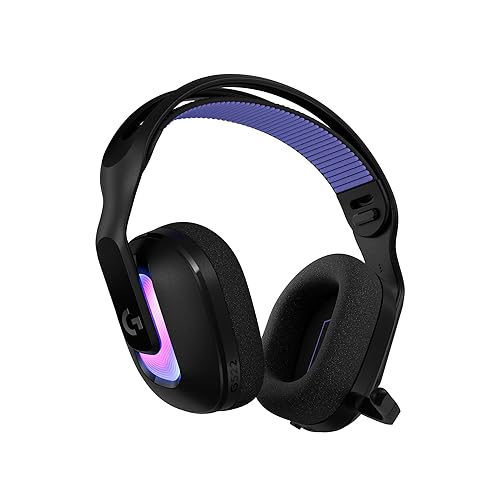 Best for PC with BluetoothBluetooth gaming headset, full-band mic, advanced audio, tri-connect (View on Amazon
- 7
 Best for console playersNUBWO Wireless Gaming Headset with Mic for Ps5 Ps4 PC, Zero InterferenView on Amazon
Our Top Picks
| Product | Best for | Key feature |
|---|---|---|
| Razer Barracuda X Wireless Gaming & Mobile Headset | Best overall | Bluetooth 5.2 and 2.4GHz |
| HyperX Cloud Jet Wireless Gaming Headset | Best for battery life | Long-running wireless play |
| SteelSeries Arctis Nova 5 Wireless Multi-System Gaming Headset | Best for multi-system use | Works across many platforms |
| Logitech G321 Lightspeed Wireless Bluetooth Gaming Headset | Best for PC and console budgets | Dynamic comfort and fit |
| HyperX Cloud Flight 2 Wireless Gaming Headset | Best for comfort on long sessions | Removable earcup plates |
| Logitech G522 Lightspeed Bluetooth Wireless Gaming Headset | Best for PC with Bluetooth | Tri-connect connectivity |
| NUBWO Wireless Gaming Headset with Mic | Best for console players | Triple-mode compatibility |
Razer Barracuda X Wireless Gaming & Mobile Headset
RazerBluetooth 5.2, Lightweight, 40mm Drivers, Detachable Mic, 50 Hr Battery Barracuda X Wireless Gaming & Mobile Headset, 2.4Ghz + BT, White
Best for: Best overall
This is a fit for players who want a light, mobile-friendly headset that works with both a computer and a phone without juggling adapters.
Pros
- Bluetooth 5.2 and 2.4GHz connection options
- Detachable microphone and roughly 50-hour battery claim
Cons
- Owners sometimes mention a snug clamp on smaller heads
HyperX Cloud Jet Wireless Gaming Headset
Wireless Headphones | Wireless Connectivity HyperX Cloud Jet Wireless Gaming Headset
Best for: Best for battery life
Suited to players who play marathon sessions and want to avoid frequent charging breaks.
Pros
- Wireless connectivity designed for extended use
- Lightweight build that keeps the clamp force moderate
Cons
- Fewer customization options than full-featured flagship models
SteelSeries Arctis Nova 5 Wireless Multi-System Gaming Headset
SteelSeriesNeodymium Magnetic Drivers — 60 HR Battery — 2.4GHz or BT — ClearCast Gen2.X Mic — PC, PS5, PS4, Switch, Mobile Arctis Nova 5 Wireless Multi-System Gaming Headset – Black
Best for: Best for multi-system use
A good match for households that move one headset between a PC, PlayStation, Switch and mobile devices.
Pros
- Manufacturer lists battery life of around 60 hours
- Dual 2.4GHz and Bluetooth connectivity
Cons
- Switching between systems can require manual menu steps
Logitech G321 Lightspeed Wireless Bluetooth Gaming Headset with Mic
Pc gaming headset, dynamic comfort and fit, 16 kHz boom mic, 20+ hrs battery, PC, PS4, PS5, nintendo switch, mobile Logitech G321 Lightspeed Wireless Bluetooth Gaming Headset with Mic – Black
Best for: Best for PC and console budgets
Works well for players who want a comfortable wireless option for PC, PlayStation, Switch and mobile without a premium build.
Pros
- Dynamic comfort and fit design
- Boom microphone with clear voice pickup
Cons
- Plastic construction feels less substantial than metal-frame rivals
HyperX Cloud Flight 2 Wireless Gaming Headset
HyperX Cloud Flight 2 – Wireless Gaming Headset for PS5, PS4, Switch, PC, Mac, and Mobile, Up to 100-Hour (2.4GHz) / 150-Hour (Bluetooth) Battery, Customizable RGB, Removable Earcup Plates – Black
Best for: Best for comfort on long sessions
Aimed at players who wear a headset for several hours and want replaceable earcup plates to adjust padding feel.
Pros
- Removable earcup plates for comfort adjustments
- Battery claims of up to 100 hours on 2.4GHz
Cons
- Bluetooth battery estimate is shorter than the 2.4GHz figure
Buying Guide
Weight and Comfort
Weight is the first thing to check if you plan to wear a headset for hours. Look for a light frame, soft padding on the headband and earcups that distribute pressure evenly, since comfort over a long session matters more than any single spec.
Earcup style also affects comfort. Over-ear designs with breathable memory foam are generally easier to wear for extended periods than tight, small-cup designs, especially if you wear glasses.
Connection Options
Think about every device you plan to use. Some headsets offer a 2.4GHz wireless dongle for low-latency play on PC and consoles, plus Bluetooth for phones and tablets. A headset with multiple connection modes lets you switch between a console and a mobile device without re-pairing.
Check that the headset works natively with your main platform, whether that is PC, PS5, PS4, Nintendo Switch or mobile. Some models need an adapter or a specific cable for certain systems, so confirm compatibility before buying.
Battery Life
Battery claims vary widely, and manufacturers often list different numbers depending on whether the headset is running wireless 2.4GHz or Bluetooth, and whether lighting is on. Use the listed hours as a rough guide and expect real-world results to differ based on volume and features in use.
For long sessions, a longer battery life reduces how often you need to recharge. Also consider whether the headset charges over USB-C, since that makes it easy to top up from the same cable you use for other devices.
Microphone Quality and Detachability
A detachable microphone lets you wear the headset as regular headphones when you are not gaming or on a call. Look at the mic type and placement as well, since a boom mic on an adjustable arm usually picks up voice more clearly than a fixed mic built into the earcup.
If you game with friends or stream, a mic with noise reduction can keep background sound from reaching your teammates. Test your setup with a friend or recording app if you can.
Driver Size and Sound Profile
Driver size and tuning shape how the headset sounds, but personal taste matters most. Larger drivers are often associated with fuller bass, while balanced tuning can make footsteps and in-game audio cues easier to pick out. Many headsets also offer software for adjusting equalizer settings on PC, which can help you tailor the sound to your preferences.
FAQ
Are lightweight wireless gaming headsets good for long sessions?
Yes, a lighter headset with soft padding and an even clamping force is generally more comfortable over several hours of play. Comfort varies from person to person, so fit and head shape matter as much as the listed weight. Trying a headset on in person when possible is a good way to confirm it feels right for you.
Do I need a dongle for wireless gaming?
A 2.4GHz dongle is usually the best choice for low-latency gaming on PC and consoles, while Bluetooth is more convenient for phones and tablets. Some headsets include both options, which lets you use one for gaming and the other for everyday devices. Check which modes a specific model supports before you buy.
Can I use these headsets on PS5, PS4, and Nintendo Switch?
Many multi-system wireless headsets support PS5, PS4, Switch, PC and mobile, but the exact setup can differ by model. Some systems need a specific adapter or a cable for voice chat, and certain features may only work on one platform. Review the listed compatibility for each model to confirm it works with your system.
How long do the batteries last in real use?
Listed battery life is typically measured under specific conditions, so actual runtime will vary with volume, lighting and connection mode. Wireless 2.4GHz use often drains the battery differently than Bluetooth, and RGB lighting can shorten runtime. Expect the real number to fall below the maximum claim if you play at high volume.
Is a detachable microphone worth it?
A detachable mic is useful if you want to switch between a gaming headset and regular headphones for music, movies or travel. It also lets you remove the mic when you do not need to speak, which can make the headset feel more casual. If you always need voice chat, a fixed boom mic may be just as practical.
Which headset is best for someone who needs maximum comfort?
Look for the lightest model with breathable, memory-foam earcups and an adjustable headband that spreads pressure well. Removable or replaceable earcup pads can also extend comfort over time. Because comfort is personal, choose the option whose design fits your head shape and gaming habits best.
Conclusion
If you want an all-around choice that works across consoles, PC and mobile, the multi-system and multi-connection options in this list are the most flexible picks. Players who care most about long runtimes should focus on the models with the strongest battery claims and USB-C charging.
Anyone who mostly games on one platform can narrow the field by checking native compatibility and weight first, then comparing mic and comfort features. Choose the headset that matches your main device and the number of hours you expect to play each session.
Related reading
- Wireless Headset vs Wired Gaming: Which Should You Choose? (2026)
- Wireless Gaming Headset PlayStation: 6 Factors to Check Before You Buy (2026)
- Wireless Gaming Headset Computer Setup: A Step-by-Step Guide (2026)
- Top 5 Wireless Gaming Headsets with Microphone Picks for Every Setup
- Steelseries Arctis Nova Pro Wireless Gaming Headset: Setup, Fit and Fixes (2026)
- Best Wireless Gaming Headset Reddit: 5 Factors That Matter in 2026
- Audeze Maxwell Wireless Gaming Headset Review (2026)
About Colin Foster
Colin Foster is part of our editorial team and reviews and edits our headphone comfort & accessories + gaming headsets guides, checking product details against manufacturer specifications and owner feedback.