By Colin Foster
Updated November 2026
A mic for gaming headset use is often the fastest fix when your teammates can’t hear you or your current boom mic has gone quiet. This list compares six replacement and attachable microphones by compatibility, boom design, noise handling and how easily they connect to consoles and PCs. Each pick is based on product listings, brand reputation and common owner feedback patterns, not on our own testing.
Our top picks at a glance
- 1
 TOP CHOICEBest overallLEFXMOPHY XO4 Mic Replacement for Turtle Beach Ear Force XO SeriesView on Amazon
- 2
 TOP CHOICEBest for PlayStation and QuestPlayStation 4 Gaming Headphones Mic AttachmentView on Amazon
- 3
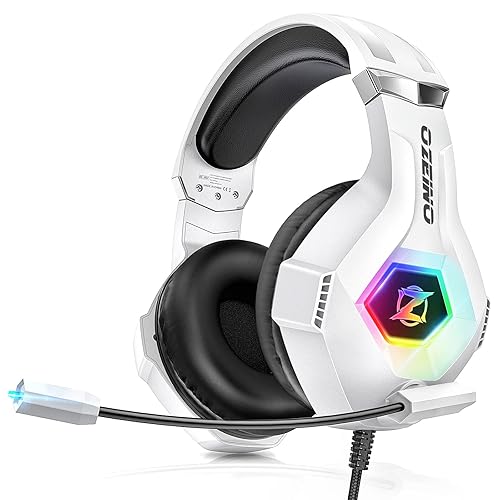 TOP CHOICEBest for a full headset upgradeOzeino Gaming Headset for PC, PS4, PS5, XboxView on Amazon
- 4
 Best for budget setupsBENGOO G9000 Stereo Gaming Headset for PS4, PC, XboxView on Amazon
- 5
 Best for a detachable mic on any headphoneModMic Uni 2+ Attachable 3.5mm Headset MicrophoneView on Amazon
- 6
 Best for Razer headsetsLEFXMOPHY Mic Replacement for Razer Barracuda XView on Amazon
Our Top Picks
| Product | Best for | Key feature |
|---|---|---|
| LEFXMOPHY XO4 Mic Replacement | Turtle Beach owners | Replacement 3.5mm boom mic |
| PlayStation 4 Gaming Headphones Mic Attachment | PS4 and Quest 2 users | Detachable boom attachment |
| Ozeino Gaming Headset | Multi-platform gamers | Noise canceling mic |
| BENGOO G9000 Stereo Gaming Headset | Budget setups | 7.1 surround and LED light |
| ModMic Uni 2+ Attachable Microphone | Any headphone upgrade | Attaches to existing headphones |
| LEFXMOPHY Mic Replacement for Razer Barracuda X | Razer headset owners | Foam-covered detachable boom |
LEFXMOPHY XO4 Mic Replacement for Turtle Beach Ear Force XO Series
LEFXMOPHY XO4 Mic Replacement for Turtle Beach Ear Force XO Three XO Four Stealth Recon 150 50 50X 50P 60P Xbox One 400 420x 450 500p 520 Game Headset, Not for Recon500, 3.5mm Boom Microphone
Best for: Turtle Beach owners who need a direct boom mic replacement.
This suits players whose existing Turtle Beach boom has frayed or stopped transmitting audio. Listings state it is not meant for the Recon 500 model, so check your model number first.
Pros
- Plugs into the standard 3.5mm port
- Covers many Turtle Beach Ear Force and Stealth models
Cons
- Not compatible with every Turtle Beach model
PlayStation 4 Gaming Headphones Mic Attachment
Playstation 4 Gaming Headphones – 3.5mm Microphone Attachment, Detachable Mic Replacement for Rig 400 Headset, Turtle Beach, Oculus Quest 2, PS4
Best for: PS4 and Quest 2 players who want a detachable mic option.
This works well for people who want a simple add-on mic for consoles and VR without replacing the whole headset.
Pros
- Detachable design for quick removal
- Listed as compatible with several Rig and PS4 setups
Cons
- Fit depends on your headset’s jack and mounting points
Ozeino Gaming Headset for PC, PS4, PS5, Xbox
Ozeino Gaming Headset for PC, Ps4, Ps5, Xbox Headset with 7.1 Surround Sound Gaming Headphones with Noise Canceling Mic, LED Light Over Ear Headphones for Switch, Xbox Series X/S, Laptop, Mobile White
Best for: Multi-platform gamers who want a full headset with a built-in noise canceling mic.
This is a better fit for someone replacing their whole headset than for someone who only needs a new boom.
Pros
- Noise canceling mic is listed for lower background pickup
- Works across PC, consoles and mobile devices
Cons
- Users often note the lightweight build feels less solid than premium headsets
BENGOO G9000 Stereo Gaming Headset for PS4, PC, Xbox
BENGOO G9000 Stereo Gaming Headset for PS4 PC Xbox One PS5 Controller, Noise Cancelling Over Ear Headphones with Mic, LED Light, 7.1 Surround Sound, Soft Memory Earmuffs for Nintendo Xbox Series X|S
Best for: Budget setups that need a complete headset with a mic in one box.
Owners who want surround sound and a basic noise canceling mic without spending much often look at this model.
Pros
- Includes 7.1 surround sound and LED lighting
- Covers PC, PS4, Xbox and Switch
Cons
- Mic clarity is generally rated as basic by owners
ModMic Uni 2+ Attachable 3.5mm Headset Microphone
ModMic Uni 2+ Attachable 3.5mm Headset Microphone. Gaming on PC, PS5, Xbox
Best for: Anyone who wants to add a mic to headphones they already own.
This suits players who like their current headphones’ comfort and sound but have no boom mic.
Pros
- Attaches to most headphones with a 3.5mm connection
- Works on PC, PS5 and Xbox
Cons
- Placement and stability depend on your headband design
LEFXMOPHY Mic Replacement for Razer Barracuda X
LEFXMOPHY Mic Replacement for Razer Barracuda X Game Headset 3.5mm Detachable Gaming Boom Microphone with Foam
Best for: Razer Barracuda X owners who need a replacement boom.
This is aimed at players whose Barracuda X boom has broken or lost clarity and who want a like-for-like swap.
Pros
- Foam cover is included to reduce breath and wind noise
- Detachable 3.5mm connection
Cons
- Designed specifically for the Barracuda X, so check compatibility first
Buying Guide
Compatibility With Your Headset and Platform
Before you buy a mic for gaming headset use, confirm that the microphone matches your headset model and your platform. Many replacement booms are designed for specific brands like Turtle Beach or Razer, and some only fit certain connector layouts. Check whether the mic plugs into a 3.5mm jack and whether your console or PC supports that connection.
Boom Design and Fit
The boom’s length, flexibility and mounting style affect how close the capsule sits to your mouth. A boom that sits too far away can sound thin, while one that sits too close can pick up breathing noise. Look for a flexible or adjustable boom that stays in position during long sessions.
Noise Handling
Noise-canceling or foam-covered mics help reduce background sounds like keyboard clatter, fans and room echo. Attachable mics often rely on the headset’s own design for pickup, so the mic’s placement matters as much as its internal features. A foam windscreen can also help cut down on plosive pops.
Ease of Installation and Detachability
Some mics snap into a headset with no tools, while others need a more involved setup. If you switch between a headset and a separate gaming setup, a detachable boom can be convenient. Consider how often you plan to remove or replace the mic before choosing a model.
FAQ
Will a replacement mic work with any gaming headset?
Not always. Most replacement mics are built for specific headset brands or models, so check the compatibility list before buying. Universal or attachable options can fit a wider range of headsets but may need a secure mounting point.
Do I need a special mic for PC and console use?
Many gaming mics use a standard 3.5mm connector that works on both PC and console, but some controllers and consoles handle audio differently. Check that your device supports the mic’s connection type. Adapters may be needed in some setups.
Why does my teammates’ audio sound muffled after changing mics?
Muffled audio is often caused by the mic being positioned too far from your mouth or blocked by a cable or boom angle. Adjust the boom so it sits a few finger-widths from your lips. Also check that your device’s microphone input is selected correctly.
Is a noise-canceling mic worth it for gaming?
It can be, especially if you game in a room with background noise or share space with others. Noise cancellation reduces unwanted sound but cannot remove everything, so proper placement still matters. Pairing a good mic with a quiet environment usually gives the best results.
How often should I replace a gaming mic?
There is no fixed schedule, but replace the mic when it stops picking up clear audio, develops crackling, or the boom no longer stays in position. Frequent bending or pulling on the boom can wear out the connector over time. Regular gentle handling helps extend its life.
Conclusion
If you need a direct replacement for a specific headset, pick a mic built for that brand and model, such as the Turtle Beach, Razer or PlayStation-compatible options in this list. If you want a versatile choice that works across several headsets and platforms, an attachable or universal mic like the ModMic Uni 2+ is a practical pick.
Budget-minded gamers with a full headset might prefer a complete bundle like the Ozeino or BENGOO models, while those who only need to fix a worn boom will get the most value from a simple replacement mic. Match the mic to your headset and platform first, and the rest of the decision becomes much easier.
Related reading
- Top 5 PC Gaming Mic Headset Picks for Every Setup in 2026
- Top 5 Mic Monitoring Gaming Headset Picks for Every Setup
- Gaming Headset Best Mic Quality: 6 Factors That Matter (2026)
- Best Headset Without Mic for Gaming: 5 Options That Fit Solo Play (2026)
- 5 Best Mic on Gaming Headsets for Clear Voice Chat (2026)
- Wireless Headset vs Wired Gaming: Which Should You Choose? (2026)
- Wireless Gaming Headset PlayStation: 6 Factors to Check Before You Buy (2026)
About Colin Foster
Colin Foster is part of our editorial team and reviews and edits our headphone comfort & accessories + gaming headsets guides, checking product details against manufacturer specifications and owner feedback.