 By Claire Whitaker
Updated November 2026
A logitech headphone USB adapter is useful when your headset plugs into a computer or device that has no 3.5 mm jack, or when you need a USB audio path for clearer sound and a working microphone. This list focuses on compatibility, plug-and-play setup, whether the adapter includes a separate headphone and mic jack, and whether it fits a USB-A or USB-C port. Selection is based on product listings, brand reputation and common owner feedback patterns.
Our top picks at a glance
- 1
 TOP CHOICEBest overallSABRENTUSB USB Audio Adapter (AU-MMSA)View on Amazon
- 2
 TOP CHOICEBest for USB-C laptopsLogitechConnects USB-A to USB-C AdapterView on Amazon
- 3
 TOP CHOICEBest for PlayStation and PCUSB Audio Adapter USB Sound Card for PC/Laptops/PS5/PS4View on Amazon
- 4
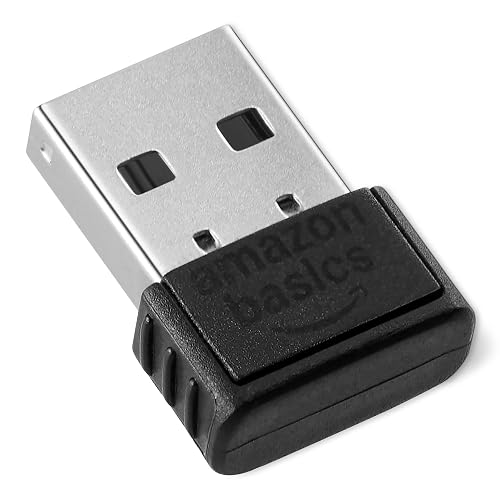 Best for wireless accessoriesAmazon Basics Bluetooth 5.4 USB Adapter DongleView on Amazon
- 5
 Best value pack2 Pack USB to 3.5mm Audio Jack AdapterView on Amazon
- 6
 Best for two headphonesUSB to Dual 3.5mm Audio Jack Adapter, Mic-Supported Headphone AdapterView on Amazon
- 7
 Best for Logitech headset ownersLogitechSimple USB-C and Included USB-A Adapter, Plug-and-Play CompatiView on Amazon
Our Top Picks
Quick Comparison
| Product | Best for | Key feature |
|---|---|---|
| SABRENTUSB USB Audio Adapter (AU-MMSA) | Desktop PCs and Macs | Plug and play, no drivers |
| Logitech USB-C to USB-A Adapter | USB-C laptops | USB-A to USB-C conversion |
| USB Audio Adapter USB Sound Card | PS4 and PS5 users | Headphone and mic jacks |
| Amazon Basics Bluetooth 5.4 USB Adapter | Wireless accessories | Bluetooth 5.4 receiver |
| 2 Pack USB to 3.5mm Audio Jack Adapter | Multiple setups | Two adapters included |
| USB to Dual 3.5mm Audio Jack Adapter | Sharing audio | Two headphone outputs |
| Logitech Simple USB-C Adapter | Zone 750 headset users | Plug-and-play USB-C |
SABRENTUSB USB Audio Adapter (AU-MMSA)
SABRENTUSB audio adapter; no drivers needed; for Windows & Mac; 3.5mm headphone & mic jacks; usb to 3.5mm jack audio adapter USB External Stereo Sound Card Adapter, Plug & Play (AU-MMSA)
Best for: Desktop and laptop users who need separate headphone and mic jacks.
This adapter suits anyone who wants a simple external sound card without installing software. Manufacturers describe it as working on both Windows and Mac.
Pros
- No drivers required
- Separate 3.5 mm headphone and mic jacks
Cons
- Adds a cable to the desk setup
LogitechConnects USB-A to USB-C Adapter
LogitechConnects USB-A devices to USB-C ports, supports fast data transfer, durable design, plug and play compatibility USB-C to USB-A Adapter
Best for: USB-C laptops that need to connect older USB-A headsets.
This is a conversion adapter rather than an audio device, so it works best when paired with a headset that already uses USB-A. Listings highlight fast data transfer and a durable build.
Pros
- Plug-and-play compatibility
- Durable housing per manufacturer specs
Cons
- Does not add a headphone jack by itself
USB Audio Adapter USB Sound Card for PC/Laptops/PS5/PS4
USB to 3.5mm Jack Audio Adapter, Plug and Play, No Drivers Needed, 3.5mm Headphone and Microphone TRS Jack, for Windows & Mac USB Audio Adapter USB Sound Card for PC/Computer/Laptops/PS5/PS4
Best for: Console owners and PC users wanting a USB audio path with a mic.
Listings describe it as a plug-and-play USB sound card for Windows, Mac and several consoles. It is a practical fit for shared setups.
Pros
- Headphone and microphone TRS jacks
- Works across PC and console platforms
Cons
- Console compatibility can vary by firmware
Amazon Basics Bluetooth 5.4 USB Adapter Dongle
Amazon Basics Bluetooth 5.4 USB Adapter Dongle for PC, USB Receiver for Bluetooth Mouse, Keyboard, Laptop, Works with Windows 11/10/8.1
Best for: Adding Bluetooth audio or accessories to a PC without a built-in receiver.
This dongle is aimed at wireless peripherals rather than wired headsets. Owners often use it to pair Bluetooth headphones with older desktops.
Pros
- Bluetooth 5.4 per manufacturer specs
- Works with Windows 8.1 through 11
Cons
- Not a wired headset adapter
2 Pack USB to 3.5mm Audio Jack Adapter
2 Pack USB to 3.5mm Audio Jack Adapter, Audio Aux Cable External Stereo Sound Card, USB to 3.5mm TRRS Female Headset for PS5 PS4 Headphone PC Laptop Linux Desktops and More Device
Best for: Households or offices with more than one machine that needs a headset.
Two units let you keep one at a desk and one in a second location. Listings cite support for PS5, PS4 and Linux.
Pros
- Two adapters in one purchase
- TRRS headset support listed
Cons
- Duplicate units may be unnecessary for solo users
Buying Guide
Port Type: USB-A or USB-C
Check which port your computer or device uses before you buy. Some adapters plug straight into a USB-A port, while others need a USB-C port or include a USB-C to USB-A converter. Matching the port type first saves you from buying an adapter that will not connect.
Separate Headphone and Microphone Jacks
Many headsets use two plugs, one for audio and one for the mic. If your headset has separate connectors, choose an adapter with both a headphone jack and a mic jack, or a combined TRRS option that matches your headset’s plug. Confirm the jack layout against your headset’s cable before ordering.
Plug and Play Setup
Adapters that need no drivers are the easiest to use, especially on a work computer where you may not have admin rights. Look for plug-and-play compatibility with your operating system, whether that is Windows, Mac, or a gaming console. This keeps setup to a few seconds.
Compatibility With Your Devices
Think about where you will use the adapter. A simple audio adapter suits a desktop or laptop, while some models also work with game consoles or Linux systems. If you plan to pair a wireless accessory, a Bluetooth dongle may be a better fit than a wired audio adapter.
Build Quality and Cable Length
Since you will plug and unplug the adapter often, a sturdy connector and a cable that reaches your desk matter. Shorter cables keep things tidy at a desk, while longer ones give you room to move. Choose the length that matches your setup so the adapter does not strain the port.
FAQ
Do I need to install drivers for a Logitech headphone USB adapter?
Many USB audio adapters are plug-and-play and need no driver installation. Plug the adapter in, and your computer should detect it automatically. If your system does not recognize it, check your sound settings to make sure the adapter is selected as the output device.
Can I use a USB adapter for both headphones and a microphone?
Some adapters include both a headphone jack and a microphone jack, so you can use a headset with a mic on one device. Others only carry audio output, so confirm the adapter lists microphone support before buying. Check that the jacks match the plugs on your headset.
Will a USB audio adapter work on a Mac?
Several of the adapters in this list are listed for both Windows and Mac. Plug-and-play models generally work on macOS without extra software. Still, check the product listing for supported systems before you buy.
What is the difference between a USB-C adapter and a USB-A adapter?
A USB-A adapter plugs into the traditional rectangular USB port, while a USB-C adapter fits the smaller reversible port found on newer laptops and phones. Some products include a USB-C to USB-A converter so one adapter can work with both port types. Match the connector to the port on your device.
Can a Bluetooth dongle replace a wired headphone adapter?
A Bluetooth dongle lets you connect wireless accessories such as headphones, mice, or keyboards, but it is not the same as a wired audio adapter. If your headset has a cable, a wired USB audio adapter is the better match. Choose a Bluetooth dongle only if your headphones are wireless.
Conclusion
If you need a simple, no-driver adapter for a desktop or laptop with separate headphone and mic jacks, a USB audio adapter with both jacks is the most practical pick. If your computer only has USB-C ports, choose an option that includes a USB-C to USB-A converter so your existing headset still connects.
For wireless accessories rather than a wired headset, a Bluetooth dongle is the better fit. Match the port type, jack layout, and operating system to your setup, and you will find an adapter that works without fuss.
Related reading
- Headphone Adapters Explained: 3.5 mm, 6.3 mm and USB-C
- iPad USB-C Headphone Adapter Review: Pros and Cons
- Usb-c to 3.5mm Headphone Adapter (2026): Pros, Cons & Verdict
- Usb-c to 3.5 Mm Headphone Jack Adapter Nearby: A Practical Guide (2026)
- Usb-C Headphone Adapter with DAC: 5 Best Picks for Every Phone (2026)
- USB-C Headphone Adapter Not Working Samsung S22: 6 Fixes That Work
- USB C to-Male Headphone Jack Adapter: How to Choose and Use One (2026)
About Claire Whitaker
Claire Whitaker is part of our editorial team and reviews and edits our headphone comfort & accessories + gaming headsets guides, checking product details against manufacturer specifications and owner feedback.


