By Claire Whitaker
Updated November 2026
A usb c to-male headphone jack adapter lets you plug a standard 3.5 mm headphone into a USB-C port, which most newer phones, tablets and laptops use instead of a built-in audio jack. This guide explains what the adapter does, how to check compatibility, and how to set it up so you get clean audio and working call controls. Most of the work is matching the adapter to your device and confirming the connection before you blame the headphones.
What a USB-C to 3.5 mm Adapter Actually Does
Inside the small housing, the adapter contains either a digital-to-analog converter (DAC) or a simple passthrough circuit. Analog adapters route the signal from the device’s USB-C port straight to the 3.5 mm plug, while digital adapters convert the signal themselves. Manufacturers specify which type a given adapter is, and that difference affects sound quality and compatibility with certain phones.
Shopping for one? See our guide: 6 Best USB-C to 3.5mm Headphone Jack Adapters for Music and Calls (2026).
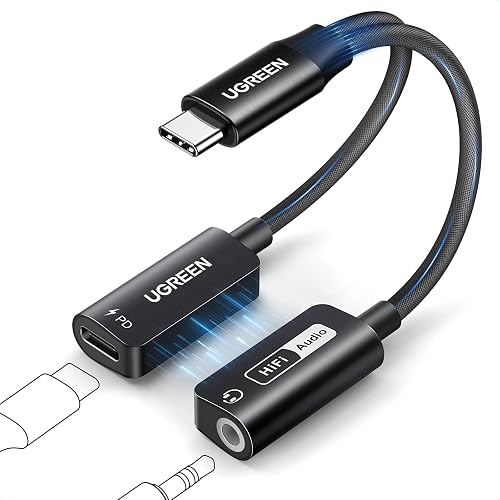
The male end plugs into the USB-C port on your device. The female end accepts your standard headphone cable. Some adapters also include a second USB-C port for charging, which is useful if you need to listen and charge at the same time.
How to Choose the Right Adapter
Start by confirming your device supports audio output over USB-C. Many Android phones do, but some tablets and laptops only pass audio when a specific driver is installed. Check your manufacturer’s support page before buying.
- Confirm your device’s USB-C port supports audio output, not only charging or data.
- Decide whether you need a charging passthrough port.
- Choose an adapter labeled for your device family, such as a Samsung or Apple model, if you want the most reliable match.
- Check that the adapter includes an inline microphone and call controls if you take calls.
| Feature | Why it matters |
|---|---|
| Analog or DAC type | Determines sound handling and compatibility |
| Charging passthrough | Lets you charge while listening |
| Inline mic and controls | Needed for calls and volume buttons |
| Device-specific label | Reduces the chance of a mismatch |
Setting Up Your Adapter Step by Step
Once you have a compatible adapter, the setup takes about a minute. Plug the adapter into the USB-C port firmly until it seats. Then connect your headphones to the female end. Play a track and adjust the device volume to a moderate level before you increase it.
If you use the charging port, connect the charger to the adapter rather than the phone. Check that your phone reports the charge as active. Some owners report that charging through an adapter is slower than direct charging, which is normal for pass-through designs.
Troubleshooting Common Connection Problems
If audio does not play, first unplug and reseat the adapter. Then test the headphones on another device to rule out a faulty cable. Clean the USB-C port with a dry wooden or plastic toothpick to remove lint, since debris often causes intermittent sound.
If the microphone does not work, confirm the adapter is designed for calls, because a basic audio-only adapter lacks the mic contact. Restart the device after plugging in. For persistent issues, see Samsung USB-C Headphone Jack Adapter Not Working: 7 Fixes That Work or USB C Headphone Adapter Not Working: 7 Fixes That Work for device-specific steps.
Recommended Gear
- Apple USB-C to 3.5 mm adapter: Designed for iPhone and iPad with the expected call and volume behavior on those devices. View on Amazon
- Samsung USB-C to 3.5 mm adapter: Matches the audio profile Samsung Galaxy phones expect and includes inline controls. View on Amazon
- Dual-port USB-C headphone adapter: Adds a charging port so you can listen and charge at the same time. View on Amazon
Tips and Common Mistakes
- Do not assume every USB-C port carries audio; check your device’s specifications first.
- Avoid plugging the adapter into a laptop USB-C port that only handles data.
- Keep the cable slack near the plug to reduce strain on the connector.
- Test volume at a low level before raising it, since adapters can output differently than a built-in jack.
- Keep the adapter in a small pouch so the pins stay clean.
FAQ
Does a usb c to-male headphone jack adapter work with all phones?
Most phones with a USB-C port support audio output, but a few do not. Check your manufacturer’s documentation before buying.
Will the adapter drain my battery?
A passive adapter draws almost no power. Adapters with a DAC use a small amount of power, which owners rarely notice in normal use.
Can I use my headphones’ inline mic through the adapter?
Only if the adapter supports microphone input and your headphones include a compatible mic. Audio-only adapters will play sound but not pick up your voice.
Conclusion
A usb c to-male headphone jack adapter is simple to use once you confirm your device supports audio over USB-C and choose a model with the features you need. Check the adapter type, charging support and mic compatibility before buying. If something goes wrong, reseat the connection, test your headphones elsewhere and clean the port.
Related reading
- Usb-c to 3.5 Mm Headphone Jack Adapter Nearby: A Practical Guide (2026)
- USB C to Headphone Jack Adapter Nearby: Where to Find One and How to Choose
- Samsung USB-C to 3.5 Mm Headphone Jack Adapter: 5 Best Picks for Every Phone
Ready to choose one?
About Claire Whitaker
Claire Whitaker is part of our editorial team and reviews and edits our headphone comfort & accessories + gaming headsets guides, checking product details against manufacturer specifications and owner feedback.