By Colin Foster
Updated November 2026
Finding the best over ear headset gaming option comes down to comfort over long sessions, clear directional sound, a mic that does not sound muffled, and a connection that works with your console or PC. This list weighs those criteria against manufacturer specifications, product listing details and the patterns owners tend to mention in their reviews. No product here was tested in a lab or used by the author.
Our top picks at a glance
- 1
 TOP CHOICEBest overallRazer BlackShark V2 X Wired Gaming Headset with Mic for PC and PS5, BlackView on Amazon
- 2
 TOP CHOICEBest for surround soundJBL Quantum 400 Wired Over-Ear Gaming Headset with Game-Chat Balance Dial (Black)View on Amazon
- 3
 TOP CHOICEBest for wireless freedomTurtle Beach Stealth 600 Wireless Multiplatform Gaming Headset for PS5 and PCView on Amazon
- 4
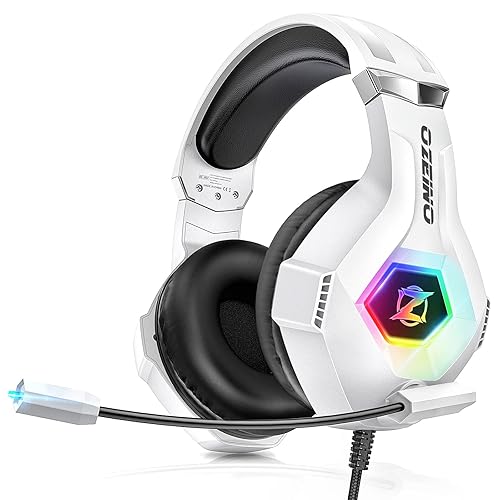 Best budget pickOzeino Gaming Headset for PC, PS4, PS5 and Xbox with 7.1 Surround SoundView on Amazon
- 5
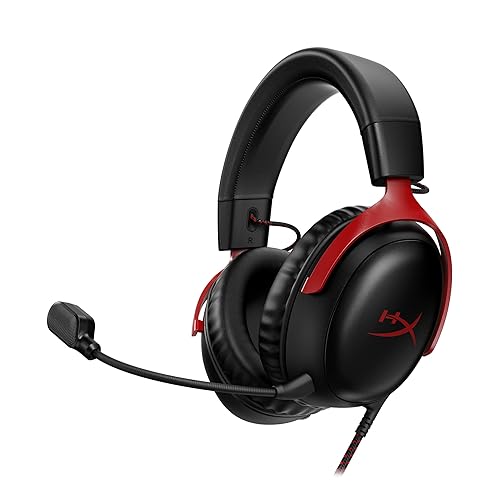 Best for mic qualityHyperX Cloud III Wired Gaming Headset for PC, PS5, PS4 and Xbox Series X|SView on Amazon
- 6
 Best for comfort on a budgetJBL Quantum 100 Wired Over-Ear Gaming Headphones, White, LargeView on Amazon
Our Top Picks
| Product | Best for | Key feature |
|---|---|---|
| Razer BlackShark V2 X | Overall balance | 50 mm TriForce Titanium drivers |
| JBL Quantum 400 | Surround sound | Game-chat balance dial |
| Turtle Beach Stealth 600 | Wireless freedom | 80-hour rechargeable battery |
| Ozeino Gaming Headset | Budget pick | 7.1 surround and LED lights |
| HyperX Cloud III | Mic quality | Memory foam, 10 mm mic |
| JBL Quantum 100 | Comfort on a budget | Memory foam over-ear cups |
Razer BlackShark V2 X Wired Gaming Headset with Mic for PC and PS5, Black
TriForce Titanium 50 mm Drivers, HyperClear Cardioid Mic, 240 g Lightweight, Noise-Isolating Earcups, 3.5 mm, PS4, Switch Razer BlackShark V2 X Wired Gaming Headset with Mic for PC and PS5, Black
Best for: Overall balance of comfort, sound and mic clarity.
This headset suits players who want a lightweight, noise-isolating option for PC and console. Razer lists the earcups as noise-isolating and the unit at about 240 g, which helps during long sessions.
Pros:
- Razer specifies 50 mm TriForce Titanium drivers for clear detail.
- The HyperClear cardioid mic is designed to reduce background noise.
Cons:
- The 3.5 mm connection limits wireless use.
JBL Quantum 400 Wired Over-Ear Gaming Headset with Game-Chat Balance Dial (Black)
JBL Quantum 400 – Wired over-ear gaming headset with game-chat balance dial, JBL QuantumSURROUND and DTS, Voice focus directional flip-up mic and memory foam ear cushions (Black)
Best for: Surround sound and easy game-chat balancing.
This is a fit for players who switch often between game audio and voice chat. The balance dial lets you adjust the mix without digging through menus.
Pros:
- The game-chat balance dial makes mixing audio simple.
- JBL lists QuantumSURROUND and DTS support for spatial audio.
Cons:
- Owners often mention the cable as the main limitation for mobility.
Turtle Beach Stealth 600 Wireless Multiplatform Gaming Headset for PS5 and PC
PlayStation, PS4, Bluetooth, 50mm Drivers, Rechargeable 80-Hr Battery, Noise-Cancelling Flip-to-Mute Mic, Memory Foam, White Turtle Beach Stealth 600 Wireless Multiplatform Gaming Headset for PS5 & PC
Best for: Wireless freedom across consoles and PC.
This headset fits players who want to move around without a cable and who use more than one platform. Turtle Beach specifies an 80-hour rechargeable battery.
Pros:
- Turtle Beach lists a rechargeable battery rated for about 80 hours.
- The flip-to-mute mic is listed with noise cancellation.
Cons:
- Wireless models need regular charging, which some owners find inconvenient.
Ozeino Gaming Headset for PC, PS4, PS5 and Xbox with 7.1 Surround Sound
Ozeino Gaming Headset for PC, Ps4, Ps5, Xbox Headset with 7.1 Surround Sound Gaming Headphones with Noise Canceling Mic, LED Light Over Ear Headphones for Switch, Xbox Series X/S, Laptop, Mobile White
Best for: A budget pick with multi-platform compatibility.
This headset suits players who want surround sound and LED lighting without a premium price tag. It works with a wide range of consoles and devices, according to the listing.
Pros:
- The listing names 7.1 surround sound and a noise-canceling mic.
- Compatibility covers PC, several consoles and mobile devices.
Cons:
- Budget builds often have less refined sound than premium models.
HyperX Cloud III Wired Gaming Headset for PC, PS5, PS4 and Xbox Series X|S
HyperXUSB-C + USB-A + 3.5mm Connectivity | Memory Foam | Durable Frame | Ultra-Clear 10mm Mic Cloud III Wired Gaming Headset for PC, PS5, PS4, Xbox Series X | S
Best for: Mic quality and long-session comfort.
This headset is aimed at players who spend hours in voice chat and want a stable fit. HyperX lists a 10 mm mic and memory foam cushioning.
Pros:
- HyperX specifies an ultra-clear 10 mm mic.
- USB-C, USB-A and 3.5 mm connections give flexible setup options.
Cons:
- The frame and cushions can feel snug on larger heads, based on owner feedback patterns.
JBL Quantum 100 Wired Over-Ear Gaming Headphones, White, Large
Be at the center of the game with JBL QuantumSOUND Signature, Play even longer in memory foam comfort JBL Quantum 100 – Wired Over-Ear Gaming Headphones – White, Large
Best for: Comfort on a budget with solid everyday sound.
This is a good choice for players who want memory foam comfort and QuantumSOUND Signature tuning without extra features. The large size suits bigger heads.
Pros:
- JBL specifies memory foam ear cushions for extended wear.
- The simple wired design keeps setup straightforward.
Cons:
- It lacks the surround processing and mic features of higher-tier models.
Buying Guide
Comfort for Long Sessions
Over-ear headsets sit around your whole ear, so comfort matters most when you play for hours at a time. Look for memory foam or padded earcups, a headband that spreads pressure evenly, and a weight that feels light on your head. Try to match the fit to your head size, since an overly tight clamp can cause fatigue faster than a loose one.
Sound Quality and Positional Audio
Clear, balanced sound helps you hear footsteps, reloads and nearby voices. Some headsets offer surround sound modes or software that enhances directional cues, which can be useful in competitive shooters. If you mainly play story-driven or casual games, a well-tuned stereo sound profile may be all you need.
Microphone Quality and Mute Features
If you chat with teammates, the mic matters as much as the earcups. A boom mic with noise-canceling helps keep background noise out of your voice, and a flip-to-mute function makes it easy to silence yourself quickly. Check whether the mic is detachable, since that can help when you want a headset for listening only.
Connectivity and Platform Compatibility
Before buying, confirm that the headset works with the devices you own. Some models use a 3.5 mm plug, others use USB, and a few support Bluetooth or a wireless dongle. Wired options are usually simpler and avoid charging, while wireless models offer more freedom but require you to keep the battery topped up.
FAQ
Do I need a wireless over-ear gaming headset?
Not necessarily. Wired headsets avoid battery charging and often have lower audio delay, which many players prefer for competitive games. Wireless models are better if you want to move around freely or dislike cables.
Can one headset work with both a PC and a console?
Many multiplatform headsets do, but the connection method matters. Check whether the headset includes the right cables or adapters for your console, and whether it supports the chat features you need on each system.
Is a surround sound headset worth it?
It can be, especially in games where directional audio helps you locate enemies. Surround features often work best with the right software or settings enabled. If you mostly play single-player games, standard stereo may be enough.
How important is memory foam in gaming headsets?
Memory foam helps the earcups conform to your head and can reduce pressure during long sessions. It does not guarantee comfort for everyone, so fit and weight still matter. Pay attention to how the cushions feel over time, since they can wear down.
Should I choose a headset with a detachable mic?
A detachable mic gives you flexibility, letting you use the headset for music or media without a visible boom arm. A fixed mic is often more stable and less likely to break. Choose based on how you plan to use the headset most often.
Conclusion
If you want a comfortable, well-rounded option for PC and console play, a wired headset with a clear mic and surround support fits most players. Those who value freedom of movement or want a cable-free setup should focus on wireless models, while budget-conscious gamers can find solid value in simpler wired designs.
Ultimately, match the headset to your main platform, the games you play most and how long your sessions usually last. A headset that feels comfortable and sounds clear for your habits will serve you better than any single top-rated feature.
Related reading
- Top 6 Gaming Headsets with Cat Ears for Streamers and Casual Players
- Top 5 Gaming in Ear Headset Picks for Every Setup (2026)
- Open Ear Gaming Headset Picks: 7 Best Options for Comfort in 2026
- What's a Good Gaming Headset? 7 Best Picks Compared for 2026
- Top 6 Best Bluetooth Gaming Headset Picks Compared for 2026
- Top 5 Wireless Gaming Headsets with Microphone Picks for Every Setup
- Top 5 Virtual Reality Headsets for PC Gaming Picks Compared in 2026
About Colin Foster
Colin Foster is part of our editorial team and reviews and edits our headphone comfort & accessories + gaming headsets guides, checking product details against manufacturer specifications and owner feedback.