By Colin Foster
Updated November 2026
Choosing an over ear wireless gaming headset comes down to a few practical questions: how long the battery lasts, which consoles and PCs it connects to, whether the ear cups stay comfortable through a long session, and how clear the microphone sounds to your squad. The picks below were compiled from manufacturer specifications, product listing details and common owner feedback patterns, not from personal testing.
At a glance:
Our top picks at a glance
- 1
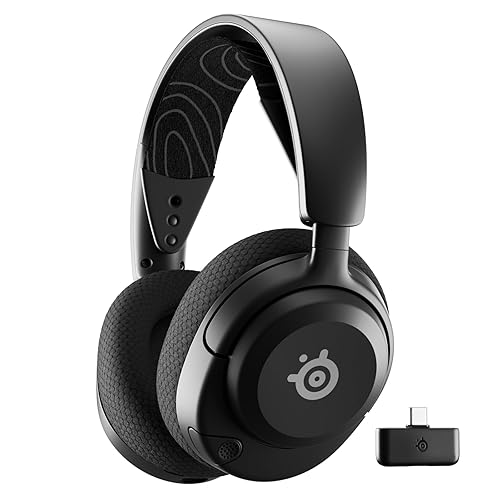 TOP CHOICEBest overallSteelSeries Arctis Nova 5 Wireless Multi-System Gaming HeadsetView on Amazon
- 2
 TOP CHOICEBest for long sessionsLogitech G733 Lightspeed Wireless Gaming Headset – BlackView on Amazon
- 3
 TOP CHOICEBest for Xbox ownersTurtle Beach Stealth 600 Wireless Gaming Headset for Xbox, PS5, PC, MobileView on Amazon
- 4
 Best for PlayStation ownersTurtle Beach Stealth 600 Wireless Multiplatform Gaming Headset for PS5 & PCView on Amazon
- 5
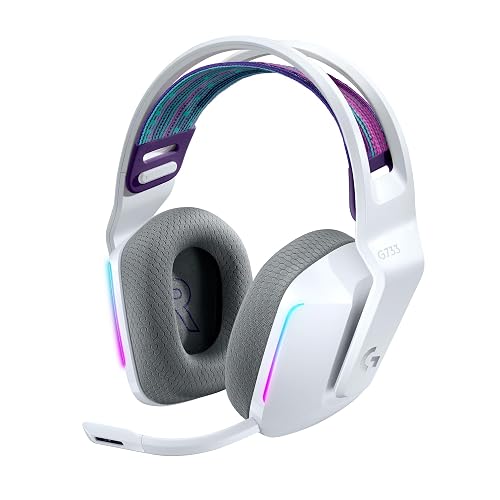 Best for RGB lightingLogitech G733 Lightspeed Wireless Gaming Headset – WhiteView on Amazon
- 6
 Best budget pickNUBWO Wireless Gaming Headset with Mic for PS5 PS4 PCView on Amazon
Our Top Picks
| Product | Best for | Key feature |
|---|---|---|
| SteelSeries Arctis Nova 5 Wireless | Multi-system switching | 60-hour battery |
| Logitech G733 Lightspeed (Black) | Long sessions | Suspension headband |
| Turtle Beach Stealth 600 (Xbox) | Xbox owners | 80-hour battery |
| Turtle Beach Stealth 600 (PS5) | PlayStation owners | Memory foam cushions |
| Logitech G733 Lightspeed (White) | Customized lighting | LIGHTSYNC RGB |
| NUBWO Wireless Gaming Headset | Budget-conscious buyers | 100-hour battery |
SteelSeries Arctis Nova 5 Wireless Multi-System Gaming Headset
SteelSeriesNeodymium Magnetic Drivers — 60 HR Battery — 2.4GHz or BT — ClearCast Gen2.X Mic — PC, PS5, PS4, Switch, Mobile Arctis Nova 5 Wireless Multi-System Gaming Headset – Black
Best for: Multi-system switching
This suits players who move between a PC, a console and a phone and want one headset that connects to all of them. The listing cites a 60-hour battery and a 2.4GHz wireless connection alongside Bluetooth.
Pros
- Connects to PC, PS5, PS4, Switch and mobile
- Long battery life rated at 60 hours
Cons
- Multi-mode connectivity can take some setup time
Logitech G733 Lightspeed Wireless Gaming Headset – Black
Suspension Headband, Blue VO!CE Mic, PRO-G Audio, PC, PS5, PS4, Switch Compatible Logitech G733 Lightspeed Wireless Gaming Headset – Black
Best for: Long sessions
A good fit for players who wear headphones for hours and want a light, adjustable frame. The suspension headband spreads weight across the top of the head rather than the ear cups alone.
Pros
- Suspension headband reduces pressure on the crown
- Blue VO!CE mic technology is designed for clearer voice pickup
Cons
- Lighting features are mainly a visual extra
Turtle Beach Stealth 600 Wireless Gaming Headset for Xbox, PS5, PC, Mobile
Xbox Series X|S, Xbox One, PlayStation, PS4, Multiplatform, Bluetooth, 50mm Drivers, 80-Hr Battery, Flip-to-Mute Mic, Black Turtle Beach Stealth 600 Wireless Gaming Headset for Xbox, PS5, PC, Mobile
Best for: Xbox owners
Built for Xbox players who want Bluetooth support and a mic that flips up to mute. The listing specifies 50mm drivers and an 80-hour battery.
Pros
- 80-hour battery rating
- Flip-to-mute microphone is easy to find mid-match
Cons
- Sound profile is tuned for gaming rather than music
Turtle Beach Stealth 600 Wireless Multiplatform Gaming Headset for PS5 & PC
PlayStation, PS4, Bluetooth, 50mm Drivers, Rechargeable 80-Hr Battery, Noise-Cancelling Flip-to-Mute Mic, Memory Foam, White Turtle Beach Stealth 600 Wireless Multiplatform Gaming Headset for PS5 & PC
Best for: PlayStation owners
This version targets PlayStation and PC players and includes memory foam ear cushions. It shares the same 80-hour battery rating as its Xbox-oriented sibling. A related read: 5 Best Multiplatform Wireless Gaming Headset Picks for 2026.
Pros
- Memory foam cushions are listed for comfort
- Noise-cancelling flip-to-mute microphone
Cons
- Bluetooth audio quality can differ from the dedicated wireless link
Logitech G733 Lightspeed Wireless Gaming Headset – White
Suspension headband, LIGHTSYNC RGB, Blue VO!CE mic technology, PRO-G audio drivers Logitech G733 Lightspeed Wireless Gaming Headset – White
Best for: Customized lighting
Players who want their headset to match a colorful desk setup will value the LIGHTSYNC RGB lighting. It uses the same suspension headband and PRO-G drivers as the black model. You may also like 6 Best Gaming Headset Wireless Turtle Beach Models for Every Setup (2026).
Pros
- LIGHTSYNC RGB lighting is customizable
- Same lightweight suspension design as the black version
Cons
- Lighting draws additional attention to battery use
NUBWO Wireless Gaming Headset with Mic for PS5 PS4 PC
NUBWO Wireless Gaming Headset with Mic for Ps5 Ps4 PC, Zero Interference, 100-Hour Battery All-Day Play, 23ms Sync for Fortnite & Call of Duty/FPS Gamers, Triple Mode All Devices Compatible – Orange
Best for: Budget-conscious buyers
A budget pick for players who want wireless convenience across PlayStation and PC without a premium price focus. The listing cites a 100-hour battery and a 23ms sync for fast-paced titles.
Pros
- 100-hour battery rating
- Triple connection modes for multiple devices
Cons
- Build materials are lighter than the premium options above
Buying Guide
Connection Type and Platform Compatibility
Before anything else, confirm the headset supports the systems you play on. Some models use a 2.4GHz wireless dongle for low-latency play, while others add Bluetooth for phones and tablets. Triple-mode designs that handle both are the most flexible if you switch between a console, a PC, and a mobile device. If you want more background, see 6 Best Over Ear Headset Gaming Picks for Every Setup (2026).
Battery Life and Charging
Battery life determines how many sessions you can get before needing a recharge. Look for a headset that lasts through your typical play schedule, and check whether it charges over USB-C or a proprietary cable. A headset with a long battery is especially useful if you often game in marathon sessions.
Comfort and Ear Cup Design
Because over-ear headsets sit on your head for hours, padding, clamping force, and weight matter a lot. Memory foam cushions and adjustable suspension headbands tend to spread pressure more evenly. If you wear glasses or have a larger head, pay attention to how the ear cups fit around your ears.
Microphone Quality and Mute Controls
A clear mic keeps your team communicating without frustration. Detachable or flip-to-mute boom microphones are convenient for quick muting, and noise-reduction features help cut background sound from your room. If voice chat is a big part of your gaming, prioritize a mic with strong reviews for clarity.
Sound Profile and Driver Size
Driver size and tuning shape how the game sounds to you. Many gamers prefer a balanced profile that makes footsteps and directional audio easy to pick out, while others want deeper bass for immersive single-player titles. Check whether the headset offers software equalizer options so you can adjust the sound to your taste. For another angle, check out 7 Best Comfortable Wireless Gaming Headset Picks for 2026.
FAQ
Can I use an over ear wireless gaming headset with both a PS5 and a PC?
Many multiplatform models support both systems, usually through a 2.4GHz wireless dongle that plugs into each device. Some headsets also add Bluetooth for phones. Always confirm the listed compatibility before you buy, since support can vary by model.
How long should the battery last on a wireless gaming headset?
Battery life depends on volume level, lighting features, and connection mode, so real-world results may differ from listed figures. Many models advertise battery life well over a day of moderate use. Choose one that matches how many hours you typically game between charges.
Is Bluetooth good enough for competitive gaming?
Bluetooth is convenient for phones and general audio, but it can add more latency than a dedicated 2.4GHz connection. For fast-paced shooters where timing matters, a low-latency wireless dongle is usually the better choice. Triple-mode headsets let you switch depending on what you are playing. Worth reading next: 6 Best 2.4GHz Wireless Gaming Headsets for Low-Latency Play (2026).
Do I need a headset with noise cancellation for the microphone?
Noise-reducing microphones help keep keyboard clicks, fans, and room noise out of voice chat, which makes communication smoother for your team. If you game in a busy home or share a room, this feature is worth prioritizing. Test the mic with a friend if possible before committing to a long session.
How do I keep an over-ear headset comfortable during long sessions?
Take short breaks every hour or so to relieve pressure on your head and ears. Adjust the headband so the clamp is firm but not tight, and make sure the ear cups fully cover your ears. Replacement ear pads are also available for many models if the original cushions wear down over time.
Conclusion
If you want the most well-rounded option across platforms, the SteelSeries Arctis Nova 5 is a strong starting point, while the Logitech G733 suits gamers who prioritize long battery life and comfort for extended play. Xbox owners should look closely at the Turtle Beach Stealth 600 models, and budget-minded buyers may find the NUBWO a practical choice.
Match your choice to your main platform, how long you play at a time, and how much you rely on voice chat. Once those three priorities are clear, the right over ear wireless gaming headset for your setup becomes much easier to pick.
Related reading
- Wireless Headset vs Wired Gaming: Which Should You Choose? (2026)
- Wireless Gaming Headset PlayStation: 6 Factors to Check Before You Buy (2026)
- Wireless Gaming Headset Computer Setup: A Step-by-Step Guide (2026)
- Top 6 Gaming Headsets with Cat Ears for Streamers and Casual Players
- Top 5 Wireless Gaming Headsets with Microphone Picks for Every Setup
About Colin Foster
Colin Foster is part of our editorial team and reviews and edits our headphone comfort & accessories + gaming headsets guides, checking product details against manufacturer specifications and owner feedback.