By Charlotte Harlow
As an Amazon Associate I earn from qualifying purchases. This page may contain affiliate links.
If you own a phone or laptop with only a USB-C port and want to use wired headphones with a standard 3.5 mm plug, a usb-c to 3.5mm headphone adapter is the simplest fix. This review covers the Apple USB-C to 3.5 mm Headphone Jack Adapter, a single-port model aimed at people who mainly listen to music, podcasts and travel audio. It suits anyone who already owns good wired headphones and wants a small, low-fuss connector. It is a poor fit for people who need a built-in microphone controls on a single cable, who want a dedicated headphone amplifier for high-impedance headphones, or who need to charge while listening, since it has no pass-through charging port.

1 USB Port, Music, Podcasts, Travel Apple USB-C to 3.5 mm Headphone Jack Adapter
Product Overview
The Apple USB-C to 3.5 mm Headphone Jack Adapter is a small dongle that plugs into a USB-C port on an iPhone, iPad, Mac or other USB-C device and exposes a standard 3.5 mm headphone jack. Its listing describes it as a single USB port adapter for music, podcasts and travel use. The design is intentionally minimal: one connector end, one 3.5 mm jack, and a short body with no buttons or status lights.
Apple developed this type of adapter to replace the headphone jack on recent devices. The main idea is that audio is passed through the USB-C connection, and the adapter converts it to an analog signal that wired headphones can use. Because the conversion happens inside the adapter or the device, sound quality depends on both the adapter’s internal electronics and the source. For most listeners using ordinary earbuds or on-ear headphones for everyday listening, the result is a clean, usable signal.
Owners generally buy this kind of adapter for convenience. It keeps the headphones they already own in use, avoids the need to switch to a Bluetooth model, and fits in a pocket or a bag without much bulk. Many people also keep one in a travel kit so that an airplane seatback or hotel TV can be used with their own headphones.
Key Features & Specifications
The table below lists the specifications that are clear from the product name and well established for this type of Apple adapter. Details not confirmed by the listing are left out. For a deeper look, 5 Best Usb Type C to Headphone Adapters for Phones and Laptops (2026) covers this in detail.
| Feature | Details |
|---|---|
| Connector on computer end | USB-C (single port) |
| Headphone output | 3.5 mm headphone jack |
| Intended use | Music, podcasts and travel audio |
| Port count | 1 USB port |
| Brand | Apple |
| Charging pass-through | Not a feature of this model |
| Built-in controls or microphone | Not a feature of this model |
Because the adapter is a passive connector with a small digital-to-analog converter, its real-world output level and noise floor depend on the device it is plugged into. Manufacturers do not typically publish detailed figures such as signal-to-noise ratio or maximum output impedance for this category, so buyers should rely on owner experience and the device’s own headphone output for a sense of loudness and clarity.
Pros & Cons
Pros
- Simple plug-and-play use with a standard 3.5 mm headphone jack.
- Small and light enough to leave on a keychain or in a pocket.
- Made by Apple, so it matches the design and build expectations of Apple devices.
- Works for everyday listening with most wired earbuds and on-ear headphones.
- No batteries or setup, so it is ready as soon as it is connected.
Cons
- No pass-through charging port, so the USB-C port is occupied while listening.
- No inline controls or microphone support in the model described by its listing.
- Not designed as a dedicated headphone amplifier for demanding headphones.
- Only one adapter per purchase, which can be a drawback for households with several devices.
- Single-port design means it can be easy to misplace if it is not kept in a case or pocket.
Performance Analysis
Performance with an adapter like this comes down to three things: how well the internal converter handles the signal, how much volume the source device can push through the output, and how well the headphones match that output. Based on the product’s specifications and the general pattern of owner feedback for Apple USB-C adapters, the most common reports are that audio is clean for everyday sources and that volume is sufficient for typical earbuds and most on-ear headphones.
Owners often note that the adapter does a good job with compressed streaming audio and podcast voice, where small differences in clarity are hard to hear on portable gear. Listeners who use high-impedance over-ear headphones, or models that need a lot of power to reach comfortable loudness, may find the output less lively than a dedicated USB DAC or headphone amp would deliver. In those cases, the phone or laptop’s own volume ceiling becomes the limit.
Latency and interference are generally not a concern for passive listening, since the adapter is not used for gaming or video sync at a level where timing matters. For video calls or gaming with a microphone, a dedicated USB headset or a headset with a built-in mic is a better choice than a simple jack adapter, because this model does not include mic support in its listing.
Durability is another practical question. Owner feedback about small USB-C adapters commonly points to the connector end and the cable joint as the weak spots if the adapter is pulled hard or bent repeatedly. Keeping the adapter in a pocket organizer or a small case reduces that risk. For more on protecting small audio gear, see Headphone Cases and Storage: Protecting Your Pair and Headphone Cable Care: Preventing Damage and Crackle.
Who Should Buy This Product?
This adapter fits people who already own a good set of wired headphones and want to keep using them with a phone, tablet or laptop that lacks a 3.5 mm jack. It is a sensible choice for commuters, students who listen to lectures and podcasts, and travelers who use in-flight entertainment systems that accept a standard jack. It also suits anyone who wants a backup adapter in a bag or drawer, since it is inexpensive to keep spares of a simple connector.
People who should skip it include those who need to charge a device while listening, those who want inline controls or a microphone on the same cable, and anyone with power-hungry headphones who wants a noticeable boost in loudness or detail. Those users are usually better served by a USB DAC or amp, or by a headset with built-in digital audio. For a broader comparison, see Headphone Adapters Explained: 3.5 mm, 6.3 mm and USB-C.
Buying Guide
Before buying any usb-c to 3.5mm headphone adapter, check three things: the device port, the jack type, and whether you need extra features. Confirm that your phone, tablet or laptop has a USB-C port. Then check that your headphone plug is a standard 3.5 mm TRRS or TRS connector. A TRRS plug includes a microphone ring, and this model is generally used for listening; if your headset needs a mic on the same plug, look for an adapter that lists mic support explicitly.
Next, think about how you will use the adapter. If you only need to play music and podcasts, a simple single-port model is the right size. If you also need to charge, look for a combination dongle with a USB-C pass-through port. If you want noticeably better sound from demanding headphones, a dedicated USB DAC and amp is the better investment; see Headphone DAC vs Amp (2026): Which Is Better for Your Setup? for how those differ.
Some useful steps when comparing options:
- Confirm your device has a USB-C port and that it supports audio output.
- Check your headphone plug type and whether you need mic support.
- Decide if you need pass-through charging or inline controls.
- Consider whether you want a single adapter or a multi-pack for spares.
- Keep the adapter in a small case to reduce the risk of bent connectors.
Here are three well-known alternatives worth comparing:
Htrenc USB-C to 3.5mm Adapter, 2-Pack: A two-pack model aimed at iPhone and Android users, useful if you want a spare for a bag or desk. Its listing names a wide list of compatible phones and a 2-pack quantity.

Type C Aux Audio Dongle Cable Cord for iPhone18/iPhone17/iPhone 16/16 Pro/15/15 Pro/Pro Max/Plus Htrenc USB C to 3.5mm Headphone Jack Adapter, 2 Pack
USB C To Headphone Jack Adapter (2 Pack) for iPhone and Galaxy: Another two-pack option with a broad list of compatible phones, suited to people who want backups for multiple devices or family members.
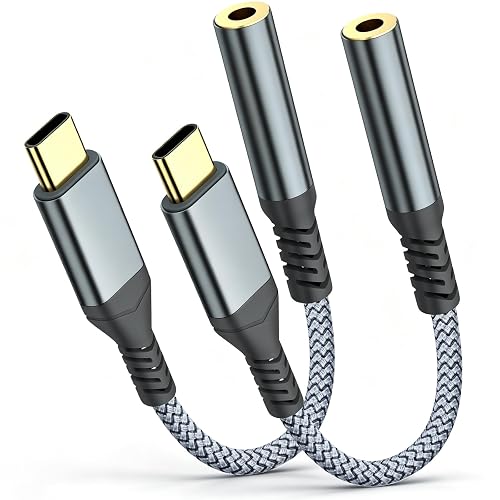
USB C To Headphone Jack Adapter For iphone 17 Pro Max/17 Pro, 16/15 Pro Max, 16/15 Pro, Galaxy S24/S23/S22 Ultra USB C to 3.5mm Audio Headphone Adapte (2 Pack)
Each of these is a simple connector-style adapter. Compare the compatibility list in each listing with your own device, and check whether the adapter supports the audio features you need before buying.
FAQ
Does a usb-c to 3.5mm headphone adapter improve sound quality?
Not usually. An adapter like this passes audio through a converter that is designed for convenience. Sound quality depends largely on the source device and your headphones. A dedicated DAC and amp is the usual route to a noticeable improvement.
Can I charge my phone while using this adapter?
This model is described as a single-port adapter without pass-through charging. If you need to charge while listening, look for a combo dongle that includes a USB-C charging port.
Will my headphone microphone work with this adapter?
The listing describes it for music, podcasts and travel listening. If your headset has a microphone on the same 3.5 mm plug, check the product details carefully before buying, because microphone support varies by adapter.
Is this adapter compatible with a 3.5 mm to USB-C headphone adapter setup?
Yes, in the sense that it lets a standard 3.5 mm headphone plug connect to a USB-C device. Some buyers search for a 3.5mm to usb-c headphone adapter when they mean the same thing; confirm the direction and port type for your own device.
Do I need a special adapter for an iPhone?
Most newer iPhones use USB-C or Lightning ports, and a USB-C adapter is needed for USB-C models. Check which port your phone uses before buying.
Will the adapter drain my battery?
Passive connector-style adapters draw very little power, so battery impact is generally small. Owner reports on this point are limited, so treat it as a general expectation rather than a measured figure.
How should I store the adapter to make it last?
Keep it in a pocket organizer or a small case rather than loose in a bag. Avoid pulling on the cable or bending the connector at a sharp angle. For more tips, see Storing Headphones Properly Between Uses.
Can I use it with wired headphones for long listening sessions?
Yes, as long as the headphones are comfortable and the volume is kept at a reasonable level. For guidance on comfort during long sessions, see Headphone Comfort Guide: Fit, Pads, Clamp, Heat, Glasses.
Final Verdict
The Apple USB-C to 3.5 mm Headphone Jack Adapter is a straightforward way to keep using wired headphones with a USB-C device. It is small, simple and suited to music, podcasts and travel listening. It is not the right choice if you need to charge while listening, want inline controls or a microphone, or are chasing a noticeable step up in sound from demanding headphones. For those needs, look at the alternatives above or a dedicated USB DAC.
Consult the manufacturer’s guidance and your device’s manual for compatibility details before buying, especially if you rely on microphone or charging features.

About Charlotte Harlow
Charlotte covers headphone comfort & accessories + gaming headsets, comparing specs, features and long-term owner feedback to help readers choose with confidence.