By Colin Foster
Updated November 2026
A computer gaming headset with mic has to do two jobs well: deliver clear game audio and pick up your voice without background noise. This list compares six well-established models on comfort, microphone design, connection type and owner feedback patterns, so you can match a headset to how you actually play.
Our top picks at a glance
- 1
 TOP CHOICEBest overallRazer BlackShark V2 X Wired Gaming Headset with MicView on Amazon
- 2
 TOP CHOICEBest for budget setupsBENGOO G9000 Stereo Gaming HeadsetView on Amazon
- 3
 TOP CHOICEBest for surround soundEKSA E900 Pro USB Gaming HeadsetView on Amazon
- 4
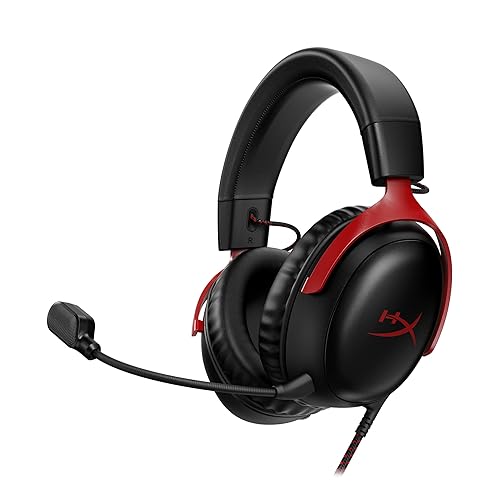 Best for long sessionsHyperX Cloud III Wired Gaming HeadsetView on Amazon
- 5
 Best for flip-to-mute convenienceLogitech G432 Wired Gaming HeadsetView on Amazon
- 6
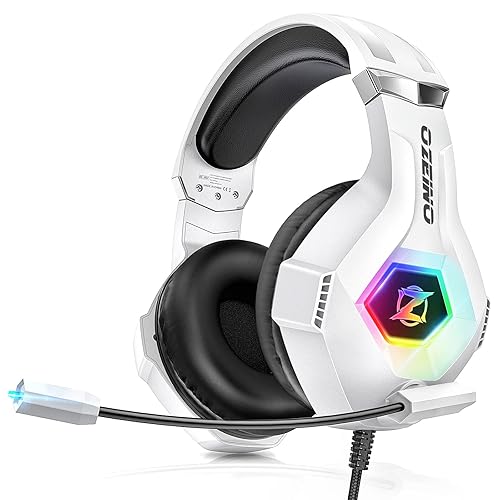 Best for casual multi-platform useOzeino Gaming Headset with 7.1 Surround SoundView on Amazon
Our Top Picks
Quick Comparison
| Product | Best for | Key feature |
|---|---|---|
| Razer BlackShark V2 X Wired Gaming Headset | Overall balance | HyperClear cardioid mic |
| BENGOO G9000 Stereo Gaming Headset | Budget setups | Noise-cancelling mic, LED light |
| EKSA E900 Pro USB Gaming Headset | Surround sound | 7.1 virtual surround, 50 mm drivers |
| HyperX Cloud III Wired Gaming Headset | Long sessions | Memory foam, detachable mic |
| Logitech G432 Wired Gaming Headset | Quick mic muting | Flip-to-mute microphone |
| Ozeino Gaming Headset with 7.1 Surround Sound | Casual multi-platform use | Noise-canceling mic, LED lights |
Razer BlackShark V2 X Wired Gaming Headset with Mic
TriForce Titanium 50 mm Drivers, HyperClear Cardioid Mic, 240 g Lightweight, Noise-Isolating Earcups, 3.5 mm, PS4, Switch Razer BlackShark V2 X Wired Gaming Headset with Mic for PC and PS5, Black
Best for: Players who want a well-rounded computer gaming headset with mic and a clear voice pickup.
This suits competitive players who value crisp voice chat and a lightweight build for hours of play. Owners often report that the cardioid mic isolates speech well in noisy rooms.
Pros
- Lightweight design with noise-isolating earcups
- Mic picks up voice with little background hiss
Cons
- Wired connection limits movement away from the desk
BENGOO G9000 Stereo Gaming Headset
BENGOO G9000 Stereo Gaming Headset for PS4 PC Xbox One PS5 Controller, Noise Cancelling Over Ear Headphones with Mic, LED Light, 7.1 Surround Sound, Soft Memory Earmuffs for Nintendo Xbox Series X|S
Best for: Budget-conscious players who want a full-featured computer gaming headset with mic.
This fits students and casual gamers who want surround sound and a noise-canceling mic without a premium investment. Owners frequently mention the soft earmuffs for comfort during extended sessions.
Pros
- Noise-cancelling mic suits shared rooms
- Soft memory-foam earmuffs
Cons
- Build feels lighter than premium models
EKSA E900 Pro USB Gaming Headset
Computer Headset with Detachable Noise Cancelling Mic, Headphones with Microphone for PS4/PS5, Xbox One, Laptop, Office EKSA E900 Pro USB Gaming Headset for PC, 7.1 Surround Sound, 50MM Driver
Best for: Players who prioritize positional audio in a gaming computer headset with mic.
This is aimed at shooter and open-world players who rely on directional cues. The 50 mm drivers and USB connection are the main draws for PC-focused setups.
Pros
- USB connection for a stable PC link
- 7.1 virtual surround for directional audio
Cons
- Virtual surround results vary by game and settings
HyperX Cloud III Wired Gaming Headset
HyperXUSB-C + USB-A + 3.5mm Connectivity | Memory Foam | Durable Frame | Ultra-Clear 10mm Mic Cloud III Wired Gaming Headset for PC, PS5, PS4, Xbox Series X | S
Best for: Players who wear headphones for long sessions and want a dependable computer gaming headset with mic.
This suits players who game for hours and want comfort prioritized. The memory foam padding and detachable 10 mm mic are commonly praised in owner feedback.
Pros
- Memory foam padding for extended wear
- Multiple connection options including USB-C and 3.5 mm
Cons
- Not as light as some competing models
Logitech G432 Wired Gaming Headset
DTS Headphone:X 2.0, 50 mm audio drivers, USB and 3.5 mm jack, Flip-to-Mute mic, PC compatible Logitech G432 Wired Gaming Headset – Black
Best for: Players who mute and unmute often during matches.
This works well for team players who switch between talking and listening frequently. The flip-to-mute mic and DTS Headphone:X support are the features owners most often mention.
Pros
- Flip-to-mute mic is quick to use
- DTS Headphone:X support for spatial audio
Cons
- Cable length may be short for some desk layouts
Ozeino Gaming Headset with 7.1 Surround Sound
Ozeino Gaming Headset for PC, Ps4, Ps5, Xbox Headset with 7.1 Surround Sound Gaming Headphones with Noise Canceling Mic, LED Light Over Ear Headphones for Switch, Xbox Series X/S, Laptop, Mobile White
Best for: Casual players who use one headset across several devices.
This fits players who move between a PC, console and other devices and want a simple setup. The noise-canceling mic and LED lighting are the main selling points in listings.
Pros
- Works across multiple platforms
- Noise-canceling mic for everyday chat
Cons
- Audio detail is modest compared with higher-end models
Buying Guide
Connection Type (Wired, USB, or Wireless)
Wired 3.5 mm headsets work with the widest range of devices, including consoles, laptops and phones. USB headsets usually bring their own sound processing and surround options, but they need an open USB port and sometimes driver software. Check which connection your platform supports before you buy.
Microphone Design and Clarity
Look for a cardioid or noise-canceling boom mic that you can position close to your mouth, since this cuts down on background noise. A flip-to-mute or detachable mic is handy if you also want to use the headset for calls without a mic in the way.
Comfort for Long Sessions
Padding, headband weight and clamping force matter most when you wear a headset for hours at a time. Memory foam earcups and adjustable headbands tend to hold up better over long sessions, and breathable earcup fabric helps in warm rooms.
Surround Sound and Driver Size
Virtual 7.1 surround can help with directional cues in shooters, but results depend on the software and your ears. Driver size and build quality also shape the overall sound, so compare specs with your main games in mind rather than chasing the highest number.
Compatibility with Your Setup
Confirm the headset works with your specific platforms, whether that is PC, PlayStation, Xbox, Nintendo Switch or a mobile device. Some headsets need an adapter or a splitter for a controller and a phone at the same time, so check the cable and jack setup.
FAQ
Do I need a USB headset for PC gaming?
Not necessarily. A wired 3.5 mm headset works on most PCs when you use a motherboard audio jack or a splitter for the mic. USB models are useful if you want built-in sound processing or surround features without extra hardware.
Can I use a gaming headset with a mic for video calls?
Yes, most gaming headsets with a mic work well for Discord, Zoom and similar apps. Check that your computer recognizes the mic as an input device, and adjust the mic level in your system sound settings for the clearest voice.
Is virtual surround sound worth it?
It can help with locating footsteps and other sounds in competitive games, but many players prefer stereo for its simplicity. Try the surround setting in your games and software to see whether it improves your experience.
Will a headset work with both a console and a PC?
Many headsets are designed for multiple platforms, but the connection type determines what works where. A 3.5 mm model is the most flexible, while USB-only models are typically limited to computers.
How do I keep my mic from picking up background noise?
Position the boom mic a finger or two away from the corner of your mouth and enable any noise-cancellation option in your software. Closing doors and reducing fan or keyboard noise nearby also makes a noticeable difference.
Conclusion
For most players who want a dependable all-around pick, the Razer BlackShark V2 X is a strong starting point, while the BENGOO G9000 suits anyone on a tighter budget. Those who prioritize surround sound should look at the EKSA E900 Pro, and anyone planning long sessions may prefer the comfort-focused HyperX Cloud III.
If you split time between consoles and a computer, a flexible 3.5 mm or multi-platform model will serve you best. Match the connection type, mic style and comfort features to your most common games, and the right headset for your setup should be easy to choose.
Related reading
- Wireless Gaming Headset Computer Setup: A Step-by-Step Guide (2026)
- Top 5 PC Gaming Mic Headset Picks for Every Setup in 2026
- Top 5 Mic Monitoring Gaming Headset Picks for Every Setup
- Top 4 Computer Gaming Headset Microphone Options for Every Setup
- Gaming Headset Best Mic Quality: 6 Factors That Matter (2026)
- Best Headset Without Mic for Gaming: 5 Options That Fit Solo Play (2026)
About Colin Foster
Colin Foster is part of our editorial team and reviews and edits our headphone comfort & accessories + gaming headsets guides, checking product details against manufacturer specifications and owner feedback.