 By Colin Foster
Updated November 2026
The hyperx cloud core gaming headset is a wired, over-ear option aimed at players who want a comfortable, no-nonsense headset for PC and Xbox without paying for wireless features or extra software. It suits people gaming for long stretches on a budget, anyone who plays on a console and PC and wants one cable-based headset for both, and beginners upgrading from earbuds. It is less suitable for buyers who need wireless freedom, a detachable mic with premium voice clarity, or the most advanced surround processing. If you mostly play competitive shooters and want precise positional audio above everything else, you may want to compare it with higher-tier models before committing.

HyperX Cloud Core Wired DTS Headphone:X Gaming Headset for PC, Xbox X|S, and Xbox One – Black
Product Overview
The HyperX Cloud Core is part of HyperX’s Cloud line, which has long been built around the idea of a lightweight, padded headset that stays comfortable through extended sessions. The Cloud Core sits in the wired lineup and is marketed for PC and Xbox use, with support for DTS Headphone:X spatial audio through the listing’s name. The headset uses a closed-back design, a boom microphone, and an in-line or cable-mounted control arrangement typical of this class of gaming headset.
Owners tend to describe it as a straightforward piece of gear. It does not try to be a wireless hub or a software-driven audio suite. Instead, it focuses on plugging in, fitting reasonably well, and delivering clear game audio and usable voice chat. That simplicity is part of its appeal, and also the reason some buyers look for more features after a few months.
Because the headset is designed around the Xbox and PC ecosystems, setup is generally simple: connect the appropriate cable or adapter for your platform, adjust the headband, position the boom mic, and check the audio settings on your device. For a broader look at how these headsets fit into a setup, see Wireless Gaming Headset Computer Setup: A Step-by-Step Guide (2026) and Recommended Gaming Headset PC: 5 Best Picks Compared for 2026.
Key Features & Specifications
The table below lists features that are either named in the product listing or widely associated with this model. Items not confirmed by the listing have been left out.
| Feature | Details |
|---|---|
| Connection type | Wired |
| Platforms | PC, Xbox X|S, Xbox One |
| Surround support | DTS Headphone:X (as named in the listing) |
| Design | Over-ear, closed-back |
| Microphone | Boom microphone |
| Ear cushions | Padded, designed for long sessions |
| Color | Black |
Manufacturers generally specify driver size, impedance and frequency response for headsets like this. Those figures vary between revisions and regional listings, so check the current product page before relying on any single number for comparison.
Pros & Cons
Pros
- Works across PC and Xbox consoles, which suits mixed setups.
- Wired connection means no battery charging and no wireless latency concerns.
- Padded design is generally described by owners as comfortable for long sessions.
- Includes DTS Headphone:X support, which owners can use for spatial positioning in compatible games.
- Simple, plug-and-play setup with few moving parts.
- Boom mic is adequate for most casual and team voice chat.
Cons
- Wired-only design limits movement and can tangle during active play.
- Microphone clarity is generally described as good for chat but not studio-grade.
- Build materials feel lightweight, and some owners report durability concerns over time.
- Not suited to buyers who need wireless use, Bluetooth, or advanced companion software.
- Passive noise isolation is typical of closed-back headsets but does not match active noise cancellation.
Performance Analysis
Performance in a headset like this comes down to three areas: sound, voice and comfort. On sound, owners commonly report a balanced, game-friendly tuning that makes footsteps and environmental audio easy to follow, particularly when DTS Headphone:X is enabled in supported titles. Bass is usually described as present without overwhelming the mids, which suits action, shooters and open-world games. Audiophile-level detail is not the goal here, and buyers looking for critical listening performance should consider open-back or dedicated audio headphones instead.
Voice chat is a middle-ground experience. The boom microphone is generally considered clear enough for party chat, callouts and tournaments with friends. Background noise rejection depends heavily on mic placement, so positioning the boom about a finger’s width from the corner of your mouth often makes a noticeable difference. Owners who record content or stream to large audiences may find the mic adequate but not exceptional.
Comfort is where the Cloud line has a strong reputation, and owners of this model tend to echo that. The headband distributes weight reasonably, and the ear cushions are typically soft enough for multi-hour sessions. Clamping force can feel firm for some users at first, but it often loosens with use. Glasses wearers may notice pressure at the temples, and heat buildup is common with closed-back designs in warm rooms. For more on keeping things comfortable over time, see Gaming Headset Comfort for Long Sessions.
Setup details matter. Owners frequently mention adjusting the mic boom and checking the platform’s audio output settings as the main sources of early frustration. Taking a few minutes to set the correct output device and enable spatial audio in the console or PC settings usually resolves most complaints.
Who Should Buy This Product?
This headset makes the most sense for players who want a comfortable, reliable wired option for PC and Xbox without paying for features they will not use. It also works well for households where one headset needs to move between a desktop and an Xbox, and for first-time headset buyers who want a dependable starting point. Budget-conscious players who value comfort over premium materials will likely be satisfied.
It is a weaker choice for people who need wireless freedom, PlayStation-specific compatibility (check the listing before buying for PlayStation), or top-tier microphone quality for streaming. Competitive players who depend on the most precise positional audio may also want to compare more advanced models. If you are shopping for a different platform or type, Wireless Headset vs Wired Gaming: Which Should You Choose? (2026) explains the trade-offs clearly.
Buying Guide
Before buying any gaming headset, check four things: the platforms it supports, whether you need wired or wireless, how the microphone fits your use, and how the headset feels after an hour of wear. The Cloud Core answers the first and last points well for its category. For a fuller checklist, Gaming Headset PC Gamer Guide: 7 Factors to Check Before You Buy (2026) walks through the decision in more detail.
If you want to compare options, several well-known alternatives are worth a look:
- HyperX Cloud Stinger 2 Core (wired, PC-focused): A lighter, lower-profile sibling with a swivel-to-mute mic, suited to PC players who want a similar feel with a simpler package.

HyperXWired Connectivity | Swivel-to-Mute Mic | Lightweight Cloud Stinger 2 Core Wired Gaming PC Headset
- HyperX Cloud III (wired, multi-platform): A step up in the Cloud family, with USB-C and USB-A connectivity, memory foam cushions and a detachable-style 10mm mic, aimed at players on PC, PlayStation and Xbox.
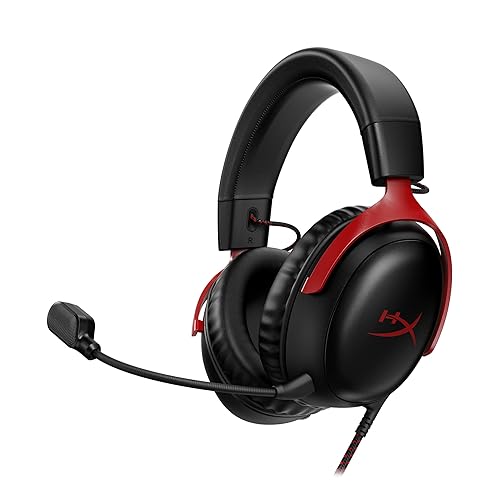
HyperXUSB-C + USB-A + 3.5mm Connectivity | Memory Foam | Durable Frame | Ultra-Clear 10mm Mic Cloud III Wired Gaming Headset for PC, PS5, PS4, Xbox Series X | S
For more options across the market, 6 Best HyperX Cloud III Gaming Headset Models Compared (2026) and What's a Good Gaming Headset? 7 Best Picks Compared for 2026 provide broader comparisons.
FAQ
Does the HyperX Cloud Core work with PlayStation?
The product listing names PC and Xbox platforms. Buyers who play primarily on PlayStation should confirm compatibility on the current product page or consider a model that lists PlayStation support directly.
Is the HyperX Cloud Core wireless?
No. This model is a wired headset, so it needs a cable connection to your device. There is no Bluetooth or wireless dongle option in the listing.
Is the microphone good enough for streaming?
The boom mic is generally considered clear enough for party chat and casual voice communication. Streamers who want broadcast-quality audio often add a dedicated microphone instead.
Is the headset comfortable for long gaming sessions?
Owners commonly describe the padded headband and ear cushions as comfortable for extended play. Clamping force can feel firm at first and typically eases with use. Glasses wearers may notice some temple pressure.
Does it support surround sound?
The listing names DTS Headphone:X support. Spatial audio benefits depend on the game and the platform’s audio settings, so enable it in your console or PC sound options and test it in a supported title.
Can I use it with a laptop?
A wired headset with a standard 3.5mm connection is generally compatible with laptops, though some laptops need a separate headset input or adapter to handle the microphone properly. Check the connector type on the product page before buying.
How do I improve the microphone sound?
Position the boom mic about a finger’s width from the side of your mouth, avoid placing it directly in front of your lips, and adjust the input level in your device’s sound settings. These steps often reduce breath noise and improve clarity noticeably.
Final Verdict
The hyperx cloud core gaming headset is a sensible choice for players who want a comfortable, wired headset for PC and Xbox with simple setup and no unnecessary extras. Its strengths are comfort, cross-platform use within its supported systems and a balanced sound profile that works well for most games. Its limits are the wired-only design, a microphone that is good rather than exceptional, and a build that some owners feel is lightweight over the long term. Buyers who need wireless freedom, strong PlayStation support or studio-quality voice should look at the alternatives above. For everyone else, it remains a practical and approachable option.
Note: Specifications and compatibility can change between product revisions. Confirm details on the current listing before purchasing.
Before you buy: helpful guides
About Colin Foster
Colin Foster is part of our editorial team and reviews and edits our headphone comfort & accessories + gaming headsets guides, checking product details against manufacturer specifications and owner feedback.


