By Colin Foster
Updated November 2026
A multi platform gaming headset is the practical choice when you play on more than one system and do not want a separate pair for each. The best options connect to PC, PlayStation, Xbox, Switch and mobile through some mix of USB dongle, Bluetooth, 3.5mm cable or a console-specific adapter. The criteria below focus on platform coverage, connection method, battery life, mic quality and how the headset fits over long sessions.
Best overall: HyperX Cloud III S – View on Amazon
Best for budget-minded wireless: Turtle Beach Stealth 600 (Xbox/PS version) – View on Amazon
Best for battery life: SteelSeries Arctis Nova 5 Wireless – View on Amazon
Best for wired simplicity: Turtle Beach Recon 70 – View on Amazon
Best for app-based tuning: SteelSeries Arctis Nova 3X Wireless – View on Amazon
Best for multi-device pairing: SteelSeries Arctis Nova 7X Wireless Gen 2 – View on Amazon
Best for PlayStation-first players: Turtle Beach Stealth 600 Wireless (PS5/PC) – View on Amazon
Our Top Picks
Quick Comparison
| Product | Best for | Key feature |
|---|---|---|
| HyperX Cloud III S Wireless | Best overall | 2.4GHz and Bluetooth |
| Turtle Beach Stealth 600 (Xbox/PS) | Budget-minded wireless | 80-hour rated battery |
| SteelSeries Arctis Nova 5 Wireless | Battery life | 60-hour rated battery |
| Turtle Beach Recon 70 | Wired simplicity | Flip-to-mute mic |
| SteelSeries Arctis Nova 3X Wireless | App-based tuning | Mobile app control |
| SteelSeries Arctis Nova 7X Wireless Gen 2 | Multi-device pairing | Real-time app control |
| Turtle Beach Stealth 600 Wireless (PS5/PC) | PlayStation-first players | Memory foam earpads |
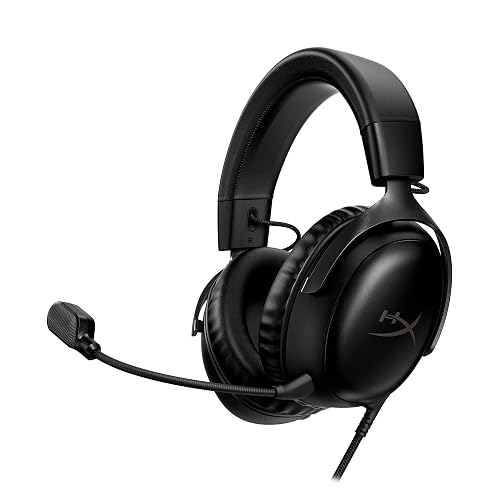
HyperX Cloud III S Wireless Gaming Headset

HyperXWireless Headphones | 2.4GHz + Bluetooth | 120-Hour Battery | Detachable Mic Cloud III S Wireless Gaming Headset | Multi-Platform Compatibility
Best for: Best overall
This is a strong default for players who want wireless freedom across PC, consoles and mobile without learning a complicated setup. It suits people who switch between a dongle for low latency and Bluetooth for phones and tablets.
Pros
- Dual 2.4GHz and Bluetooth connection
- Detachable microphone
Cons
- Bluetooth audio quality trails the dongle
Turtle Beach Stealth 600 Wireless Gaming Headset for Xbox, PS5, PC

Xbox Series X|S, Xbox One, PlayStation, PS4, Multiplatform, Bluetooth, 50mm Drivers, 80-Hr Battery, Flip-to-Mute Mic, Black Turtle Beach Stealth 600 Wireless Gaming Headset for Xbox, PS5, PC, Mobile
Best for: Budget-minded wireless
Owners often report that this model covers Xbox, PlayStation, PC and mobile with a single headset. It fits players who want long wireless runtime without moving into premium pricing tiers.
Pros
- Manufacturer-specified 80-hour battery life
- Flip-to-mute microphone
Cons
- Bulkier feel than lightweight rivals
SteelSeries Arctis Nova 5 Wireless Multi-System Gaming Headset
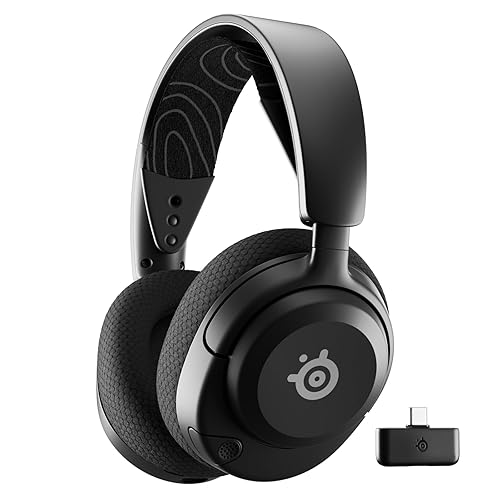
SteelSeriesNeodymium Magnetic Drivers — 60 HR Battery — 2.4GHz or BT — ClearCast Gen2.X Mic — PC, PS5, PS4, Switch, Mobile Arctis Nova 5 Wireless Multi-System Gaming Headset – Black
Best for: Battery life
This headset suits players who go long stretches between charges and want PC, PlayStation, Switch and mobile in one package. The 2.4GHz and Bluetooth combination covers most common setups.
Pros
- Manufacturer-specified 60-hour battery
- ClearCast Gen2.X microphone
Cons
- Xbox support depends on the adapter approach
Turtle Beach Recon 70 Wired Multiplatform Gaming Headset

PlayStation, PS4, Xbox Series X|S, Xbox One, Mobile, Flip-to-Mute Mic, 40mm Speakers, Lightweight, Soft Earpads, Black Turtle Beach Recon 70 Wired Multiplatform Gaming Headset for PS5, PC, Xbox
Best for: Wired simplicity
A wired option makes sense for players who want no charging, no pairing and no latency worries. It works well for a fixed desk or a console setup that rarely changes.
Pros
- No battery to manage
- Lightweight with soft earpads
Cons
- Cable limits movement
SteelSeries Arctis Nova 3X Wireless Multi-Platform Gaming Headset

Mobile App Control — 40 HR Battery — Neodymium Magnetic Drivers — 2.4GHz/Bluetooth — Xbox, PS5, PC, Switch, Mobile SteelSeries Arctis Nova 3X Wireless Multi-Platform Gaming Headset – Black
Best for: App-based tuning
Players who like adjusting EQ and sidetone from a phone will appreciate this model. It is a good match for people who want fine control without buying an external DAC.
Pros
- Mobile app control
- Manufacturer-specified 40-hour battery
Cons
- Battery runtime is shorter than the Nova 5
SteelSeries Arctis Nova 7X Wireless Gen 2 Gaming Headset

Real-Time App Control, 50+ HR Play, Neodymium Drivers, Mix 2.4GHz/Bluetooth, Xbox, PC, PS5/PS4, Switch 1/2, Mobile SteelSeries Arctis Nova 7X Wireless Gen 2 Gaming Headset – Black
Best for: Multi-device pairing
This model fits households where one headset needs to move between a PC, a console and a phone several times a day. Owners often point to the real-time app control as the main reason they keep it.
Pros
- Real-time app control
- Manufacturer-specified 50+ hour play time
Cons
- Setup takes a few extra steps for each platform
Buying Guide
Platform Compatibility
Start by listing every system you actually play on, including PC, PlayStation, Xbox, Switch and mobile. Some headsets support all of these through a USB dongle or Bluetooth, while others are built mainly for one console family, so check the box before you buy.
Pay attention to whether the headset needs a separate adapter for certain consoles. Knowing this up front prevents surprises when you switch between systems.
Connection Method
Most multi platform headsets use a 2.4GHz wireless dongle for low-latency play, Bluetooth for phones and tablets, or a 3.5mm cable as a fallback. Wireless dongles usually give the most reliable game audio, while Bluetooth is handy for calls and media on the go.
If you play competitively, prioritize a dedicated 2.4GHz connection. If you mostly play casually and use your phone often, a headset that can pair over Bluetooth at the same time is more useful.
Battery Life
Battery life determines how long you can play between charges. Longer sessions and marathon gaming nights make a bigger battery more valuable, while shorter sessions may not justify paying for extra endurance.
Also consider how the headset charges. Models that can keep playing while plugged in, or that charge quickly, are easier to live with day to day.
Microphone Quality and Mute Controls
A clear mic matters for team play and voice chat. Look for a detachable or boom-style microphone with a flip-to-mute feature, which makes it quick to silence yourself during a match.
If you record content or talk often, check whether the mic is noise-cancelling and whether it sounds natural in your own test calls.
Comfort and Fit
Long sessions depend on how the headset feels after hours of wear. Look for soft earpads, adjustable headbands and a lightweight build, and consider whether memory foam or breathable materials suit your ears and climate.
Because comfort is personal, read user feedback on clamping force and heat buildup, especially if you wear glasses or plan to game for several hours at a time.
FAQ
Can a multi platform gaming headset work with both PC and PlayStation at the same time?
Many models support multiple systems, but connecting to two sources at once depends on the headset and its dongle or Bluetooth setup. Some headsets let you switch sources quickly, while others require you to reconnect when moving between platforms. Check the connection details for the specific model you are considering.
Do I need a separate adapter for Xbox or PlayStation?
Some headsets connect directly through their included USB dongle, while others may need a console-specific adapter or cable. Confirm which accessories come in the box and whether the headset supports your console without extras. This is especially important if you own more than one system.
Is Bluetooth good enough for competitive gaming?
Bluetooth can introduce more audio delay than a dedicated 2.4GHz connection, which may matter in fast-paced games. For competitive play, a wireless dongle or wired connection is generally the safer choice. Bluetooth works well for calls, media and casual sessions.
Are wired multi platform headsets still worth buying?
Wired headsets are simple, never need charging and usually avoid wireless latency issues. They are a good pick if you want a dependable setup and do not mind a cable. Wireless models offer more freedom of movement but require regular charging.
How do I know if a headset will fit my head comfortably?
Check the headband adjustment range, earpad material and overall weight before buying. If possible, try the headset on in a store or read detailed fit feedback from other buyers. Comfort varies a lot between people, so the best fit is the one that stays comfortable during your longest sessions.
Conclusion
If you want the most well-rounded option across several systems, the HyperX Cloud III S is a strong starting point, while the Turtle Beach Stealth 600 suits buyers who want a budget-friendly wireless setup for Xbox and PlayStation. Players who prioritize long battery life should look closely at the SteelSeries Arctis Nova 5 Wireless.
For those who want a versatile wireless headset with app control, the SteelSeries Arctis Nova 3X and Nova 7X are good fits, and the Turtle Beach Recon 70 is worth a look if you prefer a simple wired connection for PC, PlayStation and Xbox.
Related reading
- 6 Best 2.4G Wireless Gaming Headsets for Multiple Platforms (2026)
- Wireless Headset vs Wired Gaming: Which Should You Choose? (2026)
- Wireless Gaming Headset PlayStation: 6 Factors to Check Before You Buy (2026)
- Wireless Gaming Headset Computer Setup: A Step-by-Step Guide (2026)
- What's a Good Gaming Headset? 7 Best Picks Compared for 2026
- Top 6 Gaming Headsets with Cat Ears for Streamers and Casual Players
- Top 6 Best Bluetooth Gaming Headset Picks Compared for 2026
- Top 5 Wireless Gaming Headsets with Microphone Picks for Every Setup
About Colin Foster
Colin Foster is part of our editorial team and reviews and edits our headphone comfort & accessories + gaming headsets guides, checking product details against manufacturer specifications and owner feedback.