By Colin Foster
Updated November 2026
Choosing the best surround gaming headset comes down to a few things: how it fits over long sessions, whether the virtual surround sound actually helps you locate footsteps, how the microphone sounds to teammates, and which platforms it connects to. The picks below are based on product listings, brand track records and patterns owners commonly mention, weighted toward comfort, positional audio and compatibility.
Our top picks at a glance
- 1
 TOP CHOICEBest overallRazer BlackShark V2 X Wired Gaming Headset with Mic for PC and PS5, BlackView on Amazon
- 2
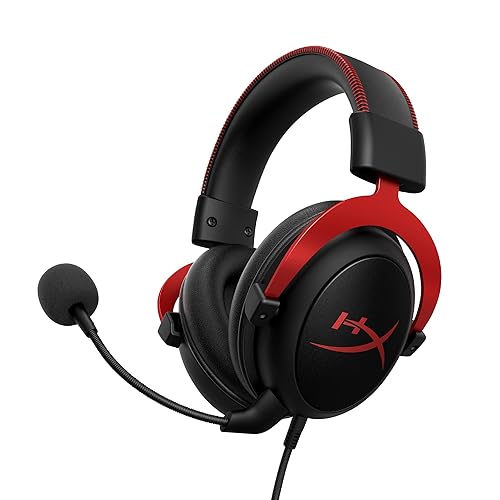 TOP CHOICEBest for budget-minded buyersHyperX Cloud II Gaming Headset – 7.1 Surround SoundView on Amazon
- 3
 TOP CHOICEBest for multiplatform setupsCorsair HS35 Surround v2 Multiplatform Wired Gaming HeadsetView on Amazon
- 4
 Best for large over-ear comfortLenovo Legion H500 PRO 7.1 Surround Sound Gaming HeadsetView on Amazon
- 5
 Best for wireless freedomLogitech G733 Lightspeed Wireless Gaming HeadsetView on Amazon
- 6
 Best for PC audio tuningLogitech G432 Wired Gaming Headset – BlackView on Amazon
- 7
 Best for voice clarityClear Microphone, Dolby 7.1 Surround Sound, SoundID Audio Profile TechView on Amazon
Our Top Picks
Quick Comparison
| Product | Best for | Key feature |
|---|---|---|
| Razer BlackShark V2 X | Overall balance | 50 mm TriForce drivers |
| HyperX Cloud II | Budget-minded buyers | Memory foam ear pads |
| Corsair HS35 Surround v2 | Multiplatform setups | Dolby 7.1 surround |
| Lenovo Legion H500 PRO | Large over-ear comfort | Stainless steel headband |
| Logitech G733 Lightspeed | Wireless freedom | Lightspeed wireless |
| Logitech G432 | PC audio tuning | DTS Headphone:X 2.0 |
| Corsair HS65 Surround | Voice clarity | SoundID audio profiles |
Razer BlackShark V2 X Wired Gaming Headset with Mic for PC and PS5, Black
TriForce Titanium 50 mm Drivers, HyperClear Cardioid Mic, 240 g Lightweight, Noise-Isolating Earcups, 3.5 mm, PS4, Switch Razer BlackShark V2 X Wired Gaming Headset with Mic for PC and PS5, Black
Best for: Overall balance
This one suits players who want a lightweight wired headset with a clear, focused mic and sound that works across PC, PS5 and Switch.
Pros
- Light at roughly 240 g, which many owners find helps during long sessions
- HyperClear cardioid mic is commonly praised for voice isolation
Cons
- The 3.5 mm connection limits some console features
HyperX Cloud II Gaming Headset – 7.1 Surround Sound
HyperX Cloud II Gaming Headset – 7.1 Surround Sound – Memory Foam Ear Pads – Durable Aluminum Frame – Multi Platform Headset – Works with PC, PS4, PS4 PRO, Xbox One, Xbox One S – Red (KHX-HSCP-RD)
Best for: Budget-minded buyers
A long-running favorite for players who want dependable comfort and virtual 7.1 positioning without paying for extras they will not use.
Pros
- Memory foam ear pads and an aluminum frame that owners often describe as durable
- Broad multiplatform support including PC and recent consoles
Cons
- The fabric-free plastic earcup finish can feel less premium than newer models
Corsair HS35 Surround v2 Multiplatform Wired Gaming Headset
Corsair HS35 Surround v2 Multiplatform Wired Gaming Headset – Dolby 7.1 – Flexible Omni-Directional Microphone – Universal 3.5mm Connection – PC, Mac, PS5, PS4, Xbox, Nintendo Switch, Mobile – Carbon
Best for: Multiplatform setups
Suited to players who move between PC, PlayStation, Xbox and Switch and want one headset that connects through a universal 3.5 mm plug.
Pros
- Dolby 7.1 surround with a universal 3.5 mm connection
- Flexible omni-directional mic that owners generally find easy to position
Cons
- Not as plush as premium memory foam options for very long sessions
Lenovo Legion H500 PRO 7.1 Surround Sound Gaming Headset
Lenovo Legion H500 PRO 7.1 Surround Sound Gaming Headset, Noise-Cancelling Mic, Memory Foam & PU Leather Earcups, Stainless Steel Headband, PC, PS4, Xbox One, Nintendo Switch, GXD0T69864, Black
Best for: Large over-ear comfort
Fits players with larger heads who want generously padded earcups and a sturdy steel headband.
Pros
- Memory foam and PU leather earcups with a wide, adjustable fit
- Noise-cancelling mic that owners say handles background noise well
Cons
- Heavier than lightweight alternatives, which can matter on extended sessions
Logitech G733 Lightspeed Wireless Gaming Headset
Suspension Headband, Blue VO!CE Mic, PRO-G Audio, PC, PS5, PS4, Switch Compatible Logitech G733 Lightspeed Wireless Gaming Headset – Black
Best for: Wireless freedom
A good match for players who want to move around without a cable and still need compatibility with PC, PS5, PS4 and Switch.
Pros
- Lightspeed wireless connection with a suspension headband that owners often find comfortable
- Blue VO!CE mic technology aimed at clearer voice pickup
Cons
- Requires charging, so battery life becomes part of your routine
Logitech G432 Wired Gaming Headset – Black
DTS Headphone:X 2.0, 50 mm audio drivers, USB and 3.5 mm jack, Flip-to-Mute mic, PC compatible Logitech G432 Wired Gaming Headset – Black
Best for: PC audio tuning
Aimed at PC players who want to adjust surround processing through software and use either USB or a standard 3.5 mm jack.
Pros
- DTS Headphone:X 2.0 support for virtual surround on PC
- Flip-to-mute mic that is simple to use during matches
Cons
- The surround effect depends on software setup and may not suit every ear
Buying Guide
Comfort for Long Sessions
Headsets that feel fine for an hour can become tiring after several. Look for padded headbands, soft ear cushions and a light overall weight. Memory foam earpads and adjustable headbands are common features that help with fit over time.
Consider how the clamp feels on your head. A snug fit keeps the earcups sealed for better sound, but a firm clamp can cause pressure during marathon sessions.
Quality of Positional Audio
The main reason to buy a surround headset is to hear where sounds come from. Virtual surround technologies such as Dolby or DTS aim to recreate directional cues like footsteps or gunfire. Results vary by person, so the software profile and your own hearing play a big role.
Drivers around 50 mm are common in this category and generally provide a clear, balanced sound. Pay attention to whether the headset offers software tuning or audio profiles you can adjust.
Microphone Clarity
If you play with friends or in ranked matches, the microphone matters as much as the speakers. Noise-cancelling booms and flip-to-mute designs help keep background noise out and make it easy to silence yourself quickly.
Boom microphones that tuck away when not in use are convenient for casual play, while detachable mics suit people who want a cleaner look when they are not chatting.
Platform Compatibility
Check which consoles and devices the headset supports before buying. Some models connect through a standard 3.5 mm jack, which works across many systems, while others need a USB adapter or a proprietary dongle for full surround features. Wireless models offer freedom of movement but require charging and may have a slight delay compared with wired options.
Wired or Wireless Connection
Wired headsets are typically simpler, lighter and never need charging, making them a practical choice for most players. Wireless headsets remove cable clutter and can be handy in a living room setup, but they depend on battery life and a stable connection. Choose based on how and where you usually play.
FAQ
Do I need a surround headset to hear positional audio?
Not always, since many games offer stereo positional cues that work with regular headphones. A surround headset with a supported virtual surround profile can make directional sound clearer and more distinct. The difference is most noticeable in competitive shooters and open-world games.
Is virtual surround as good as a real multi-speaker setup?
Virtual surround is a simulation, so it cannot fully replicate a physical speaker array in a room. For headphones, though, it is often a helpful upgrade over plain stereo. Results depend on the technology used and how well it suits your ears.
Can I use these headsets with a phone or tablet?
Many models with a 3.5 mm connection work with phones and tablets, though a microphone may only function if the headset has a compatible jack. Full surround features may not be available on mobile devices. Check the product details for mobile support before buying.
Are wireless gaming headsets worth the extra cost?
Wireless headsets are worth considering if you value freedom of movement or dislike cables. They do need regular charging, and the connection can introduce a small amount of latency depending on the technology. Wired models remain a reliable and often more affordable choice.
How do I clean and maintain my headset?
Wipe earpads and headband with a dry or slightly damp cloth to remove oil and dirt. Replace earpads when they start to flatten or wear out, since that can change the sound and comfort. Store the headset in a cool, dry place and avoid pulling hard on the cable.
Conclusion
For most players who want strong positional audio and a dependable all-around pick, the Razer BlackShark V2 X is a solid choice, while the HyperX Cloud II suits buyers looking for comfort and value. Those with several gaming platforms will find the Corsair HS35 Surround v2 especially flexible, and players who want wireless freedom should look at the Logitech G733.
Shoppers who prefer a large, padded over-ear fit or a broader feature set may lean toward the Lenovo Legion H500 PRO or the Logitech G432, depending on whether they need wired simplicity or extra audio tuning. Matching the headset to your platform and how long you play will help you pick the right one.
Related reading
- 6 Best Gaming Headset 7.1 Surround Sounds for PC and Console (2026)
- 5 Best Good Surround Sound Gaming Headset Picks for 2026
- What's a Good Gaming Headset? 7 Best Picks Compared for 2026
- Top 6 Gaming Headsets with Cat Ears for Streamers and Casual Players
- Top 6 Best Bluetooth Gaming Headset Picks Compared for 2026
About Colin Foster
Colin Foster is part of our editorial team and reviews and edits our headphone comfort & accessories + gaming headsets guides, checking product details against manufacturer specifications and owner feedback.