By Claire Whitaker
Updated November 2026
A usb and headphone adapter lets you plug a standard 3.5mm headphone into a computer, tablet or phone that has only a USB port or a USB-C port. That matters more now that many devices have dropped the traditional audio jack. This list focuses on adapters that work with common phones, Windows and Mac computers, and gaming consoles, and it weighs three things: how reliably the adapter handles stereo audio and microphone input, how well it fits the device you plan to use it with, and how much owners report problems with compatibility or sound quality.
Our top picks at a glance
- 1
 TOP CHOICEBest overallJXMOX USB to 3.5mm Jack Audio Adapter, 2-PackView on Amazon
- 2
 TOP CHOICEBest for charging and listening at onceUSB C to 3.5mm Headphone and Charger AdapterView on Amazon
- 3
 TOP CHOICEBest for desktop PCs and older USB setupsSABRENT USB External Stereo Sound Card AdapterView on Amazon
- 4
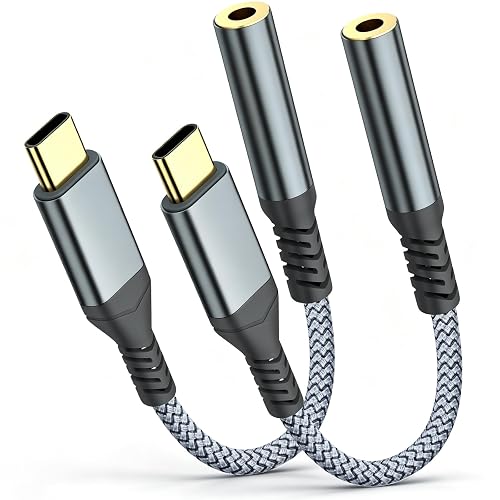 Best for iPhone 15 and newerUSB C To Headphone Jack Adapter, 2 PackView on Amazon
- 5
 Best multi-port hub option3 in 1 USB C to USB Adapter with Charger PortView on Amazon
- 6
 Best from a major brandApple USB-C to 3.5 mm Headphone Jack AdapterView on Amazon
- 7
 Best budget pick for multiple devicesHtrenc USB C to 3.5mm Headphone Jack Adapter, 2 PackView on Amazon
Our Top Picks
Quick Comparison
| Product | Best for | Key feature |
|---|---|---|
| JXMOX USB to 3.5mm Jack Audio Adapter, 2-Pack | Computers needing headphones and mic input | TRRS 4-pole sound card, two-pack |
| USB C to 3.5mm Headphone and Charger Adapter | Phones where you need to charge and listen | Pass-through USB-C power port |
| SABRENT USB External Stereo Sound Card Adapter | Desktop PCs and laptops with spare USB ports | Driver-free plug and play |
| USB C To Headphone Jack Adapter, 2 Pack | Recent iPhone and Galaxy models | Two-pack USB-C to 3.5mm adapter |
| 3 in 1 USB C to USB Adapter with Charger Port | Users who want extra USB-A ports too | Combined USB-C hub and audio jack |
| Apple USB-C to 3.5 mm Headphone Jack Adapter | Owners who prefer an official accessory | Made by Apple for USB-C devices |
| Htrenc USB C to 3.5mm Headphone Jack Adapter, 2 Pack | Households with several phones | Two adapters in one pack |
JXMOX USB to 3.5mm Jack Audio Adapter, 2-Pack
USB-A to 3.5mm TRRS 4-Pole Female Adapter | External Stereo Sound Card for Headphone, Mac, PS4, PS5, PC, Laptop, Desktop JXMOX USB to 3.5mm Jack Audio Adapter, TRRS 4-Pole Sound Card, 2-Pack
Best for: Computers and consoles that need headphones and a microphone through one usb and headphone adapter.
This option suits people who use a desktop or laptop for calls, streaming or gaming and want a separate external sound card. It is also useful when a computer’s built-in jack is damaged or missing.
Key specs
- USB-A connection
- 3.5mm TRRS 4-pole jack for headphones and microphone
- Sold as a two-pack
Pros
- TRRS design supports a headset with a built-in microphone
- Two adapters in one pack for spares or a second machine
- Works with PC, Mac, PS4 and PS5 according to the listing
Cons
- Uses a USB-A port, which newer laptops may not have free
- Adds a short cable between your device and headset
Bottom line: A strong choice for desktop users who want a headset mic to work without fiddling with settings.
USB C to 3.5mm Headphone and Charger Adapter
USB C to 3.5mm Headphone and Charger Adapter,2 in-1 USB C PD 3.0 Charging Port to Aux Audio Jack and Fast Charging Dongle Cable Cord for iPhone 18 Pro/Pro Max/Duo/17/16/15, Galaxy S25/S24/S23/S22/S21
Best for: Phones where you need to charge and listen at the same time.
This usb and headphone adapter is aimed at people whose phone has a single USB-C port. Passing through a charger lets you keep the battery topped up during long listening sessions.
Key specs
- USB-C input with 3.5mm audio output
- Built-in USB-C charging pass-through
- Compatible with the iPhone and Galaxy models named in the listing
Pros
- Lets you charge and listen with one port
- Compact, so it fits in a pocket
- Works with many recent phone models
Cons
- Charging speed depends on your charger and cable
- Owners sometimes report the charging pass-through is less reliable than a dedicated charger
Bottom line: A practical pick for commuters who rely on wired headphones and want one port for everything.
SABRENT USB External Stereo Sound Card Adapter
USB audio adapter; no drivers needed; for Windows & Mac; 3.5mm headphone & mic jacks; usb to 3.5mm jack audio adapter SABRENT USB External Stereo Sound Card Adapter, Plug & Play (AU-MMSA)
Best for: Desktop PCs and laptops with spare USB ports that need a simple external sound output.
This adapter is a good fit for people who want a plug-and-play solution without installing drivers. It is commonly used on Windows and Mac machines whose built-in audio jack is unreliable.
Key specs
- USB connection, no drivers required according to the listing
- 3.5mm headphone and microphone jacks
- Works with Windows and Mac
Pros
- Driver-free setup on supported systems
- Gives you a separate audio path from the built-in jack
- Well-known model name with wide owner familiarity
Cons
- Requires a free USB-A port
- Sound quality is typically aimed at everyday listening rather than critical audio work
Bottom line: Best for people who want a no-fuss audio output on a desktop and do not need premium sound.
USB C To Headphone Jack Adapter, 2 Pack
USB C To Headphone Jack Adapter For iphone 17 Pro Max/17 Pro, 16/15 Pro Max, 16/15 Pro, Galaxy S24/S23/S22 Ultra USB C to 3.5mm Audio Headphone Adapte (2 Pack)
Best for: Recent iPhone and Galaxy owners who want a spare adapter for a second device or bag.
The two-pack format makes this usb and headphone adapter useful for households with several USB-C phones or for keeping one in a car and one in a backpack.
Key specs
- USB-C to 3.5mm audio connection
- Sold as a two-pack
- Listed compatibility includes recent iPhone and Galaxy Ultra models
Pros
- Two adapters for the price of one pack
- Simple plug-in design with no software needed
- Covers a broad range of recent phones
Cons
- No charging pass-through, so the USB-C port is used only for audio
- Build quality varies across third-party adapters
Bottom line: A good value pick for people who only need audio and want spares.
3 in 1 USB C to USB Adapter with Charger Port
3 in 1 USB C to USB Adapter for iPhone 18/17/16/15 Samsung Galaxy S22 Ultra S21 S20 i-Pad Pro Air Pixel 4 Laptops USB C to 3.5mm Audio Headphone Adapter with Charger Port OTG Adapter
Best for: Users who want extra USB-A ports alongside headphone output on a single adapter.
This multi-function adapter suits tablet and laptop owners who run out of ports. It combines an audio jack with additional connectivity in one dongle.
Key specs
- USB-C input with 3.5mm audio output
- Additional USB port and charger port listed in the name
- OTG function for connecting USB accessories
Pros
- Adds ports without carrying a separate hub
- Handles audio and charging in one device
- Useful for tablets such as iPad models named in the listing
Cons
- Multi-function adapters can run warm during heavy use
- More connections mean more points of failure than a single-purpose adapter
Bottom line: A useful all-in-one for people who need audio plus extra ports on the go.
Apple USB-C to 3.5 mm Headphone Jack Adapter
1 USB Port, Music, Podcasts, Travel Apple USB-C to 3.5 mm Headphone Jack Adapter
Best for: Owners who prefer an official accessory made for USB-C devices.
This is the first-party option for anyone who wants a usb and headphone adapter from the device maker. It is often chosen by people who want predictable compatibility with iPhone and iPad.
Key specs
- USB-C to 3.5 mm headphone jack
- Made by Apple for USB-C devices
- Supports listening to music and podcasts, according to the listing
Pros
- Official accessory from the device manufacturer
- Straightforward plug-in use
- Consistent compatibility across Apple USB-C devices
Cons
- Generally offers less extra functionality than multi-port models
- Limited to Apple’s USB-C ecosystem for best results
Bottom line: A safe default for iPhone and iPad owners who value brand-backed compatibility.
Htrenc USB C to 3.5mm Headphone Jack Adapter, 2 Pack
Type C Aux Audio Dongle Cable Cord for iPhone18/iPhone17/iPhone 16/16 Pro/15/15 Pro/Pro Max/Plus Htrenc USB C to 3.5mm Headphone Jack Adapter, 2 Pack
Best for: Households with several phones that want a budget pick for multiple devices.
This two-pack suits families or couples who each use a USB-C phone and want a spare on hand. It is a sensible choice when you want to keep adapters in several places.
Key specs
- USB-C to 3.5mm audio connection
- Sold as a 2-pack
- Listed compatibility covers many recent iPhone models
Pros
- Two adapters make it easy to spread around the house
- Simple plug-and-listen design
- Broad list of compatible phone models
Cons
- Third-party build quality can vary between units
- No charging pass-through
Bottom line: A low-fuss pick for multi-device households that mainly need audio output.
Buying Guide
Connector Type and Device Port
Start by checking which port your device has. USB-A adapters plug into older laptops and desktops, USB-C adapters fit most recent phones and tablets, and some models use Lightning. A usb and headphone adapter only works if the connector matches your port, so confirm this before you buy.
Good picks for this: SABRENT USB External Stereo Sound Card Adapter, Apple USB-C to 3.5 mm Headphone Jack Adapter
Four-Pole (TRRS) Support for Microphones
Headsets with a built-in microphone usually use a four-pole TRRS plug. If you need calls to work, look for an adapter that explicitly supports headphone and microphone input. Standard two-pole adapters will play sound but may not pass the mic.
Good picks for this: JXMOX USB to 3.5mm Jack Audio Adapter, 2-Pack
Charging Pass-Through
If you listen while the phone charges, check whether the adapter has a USB-C power port. Charging speed depends on your charger and cable, so an adapter with pass-through is convenient but not always as fast as a direct connection.
Good picks for this: USB C to 3.5mm Headphone and Charger Adapter, 3 in 1 USB C to USB Adapter with Charger Port
Driver Requirements and Setup
Many adapters work without installing software, which is useful on locked-down work computers. Some external sound cards may need drivers or a settings change to appear as the default output. Read the listing and set the new device as your output in your operating system’s sound menu.
Good picks for this: SABRENT USB External Stereo Sound Card Adapter, JXMOX USB to 3.5mm Jack Audio Adapter, 2-Pack
Compatibility With Your Phone or Computer
Compatibility lists in product titles are a starting point, not a guarantee. Check the exact model of your device against the listing, and note that software updates can change how adapters behave. A usb and headphone adapter that works on one phone generation may behave differently on the next.
Good picks for this: USB C To Headphone Jack Adapter, 2 Pack, Htrenc USB C to 3.5mm Headphone Jack Adapter, 2 Pack
Durability and Cable Strain
Adapters take repeated plugging and unplugging, and the joint where the cable meets the connector is a common failure point. Look for strain relief and avoid yanking the cable. Owners often report that a short, sturdy adapter lasts longer than a long, thin one that dangles from a pocket.
Good picks for this: Apple USB-C to 3.5 mm Headphone Jack Adapter, Htrenc USB C to 3.5mm Headphone Jack Adapter, 2 Pack
Care and Storage
Keep adapters clean and dry, and wind cables loosely rather than tightly around your hand. Dust in the USB port can cause poor contact, so a quick check with a dry brush helps. Store spares in a small pouch so the connectors stay protected.
Good picks for this: JXMOX USB to 3.5mm Jack Audio Adapter, 2-Pack, USB C To Headphone Jack Adapter, 2 Pack
FAQ
What is a usb and headphone adapter used for?
It converts a USB or USB-C port into a 3.5mm headphone output, so you can use wired headphones on a device that lacks a standard audio jack. Some models also add a microphone input.
Do I need drivers for a USB headphone adapter?
Many adapters are plug-and-play and need no drivers. Some external sound cards may require a settings change in your operating system to become the default output. Check the listing for your specific model.
Will a USB-C adapter work with my headset’s microphone?
It depends on the adapter. Headsets with a microphone usually use a four-pole TRRS plug, and the adapter must support that design. Two-pole adapters typically play audio only.
Can I charge my phone and listen at the same time?
Some adapters include a USB-C charging pass-through port. Charging speed depends on your charger, cable and the adapter itself, so results can vary.
Why is my usb and headphone adapter not producing sound?
Common causes include the wrong output selected in your sound settings, a loose connection, or a dirty port. Unplug and reconnect, confirm the adapter is the active output, and try a different headphone to rule out the headset.
Are third-party adapters as good as official ones?
Quality varies widely among third-party models. Official accessories offer predictable compatibility, while well-reviewed third-party options can work well for everyday listening. Check owner feedback on compatibility and build quality before you choose.
Is sound quality different between adapters?
Basic adapters are generally designed for everyday listening. If you care about audio fidelity, a dedicated digital-to-analog converter may be a better choice, though it costs more and is less portable.
Conclusion
For most desktop users who need headphones and a microphone, the JXMOX two-pack is a strong fit. Phone owners who want to charge while listening should look at the USB C to 3.5mm Headphone and Charger Adapter. The SABRENT model suits people who want a driver-free desktop option, while the Apple adapter is the safest choice for those who prefer an official accessory. Multi-device households may find the two-pack options from Htrenc or the USB-C two-pack more practical. Match the adapter to your port, your need for a microphone, and whether you want charging on the same connection.
Sources
- Consumer guidance on safe use of personal audio devices and hearing protection (usa.gov)
- Information on hearing health and safe listening volume levels (nidcd.nih.gov)
- Official USB specifications and information on USB-C connector standards
Related reading
- Usb-c to 3.5mm Headphone Adapter (2026): Pros, Cons & Verdict
- Headphone Adapters Explained: 3.5 mm, 6.3 mm and USB-C
- Headphone Adapter for USB C: 5 Best Picks for Every Need (2026)
- 6 Best USB-C to 3.5mm Headphone Jack Adapters for Music and Calls (2026)
- 6 Best USB Adapter to Headphone Jack Picks for Every Setup (2026)
- 5 Best USB C to Headphone Jack Adapter Picks for Every Phone (2026)
About Claire Whitaker
Claire Whitaker is part of our editorial team and reviews and edits our headphone comfort & accessories + gaming headsets guides, checking product details against manufacturer specifications and owner feedback.