By Colin Foster
Updated November 2026
Choosing a gaming headset with 7.1 surround sound comes down to a few practical questions: which platforms you play on, whether you need a wireless connection, how comfortable the ear cups feel over long sessions, and whether the microphone will hold up in voice chat. The six picks below were compared using product listings, brand reputation and common owner feedback patterns, with a focus on virtual 7.1 setups that work across PC and consoles.
Our top picks at a glance
- 1
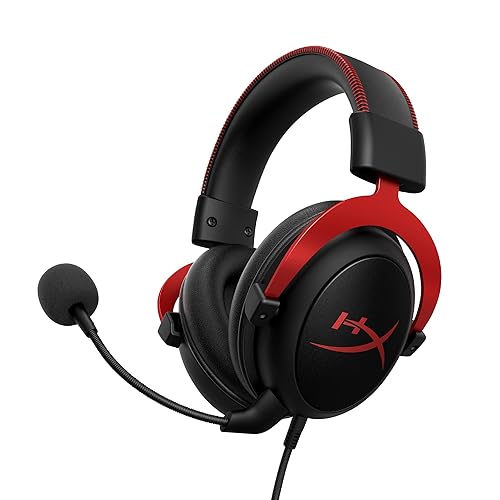 TOP CHOICEBest overallHyperX Cloud II Gaming HeadsetView on Amazon
- 2
 TOP CHOICEBest for wireless freedomCorsair VOID RGB Elite WirelessView on Amazon
- 3
 TOP CHOICEBest for multi-platform useCorsair HS65 SurroundView on Amazon
- 4
 Best for RGB stylingRazer Kraken V3 XView on Amazon
- 5
 Best for a budget pickFIFINE H9 Wired Gaming HeadsetView on Amazon
- 6
 Best for noise-reducing voice chat1 Surround Sound Over Ear HeadphonesView on Amazon
Our Top Picks
Quick Comparison
| Product | Best for | Key feature |
|---|---|---|
| HyperX Cloud II Gaming Headset | Best overall | Memory foam ear pads |
| Corsair VOID RGB Elite Wireless | Wireless freedom | 2.4GHz wireless connection |
| Corsair HS65 Surround | Multi-platform use | Dolby 7.1 with SoundID |
| Razer Kraken V3 X | RGB styling | TriForce 40mm drivers |
| FIFINE H9 Wired Gaming Headset | Budget pick | 3.5mm and USB options |
| 7.1 Surround Sound Over Ear Headphones | Voice chat clarity | Flip-up noise-canceling mic |
HyperX Cloud II Gaming Headset
HyperX Cloud II Gaming Headset – 7.1 Surround Sound – Memory Foam Ear Pads – Durable Aluminum Frame – Multi Platform Headset – Works with PC, PS4, PS4 PRO, Xbox One, Xbox One S – Red (KHX-HSCP-RD)
Best for: Best overall
This headset suits players who want a dependable, straightforward wired setup that works across PC and several consoles without extra software.
Pros
- Memory foam ear pads with a fairly even clamp force
- Durable aluminum frame that owners often describe as sturdy
Cons
- Wired design limits movement away from the console or PC
Corsair VOID RGB Elite Wireless
Clear Microphone, 7.1 Surround Sound, Microfiber Mesh Earpads, On-Ear Controls, 2.4GHz, USB Adapter, Mac CORSAIR VOID RGB ELITE WIRELESS PC PS5 PS4 Mac Gaming Headset – White
Best for: Wireless freedom
A good fit for players who move around the room and want to avoid cable tangles while keeping 7.1 virtual surround.
Pros
- 2.4GHz wireless connection with a USB adapter
- Microfiber mesh earpads and on-ear controls
Cons
- Requires charging, so battery habits matter for long sessions
Corsair HS65 Surround
Clear Microphone, Dolby 7.1 Surround Sound, SoundID Audio Profile Technology, Memory Foam Earpads, USB Adapter, Mac Corsair HS65 Surround Wired 3.5mm PC PS5 Xbox Switch Gaming Headset – Black
Best for: Multi-platform use
Players who switch between PC, PlayStation and Switch will appreciate the wired 3.5mm and USB options with Dolby 7.1 processing.
Pros
- Dolby 7.1 surround with SoundID audio profile support
- Memory foam earpads and a USB adapter for PC use
Cons
- Some owners find the default bass tuning a little heavy
Razer Kraken V3 X
TriForce 40mm Drivers, HyperClear Cardioid Mic, 7.1 Surround Sound, Chroma RGB Lighting Razer Kraken V3 X Wired USB Gaming Headset, Lightweight, Black
Best for: RGB styling
A fit for players who want lighting on their desk setup and a wired USB connection with a cardioid microphone.
Pros
- TriForce 40mm drivers with HyperClear cardioid mic
- Lightweight build with Chroma RGB lighting
Cons
- USB-only design means no direct 3.5mm connection for some consoles
FIFINE H9 Wired Gaming Headset
50mm Drivers, 7.1 Surround Sound, Lightweight, Soft Ear Cusion, Detachable Boom Mic, USB Control Box, for PC, Xbox, PS4/5 FIFINE H9 Wired Gaming Headset with Microphone, 3.5mm and USB Connectivity
Best for: Budget pick
Suited to players who want a basic 7.1 setup for PC and consoles without paying for premium features.
Pros
- 50mm drivers with a detachable boom microphone
- Both 3.5mm and USB connectivity
Cons
- Soft ear cushions may feel less substantial than premium pads
7.1 Surround Sound Over Ear Headphones
7.1 Surround Sound Over Ear Headphones, RGB Lighting, Flip Noise Canceling Mic, 50mm Drivers, Memory Foam Earcups Gaming Headset for Xbox Series X|S Xbox One PS5 PS4 PC Switch Mac, Wired
Best for: Voice chat clarity
Useful for players who take part in team voice chat and want a flip-up mic with noise canceling plus RGB lighting.
Pros
- Flip noise-canceling mic and 50mm drivers
- Memory foam earcups for compatibility with Xbox, PS5, PC and Switch
Cons
- Wired design means a fixed cable length to plan around
Buying Guide
Virtual vs. Physical 7.1 Surround
Most headsets with 7.1 surround sound use virtual processing on two drivers, which works well for positional cues in games. Check whether the product relies on software or a USB control box, since that affects compatibility.
Wired vs. Wireless Connection
Wired headsets avoid battery charging and latency concerns, while wireless models offer more freedom of movement. Consider how far you sit from your console or PC.
FAQ
Is 7.1 surround sound on a headset actually different from stereo?
Yes, in most games it gives you more directional cues, so footsteps and gunfire are easier to place around you. Many headsets create this effect virtually through software rather than using seven separate physical speakers. The benefit is most noticeable in competitive shooters and open-world games with busy soundscapes.
Do I need a USB adapter or a special dongle to use a 7.1 headset?
It depends on the model. Some headsets connect through a USB adapter or control box that handles the 7.1 processing, while others plug in directly through a 3.5mm jack. Check the connection type before you buy so it matches the ports on your PC or console.
Will a wireless 7.1 headset work with my console as well as my PC?
Many wireless models support both, but the setup can vary by platform. Some consoles need a separate wireless dongle or a specific audio setting turned on. Confirm the headset lists your exact console before purchasing.
Are virtual 7.1 setups good enough, or do I need physical surround speakers?
For headset use, virtual 7.1 is the practical choice, since physical surround speakers cannot be placed around your head. Most players find the effect convincing enough for gaming. Results can also depend on the software profile you select and how well the headset fits.
Does a detachable microphone matter for gaming?
It can be useful if you want to use the headset for casual listening or travel without the boom mic in the way. A good microphone with noise reduction is more important for clear voice chat than whether it detaches. Look for a mic that stays in a consistent position near your mouth.
How long can I expect comfort during long gaming sessions?
Comfort depends on ear cup padding, headband pressure and how the headset fits your head shape. Memory foam or soft mesh earpads tend to be easier to wear for extended play. Trying a headset on in person, if possible, is the best way to judge fit.
Conclusion
If you want a dependable, widely compatible option, the HyperX Cloud II is a strong starting point, while players who need wireless convenience should look at the Corsair VOID RGB Elite Wireless. Those who switch between PC and several consoles may find the Corsair HS65 Surround or the FIFINE H9 a good fit for their setup.
Budget-minded gamers and anyone focused on voice chat quality should weigh the Razer Kraken V3 X and the 7.1 Surround Sound Over Ear Headphones against their connection and comfort needs. Match the platform support and fit to how you actually play, and the right choice will be clear.
Related reading
- 5 Best Good Surround Sound Gaming Headset Picks for 2026
- 6 Best Gaming Headsets for Sound Quality: Top Picks Compared (2026)
- Wireless Headset vs Wired Gaming: Which Should You Choose? (2026)
- Wireless Gaming Headset PlayStation: 6 Factors to Check Before You Buy (2026)
- Wireless Gaming Headset Computer Setup: A Step-by-Step Guide (2026)
About Colin Foster
Colin Foster is part of our editorial team and reviews and edits our headphone comfort & accessories + gaming headsets guides, checking product details against manufacturer specifications and owner feedback.