By Claire Whitaker
Updated November 2026
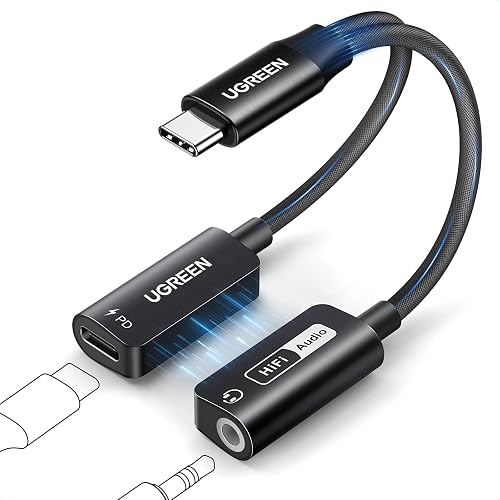
A usb-c dac headphone amp is a small dongle that sends your device’s audio to your headphones through a digital-to-analog converter and an amplifier stage. Once it is set up correctly, you get cleaner sound, more volume headroom and better control over demanding headphones. This guide walks you through choosing the right unit, connecting it and avoiding the setup problems that trip up most owners.
Step 1: Check Whether Your Headphones Need the Extra Power
Not every pair benefits from an external amp. Headphones with low impedance and high sensitivity usually run well from a phone’s built-in output. Look up the impedance and sensitivity figures the manufacturer publishes. Headphones rated around 32 ohms or less with sensitivity above roughly 100 dB/mW are generally easy to drive. Higher-impedance models, typically 150 ohms and up, often sound thin or quiet without an amp.
Shopping for one? See our guide: 7 Best Portable USB DAC Headphone Amp Picks for Every Need (2026).
Step 2: Confirm Your Device Supports USB-C Audio
A usb-c dac headphone amp only works if your phone, tablet or laptop outputs audio over the USB-C port. Most recent Android phones and many laptops do. iPads and some iPhones handle USB audio differently, so check compatibility before you buy. Some devices also cannot power the unit, which matters for amps that draw more current. A small powered hub or a unit with its own power input can solve that.
Step 3: Choose the Right Type of Unit
Usb-c dac headphone amp designs fall into a few groups:
- Basic dongles handle digital-to-analog conversion with a small output stage. They suit efficient headphones and everyday listening.
- Portable amps add a stronger output stage and volume control, useful for mid-impedance headphones.
- Desktop-style units connect to a laptop or PC and give the most output power, though they need more space and often a wall or USB power source.
If you also want a microphone input for calls, look for a model with a combined headset jack and confirm it supports your device’s mic protocol.
Step 4: Connect and Configure the Amp
- Plug the unit firmly into your USB-C port, using a short cable if the dongle sits awkwardly.
- Connect your headphones to the 3.5 mm or 4.4 mm output on the unit.
- On Android, open the sound settings and select the USB audio device as the output. On a laptop, choose it from the sound output menu.
- Set your device’s media volume to around 60 to 80 percent, then use the amp’s own volume control for fine adjustments. This keeps the signal clean.
- Play a known track and check for crackle, dropouts or channel imbalance before adjusting further.
Common Mistakes to Avoid
- Setting device volume to maximum, which can push distortion into the output stage.
- Expecting a dongle to fix poor source files. Low-bitrate streams still sound low-bitrate.
- Ignoring power limits. Some amps need more current than a phone port reliably provides.
- Buying a unit without checking that your headphone cable and plug type match the output.
- Forgetting to select the USB device in your app, so audio still routes to the phone speaker.
Recommended Gear
- A quality USB-C to USB-C cable helps keep the connection stable when the amp sits on a phone. View on Amazon
- A short extension cable or USB-C hub lets you position a dongle away from the phone case. View on Amazon
- A small pouch or sleeve protects the amp from pocket wear when you travel. View on Amazon
FAQ
Does a usb-c dac headphone amp improve sound on all headphones?
Not always. Efficient, low-impedance headphones often sound nearly identical with or without an amp. Benefits are most noticeable with higher-impedance or less sensitive models.
Will a usb c headphone dac amp drain my phone battery quickly?
It can, especially with power-hungry units. Keeping volume moderate and using a powered hub or a unit with its own power input reduces the drain.
Can I use one for phone calls?
Only if the model includes a microphone input and your device supports it. Check the product description for mic support before buying.
Conclusion
A usb-c dac headphone amp is most useful when your headphones need more drive or your device’s built-in output sounds weak. Match the unit to your headphone impedance, confirm your device supports USB audio, and keep the source volume moderate. With those steps done, setup is quick and the sound improvement is easy to hear.
Related reading
- Top 7 DAC Amp USB C Picks for Every Listening Setup (2026)
- Qudelix 5k Bluetooth Usb Dac Amp: Setup, Features and Tips for Headphone Owners
- Ifi GO Link USB Amp DAC: Setup, Uses and Tips for Headphone Users
- 6 Best Portable USB C DAC/Amp Picks for Phones and Laptops (2026)
- 5 Best Headphone Amp USB DAC Picks for Every Setup (2026)
Ready to choose one?
About Claire Whitaker
Claire Whitaker is part of our editorial team and reviews and edits our headphone comfort & accessories + gaming headsets guides, checking product details against manufacturer specifications and owner feedback.