By Claire Whitaker
Updated November 2026
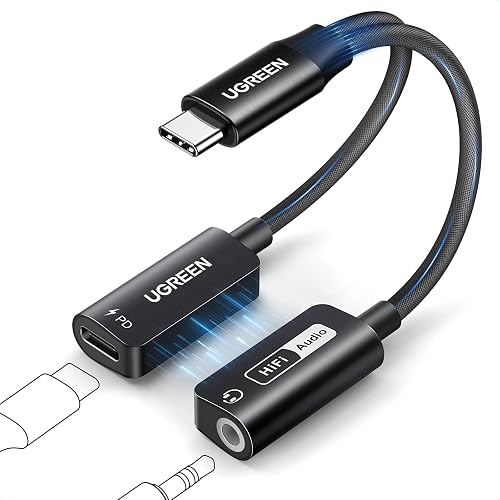
A lightning to 3.5 mm headphone jack adapter DAC lets you plug standard wired headphones into an iPhone or iPad while the adapter’s built-in digital-to-analog converter handles the audio conversion. Once it’s set up correctly, you get a stable connection, cleaner sound than a basic passthrough dongle, and the ability to keep charging during listening. This guide walks through what the adapter does, how to connect it, and how to troubleshoot the most common problems.
How a Lightning DAC Adapter Differs From a Basic Dongle
A basic Lightning-to-3.5 mm adapter is mostly a passthrough. The phone sends a digital signal, and the adapter’s small internal chip converts it to analog, which is the same job the phone’s own circuitry would normally do. A DAC-equipped adapter contains a dedicated converter, and manufacturers typically specify its sample rate and bit depth on the product page. Those figures matter less than you might expect with ordinary earbuds, but they can make a noticeable difference with higher-impedance over-ear headphones.
Shopping for one? See our guide: 6 Best Lightning to 3.5 Mm Headphone Jack Adapters for iPhone (2026).
Step-by-Step Setup
- Update your iPhone or iPad to the latest iOS version so the device recognizes USB audio class hardware correctly.
- Plug the adapter’s Lightning connector firmly into the charging port. Seat it fully; a partial connection can produce crackling or dropouts.
- Connect your headphones to the 3.5 mm output on the adapter. If the headphones have an inline remote or microphone, it should work with the adapter’s control functions as well.
- Play a test track and open Control Center. Confirm the audio output is set to the adapter, not the phone speaker.
- If you plan to charge while listening, plug the charging cable into the adapter’s Lightning pass-through port. Check that charging starts and the audio stays steady.
Choosing the Right Settings for Sound Quality
Most listeners never need to change anything beyond the default output. If you do want to tune the sound, start with the equalizer in your music app rather than system-level tweaks. Turn off any preset that boosts bass heavily if you hear distortion at higher volumes, since a DAC adapter already delivers a strong signal. Keep volume around 60 to 80 percent of maximum on the phone, then adjust from the headphones themselves. This leaves headroom and reduces the chance of clipping.
Checking Compatibility
Not every app or accessory works the same way through a DAC adapter. Some games and video apps route audio differently, and certain third-party headphone amplifiers may conflict with the adapter’s output. If one app is quiet while others work, restart the app and confirm it isn’t set to a separate output in its own audio menu.
Troubleshooting Common Problems
| Symptom | Likely cause | Fix |
|---|---|---|
| No sound | Adapter not seated fully | Reconnect and restart the audio app |
| Crackling | Dirty port or loose connector | Clean the Lightning port and retry |
| Quiet output | Low volume or wrong output selected | Raise phone volume and check output source |
| Charging stops | Underpowered charger | Use a charger rated for iPhone fast charging |
Recommended gear
A quality Lightning cable keeps the connection stable and reduces noise, especially when the adapter sits in a pocket or bag. Look for a braided or reinforced cable with strain relief. View on Amazon
A compact travel pouch protects the adapter’s connector from bending when stored with keys and other items. View on Amazon
Tips and Common Mistakes
- Don’t force the connector. If it resists, check orientation and the port for debris.
- Avoid running high volume through the phone’s default equalizer, which can add distortion.
- Keep the adapter away from liquids and extreme heat, both of which can damage the internal chip.
- Test with your own headphones before a trip, so you aren’t troubleshooting at the airport.
- Check the adapter’s firmware or companion documentation if the manufacturer provides updates.
For a deeper walkthrough of setup options, see Lightning to 3.5mm Headphone Jack Adapter DAC: Setup Guide (2026). If you’re comparing models before buying, Lightning Headphone Adapter DAC Picks: 5 Best Options for iPhone (2026) covers several popular choices. Readers using a female connector setup may also find Female Lightning to 3.5mm Headphone Jack Adapter: 6 Best Picks (2026) helpful.
FAQ
Does a DAC adapter improve sound compared to a regular adapter?
It can, particularly with higher-impedance headphones, because the internal converter provides a cleaner, more controlled signal. With efficient earbuds, the difference is often small.
Can I charge my iPhone while using the adapter?
Many models include a Lightning pass-through port for charging. Use a charger suited to fast charging to keep the power delivery steady.
Why does my audio crackle when I move the cable?
A loose connection or a dirty Lightning port is the usual cause. Reseat the adapter, clean the port gently with a dry brush, and try a different cable if the problem continues.
Conclusion
A lightning to 3.5 mm headphone jack adapter DAC is simple to set up once you confirm the connection, choose sensible volume levels, and check compatibility with your apps. Keep the port clean and the connector fully seated, and most problems disappear. Revisit the troubleshooting table whenever something sounds off.
Related reading
- 7 Best Apple's Lightning to 3.5 Mm Headphone Jack Adapters of 2026
- 7 Best Apple Lightning to 3.5 Mm Headphone Jack Adapter Picks for iPhone (2026)
- 6 Best Female Lightnings to 3.5 Mm Headphone Jack Adapter (2026): Our Picks
Ready to choose one?
About Claire Whitaker
Claire Whitaker is part of our editorial team and reviews and edits our headphone comfort & accessories + gaming headsets guides, checking product details against manufacturer specifications and owner feedback.