By Claire Whitaker
Updated November 2026
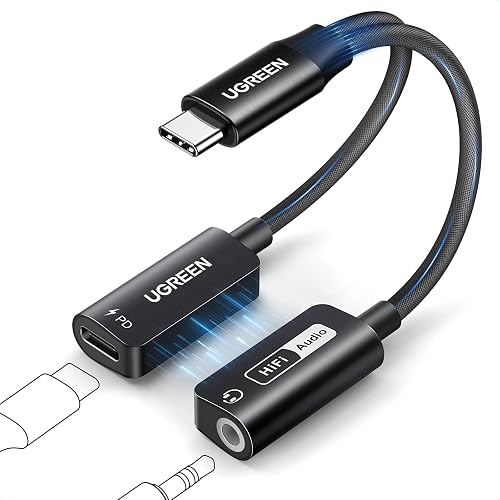
A USB C to AUX in headphone charger adapter lets you plug a wired headphone or aux cable into your phone while charging it through the same port. This guide explains how these adapters work, what to check before you buy one, and how to avoid the problems that most often leave people with silent audio or a phone that won’t charge.
How a USB C to AUX in Headphone Charger Adapter Works
Most of these adapters have three connections: a USB-C plug that goes into your phone, a USB-C charging port on the adapter body, and a 3.5 mm jack for headphones or an aux cable. The adapter uses the USB-C plug to carry both the audio signal and the power, then splits them internally. Some models also include a built-in digital-to-analog converter (DAC), which handles the audio conversion instead of your phone.
Shopping for one? See our guide: Top 6 USB C to 3.5mm Headphone and Charger Adapters for Every Phone.
Because the phone is sending power and digital audio through one port, the adapter must support both at the same time. Check the product listing for pass-through charging. Without it, you’ll choose between listening and charging.
Step-by-Step: Setting Up Your Adapter
- Connect the USB-C plug to your phone. Wait for the phone to recognize the device before continuing.
- Plug your charger into the adapter’s charging port. Use a cable and charger rated for the power your phone supports.
- Insert your headphones or aux cable into the 3.5 mm jack until it clicks or seats fully.
- Play a test track at a moderate volume. Check that audio comes through both earbuds or both channels.
- Watch the battery icon for a few minutes to confirm the phone is charging while audio plays.
What to Check Before You Buy
Pick an adapter based on three factors: charging support, audio source, and your phone’s port compatibility. The table below summarizes what to look for.
| Factor | What to look for | Why it matters |
|---|---|---|
| Pass-through charging | Explicitly stated in the listing | Lets you listen and charge at the same time |
| Built-in DAC | Mentioned in specifications | Can improve audio quality on phones with weak internal output |
| Charging wattage | Matches your charger and phone | Low passthrough wattage can cause slow or no charging |
| Phone compatibility | Lists your phone brand or USB-C standard | Some phones need a specific audio mode to work |
Manufacturers often specify the maximum charging wattage the adapter supports. Read that number before pairing the adapter with a fast charger, since a mismatch can slow charging noticeably.
Choosing the Right Model
If you mainly want to listen while charging, a basic pass-through model is usually enough. If you use high-impedance headphones or want cleaner sound, a model with a built-in DAC is the better choice. For a broader comparison of options, see 7 Best USB-C Headphone and Charger Adapters for Every Phone (2026) and Usb-C Headphone Adapter with DAC: 5 Best Picks for Every Phone (2026).
Troubleshooting Common Problems
If audio cuts out or the phone won’t charge, start with the simplest fix. Reseat the USB-C connection, restart the phone, and try a different charger. Owners often report that a dirty port causes intermittent audio, so a dry, lint-free check of the port is worth doing first. If the adapter still fails, the guides USB C Headphone Adapter Not Working: 7 Fixes That Work and Headphone Adapters Explained: 3.5 mm, 6.3 mm and USB-C cover the next steps.
Recommended Gear
- Pass-through USB-C charging adapter: A model that explicitly lists simultaneous charging makes the setup straightforward. View on Amazon
- USB-C charger with matching wattage: A charger rated to your phone’s fast-charge limit avoids slow charging when the adapter is in use. View on Amazon
Common Mistakes
- Buying an adapter without pass-through charging, then expecting it to charge while in use.
- Pairing the adapter with a low-wattage charger, which can make charging appear to stall.
- Forcing the 3.5 mm plug in at an angle, which can wear the jack over time.
- Ignoring a dirty charging port, a common cause of crackling or dropped audio.
- Assuming every phone supports audio output through USB-C. Check compatibility first.
FAQ
Can I charge my phone and listen to music at the same time?
Yes, if the adapter supports pass-through charging. Check the product listing for that feature before buying.
Do I need a DAC in my adapter?
Not always. A built-in DAC can help with weaker phone outputs or higher-impedance headphones, but many basic setups work well without one.
Why does my phone charge slowly with the adapter?
The adapter’s passthrough wattage or your charger may be the limit. Match the charger to the adapter’s stated maximum and to your phone’s supported charging speed.
Conclusion
A USB C to AUX in headphone charger adapter lets you listen and charge through one port when it supports pass-through charging. Confirm that feature, match your charger’s wattage, and keep the port clean for the most reliable results. Consult the manufacturer’s documentation for any model-specific setup questions.
Ready to choose one?
About Claire Whitaker
Claire Whitaker is part of our editorial team and reviews and edits our headphone comfort & accessories + gaming headsets guides, checking product details against manufacturer specifications and owner feedback.