By Claire Whitaker
Updated November 2026
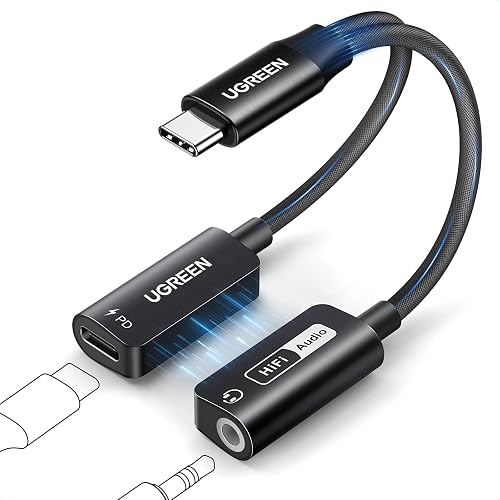
A c charger headphone adapter lets you plug in a wired headset and a USB-C charging cable at the same time, so your phone keeps its battery topped up while you listen. The adapter has a USB-C plug that goes into your phone, a 3.5 mm jack for headphones, and a second USB-C port for power. This guide explains how to choose one, set it up, and avoid the problems that cause audio dropouts or slow charging.
Check Your Phone and Headphones First
Before you shop, confirm two things. First, make sure your phone supports audio output over USB-C. Most recent Android phones do, but a few models and some older devices do not. Second, check your headphone plug. Standard 3.5 mm plugs fit most adapters, while some gaming headsets and studio cans use a 2.5 mm or 4-pole connector that needs a specific adapter.
Shopping for one? See our guide: Top 6 USB C to 3.5mm Headphone and Charger Adapters for Every Phone.
Match the Adapter to Your Charging Needs
The charging port is where most buyers get caught out. Manufacturers usually list the maximum passthrough wattage, and that number decides how fast your phone charges while in use. A lower-rated adapter may still work, but it can slow charging or cause the phone to show a “slow charging” message.
- Look for a stated passthrough rating that meets or exceeds your phone’s fast-charge wattage.
- Confirm the charging port is Power Delivery compatible if your phone supports PD.
- Choose a model with an audio chip or DAC if you use wired headphones with higher impedance.
Set Up the Adapter Step by Step
Setup takes under a minute, but the order matters. Connecting in the wrong sequence can leave the phone treating the adapter as a charge-only device.
- Plug the adapter’s USB-C connector into your phone before connecting anything else.
- Plug your charger’s USB-C cable into the adapter’s charging port, not the phone directly.
- Plug your headphones into the 3.5 mm jack.
- Play a test track and check that audio comes through both earcups and that the phone shows charging.
- If the phone does not recognize the headphones, unplug the adapter, wait five seconds, and reconnect it.
Troubleshoot Common Problems
When audio cuts out or charging stops, the cause is usually one of three things: a weak charger, a cable that only carries power, or a phone that has not registered the accessory. Start with the charger. Use a charger rated at the wattage your phone supports, and a cable that carries data as well as power.
| Symptom | Likely cause | Fix |
|---|---|---|
| Audio works, phone not charging | Charger too weak or power-only cable | Use a higher-wattage charger and a cable rated for power delivery |
| Charging works, no audio | Phone not recognizing the adapter | Reconnect the adapter, restart the phone, check audio output settings |
| Crackling or hiss | Loose plug or worn jack | Reseat the plug and try a different headphone cable |
Common Mistakes and Tips
- Connecting the charger to the phone instead of the adapter, which bypasses the audio path.
- Assuming any USB-C cable will carry enough power for fast charging.
- Ignoring the wattage rating and then blaming the adapter for slow charging.
- Using a long, heavy cable that pulls on the phone port and loosens the connection.
- Skipping a test run before a long listening session or a flight.
Recommended gear
A charger that matches your phone’s wattage is the most important companion item, because it decides how fast the phone charges during use. View on Amazon
A short, well-shielded USB-C cable keeps the connection stable and reduces strain on the phone port. View on Amazon
A strain-relief clip or cable sleeve helps keep the adapter from tugging on your phone when you move around. View on Amazon
FAQ
Will a c charger headphone adapter drain my phone battery faster?
Not on its own. Charging and audio playback run at the same time, so the net battery level depends on your charger’s wattage versus how much power the phone uses while playing.
Does the adapter work with every phone that has USB-C?
No. Some phones with USB-C do not support audio output through the port, so check your phone’s specifications before buying.
Why does my phone say charging is slow when I use headphones?
The adapter’s passthrough rating or your charger may be below what the phone expects. Upgrading to a higher-wattage charger usually resolves the message.
Conclusion
A c charger headphone adapter gives you audio and charging through one port, as long as the adapter, charger and cable all meet your phone’s requirements. Check compatibility first, match the wattage to your charging needs, and follow the setup order to avoid most problems. Keep a backup cable handy for travel.
Related reading
- USB C to AUX in Headphone Charger Adapter: How It Works and What to Buy (2026)
- 7 Best USB-C Headphone and Charger Adapters for Every Phone (2026)
- 7 Best Dual USB C Headphone and Charger Adapters for Phones (2026)
Ready to choose one?
About Claire Whitaker
Claire Whitaker is part of our editorial team and reviews and edits our headphone comfort & accessories + gaming headsets guides, checking product details against manufacturer specifications and owner feedback.