By Claire Whitaker
Updated November 2026
An airplane headphone adapter nearby is usually the fastest fix when you need to plug wired headphones into an in-flight entertainment system. Most seatback screens and armrest jacks use a two-prong connector, so a standard single-plug set won’t fit without a converter. This guide explains where to find one quickly, what to check before you buy, and how to connect it without fuss.
Where to Find an Airplane Headphone Adapter Nearby
Airport shops are the most reliable option for last-minute needs. Electronics kiosks, travel retailers and convenience stores near gates often stock two-prong adapters, though selection is limited and stock varies by terminal. Some airlines also sell them through their onboard catalog or at the gate desk, so check there if the nearby shops are closed.
Shopping for one? See our guide: 6 Best Bluetooth 3.5mm Headphone Adapters for Airplanes, Cars and Home (2026).
If you have a few hours before departure, a drugstore or large electronics store in the city is a better bet. You will see more options and can compare build quality in person.
How to Choose the Right Adapter
Match the adapter to your device and your seat before you pay for anything. Look at these details:
- Confirm the jack type on your device. A 3.5mm plug fits most headphones, while phones without a headphone port need a USB-C or Lightning adapter first.
- Check that the adapter has two output sockets, since this is what lets two people share audio from one jack.
- Look for a short, flexible cable. Stiff cables are harder to route under the armrest.
- Read the packaging for the connector standard, and avoid any listing that does not state compatibility with airline jacks.
If you travel often, a compact model with a screw-in or friction-fit plug is easier to store in a carry-on. For more detail on connector types, see Headphone Plug Adapter for Airplane Use: A Step-by-Step Guide.
Connecting Your Headphones to the In-Flight System
Setup takes under a minute once the adapter is in hand. Follow these steps:
- Plug the adapter into the seatback jack first, then attach your headphones to the adapter.
- Turn your device volume to about half before you start, then raise it gradually.
- Select the audio channel on the seatback screen, usually labeled “Audio” or with a headphone icon.
- Test both sides of the headphones and confirm the sound is clear. If audio is weak, check that the plug is fully seated.
If your phone is the source rather than the seatback system, the same logic applies to phone adapters. Users with USB-C devices may find USB C to Headphone Jack Adapter Nearby: Where to Find One and How to Choose useful for that setup.
Troubleshooting a Poor Connection
When sound cuts out or only one channel plays, the cause is usually the plug rather than the adapter. Try reseating both connections, wiping the plug with a dry cloth, and checking for debris in the jack. If the problem persists, switch to a different seat or try another adapter. For a broader set of fixes, Why Is My Headphone Adapter Not Working? A Step-by-Step Fix Guide covers the common causes.
Common Mistakes to Avoid
- Buying an adapter that only converts between plug sizes but does not support two-prong output.
- Starting at full volume, which can cause sudden loud sound through the headphones.
- Forgetting to select the audio channel on the seatback screen, which leaves you with silence.
- Pulling the cable instead of the plug when disconnecting, which can loosen the connector over time.
- Assuming every airport shop stocks the right model. Call ahead or check the store’s inventory page when possible.
Recommended Gear
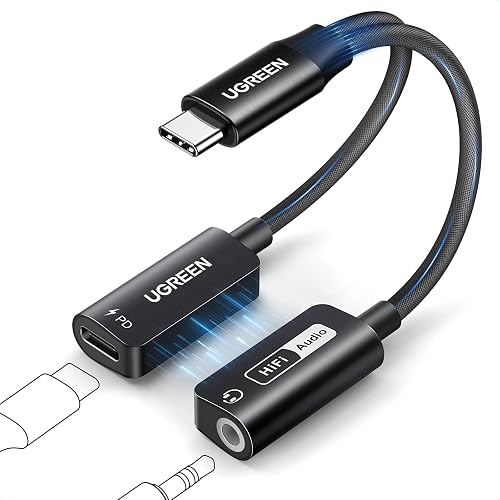
- Two-prong headphone adapter: lets two passengers share one seatback jack. View on Amazon
- Compact travel headphone adapter: fits easily in a pocket or pouch for carry-on storage. View on Amazon
FAQ
Will any airplane headphone adapter work on every flight?
Most two-prong adapters work with common seatback jacks, but a few airlines use older or unusual connectors. Check your airline’s website or the seat card if you are unsure.
Do I need a special adapter for my phone?
Only if your phone lacks a 3.5mm headphone port. In that case, you will need a USB-C or Lightning adapter first, then an airplane adapter after it.
Can I use Bluetooth headphones instead?
Some seatback systems do not support Bluetooth, so a wired adapter is the safer choice. Check your airline’s in-flight entertainment details before you fly.
Conclusion
An airplane headphone adapter nearby is easy to find if you know where to look and what to check. Match the adapter to your device, test the connection before takeoff, and keep a spare in your bag. A few minutes of preparation will keep your in-flight audio clear.
Related reading
- Usb-c to 3.5 Mm Headphone Jack Adapter Nearby: A Practical Guide (2026)
- Lightning to 3.5mm Headphone Jack Adapter Nearby: Where to Buy and How to Choose
Ready to choose one?
About Claire Whitaker
Claire Whitaker is part of our editorial team and reviews and edits our headphone comfort & accessories + gaming headsets guides, checking product details against manufacturer specifications and owner feedback.